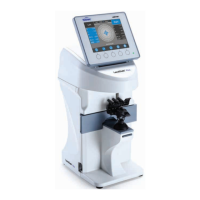
What does 'SPH Over' mean on Reichert Lensometer LensChek Plus?
- TtaylorhorneSep 9, 2025
The 'SPH Over' message on Reichert Laboratory Equipment indicates that the SPH measurement value exceeds the upper limit of the measurement range.
What does 'SPH Over' mean on Reichert Lensometer LensChek Plus?
The 'SPH Over' message on Reichert Laboratory Equipment indicates that the SPH measurement value exceeds the upper limit of the measurement range.
What to do if Reichert Lensometer LensChek Plus printer does not feed paper?
If the printer on your Reichert Laboratory Equipment doesn't feed paper, first check to make sure the printer contains paper. Next, enable the printer in the Data Output category on the Setup Screen.
What to do if Reichert Lensometer LensChek Plus Laboratory Equipment data does not print on the paper?
If data is not printing on the paper with your Reichert Laboratory Equipment, check that the paper is installed correctly (not upside down). Also, verify the printer contains thermal paper.
Why does Reichert Lensometer LensChek Plus show 'Initial Error'?
The Reichert Laboratory Equipment displays an 'Initial Error' if any of the measurement values is more than “±0.25”, if a lens is on the lens stand during startup, or due to abnormal measurement because of dust or unnecessary light. Remove the lens, restart the unit, and clean the lens stand to resolve this.
How to fix inaccurate readings on Reichert Laboratory Equipment?
To fix inaccurate readings on your Reichert Laboratory Equipment, clean the Nosepiece Lens.
What to do if Reichert Lensometer LensChek Plus Laboratory Equipment displays Errors # 100-163?
If your Reichert Laboratory Equipment displays Errors # 100-163, it indicates an abnormality of electronic parts on the Control circuit board. Contact Reichert.
What to do if Reichert Lensometer LensChek Plus Laboratory Equipment displays 'EEPROM Failure'?
If your Reichert Laboratory Equipment displays 'EEPROM Failure' due to an abnormality of memory, contact Reichert.
What to do if Reichert Lensometer LensChek Plus Laboratory Equipment displays 'Sensor Error'?
If your Reichert Laboratory Equipment displays a 'Sensor Error' due to an abnormality of CMOS sensor, contact Reichert.
What to do if Reichert Laboratory Equipment pens do not mark lenses?
If the pens on your Reichert Laboratory Equipment are not marking lenses, replace the marking pens.
What to do if Reichert Laboratory Equipment shows 'Printer Overheated'?
If the Reichert Laboratory Equipment indicates 'Printer Overheated', allow the printer time to cool off.
Lists the intended uses of the LensChek Plus and Pro models.
States that there are no contraindications for the device.
Provides step-by-step instructions for unpacking the instrument and its accessories.
Identifies and describes the various components and controls of the LensChek Plus/Pro.
Details the pre-operation checks and warnings before powering on the LensChek Plus/Pro.
Explains how to properly turn off the LensChek Plus/Pro unit.
Describes the layout and icons displayed on the LensChek Plus/Pro measurement screen.
Explains the control button icons used in the Setup and other system screens.
Details the configurable parameters available within the instrument's setup menu.
Describes how to enter and manage custom messages or practice names for printouts.
Configures parameters for outputting measurement data to external devices via ports.
Allows adjustment of the device's date, time, and their display formats.
Explains the different modes for measuring lenses on the LensChek Plus/Pro.
Details the correct procedure for placing a lens onto the Lens Stand for measurement.
Step-by-step guide for measuring single vision lenses using the device.
Instructions for measuring lenses mounted in frames.
Guide to measuring multifocal lenses, including near and far points.
Details how to set up and measure progressive lenses using the device.
Explains using the assessment graph for manual measurement of progressive lenses.
Step-by-step instructions for measuring contact lenses.
How to measure the percentage of UV light passing through a lens.
Guide to measuring pupillary distance (PD) for eyeglasses.
Procedures for marking lenses with ink points after measurement.
Methods for aligning lenses with astigmatism for marking.
How to measure and mark prism lenses in X-Y or P-B format.
Setting the lens offset from the optical center to zero.
How to print patient measurement data from the LensChek Plus/Pro.
General guidelines and cautions for cleaning the instrument's parts.
Specific instructions for cleaning the main body, LCD, and control panel.
Procedure for cleaning the nosepiece lens to ensure accurate measurements.
Steps to replace the printer paper roll in the device.
Instructions for safely replacing the internal fuses of the LensChek Plus/Pro.
Information about the instrument's storage compartment.
Details on how to replace the power cord for different voltage requirements.
Step-by-step guide for replacing the marking pens.
A chart detailing common issues and their corresponding solutions for the LensChek Plus/Pro.
Provides the physical size and weight details of the LensChek Plus/Pro.
Details the electrical specifications, power input, and fuses.
Lists the measurement ranges for various lens parameters.
Specifies the types of lenses that can be measured.
Outlines the accuracy specifications for sphere and cylinder measurements.
Specifies the environmental conditions for operating and storing the device.
Guidance on the proper disposal of the equipment at the end of its product life.
Information on how to obtain software revision details.
Declarations regarding the electromagnetic emissions of the equipment.
Declarations concerning the electromagnetic immunity of the equipment.
Details on connecting the LensChek Plus/Pro to a computer via RS232C.
Information regarding patent infringement claims and Reichert's defense.
States Reichert's right to make product design changes without prior notice.
Procedure for reporting missing items after receiving the product.
Guidelines for filing claims for damages incurred during shipping.
Lists the intended uses of the LensChek Plus and Pro models.
States that there are no contraindications for the device.
Provides step-by-step instructions for unpacking the instrument and its accessories.
Identifies and describes the various components and controls of the LensChek Plus/Pro.
Details the pre-operation checks and warnings before powering on the LensChek Plus/Pro.
Explains how to properly turn off the LensChek Plus/Pro unit.
Describes the layout and icons displayed on the LensChek Plus/Pro measurement screen.
Explains the control button icons used in the Setup and other system screens.
Details the configurable parameters available within the instrument's setup menu.
Describes how to enter and manage custom messages or practice names for printouts.
Configures parameters for outputting measurement data to external devices via ports.
Allows adjustment of the device's date, time, and their display formats.
Explains the different modes for measuring lenses on the LensChek Plus/Pro.
Details the correct procedure for placing a lens onto the Lens Stand for measurement.
Step-by-step guide for measuring single vision lenses using the device.
Instructions for measuring lenses mounted in frames.
Guide to measuring multifocal lenses, including near and far points.
Details how to set up and measure progressive lenses using the device.
Explains using the assessment graph for manual measurement of progressive lenses.
Step-by-step instructions for measuring contact lenses.
How to measure the percentage of UV light passing through a lens.
Guide to measuring pupillary distance (PD) for eyeglasses.
Procedures for marking lenses with ink points after measurement.
Methods for aligning lenses with astigmatism for marking.
How to measure and mark prism lenses in X-Y or P-B format.
Setting the lens offset from the optical center to zero.
How to print patient measurement data from the LensChek Plus/Pro.
General guidelines and cautions for cleaning the instrument's parts.
Specific instructions for cleaning the main body, LCD, and control panel.
Procedure for cleaning the nosepiece lens to ensure accurate measurements.
Steps to replace the printer paper roll in the device.
Instructions for safely replacing the internal fuses of the LensChek Plus/Pro.
Information about the instrument's storage compartment.
Details on how to replace the power cord for different voltage requirements.
Step-by-step guide for replacing the marking pens.
A chart detailing common issues and their corresponding solutions for the LensChek Plus/Pro.
Provides the physical size and weight details of the LensChek Plus/Pro.
Details the electrical specifications, power input, and fuses.
Lists the measurement ranges for various lens parameters.
Specifies the types of lenses that can be measured.
Outlines the accuracy specifications for sphere and cylinder measurements.
Specifies the environmental conditions for operating and storing the device.
Guidance on the proper disposal of the equipment at the end of its product life.
Information on how to obtain software revision details.
Declarations regarding the electromagnetic emissions of the equipment.
Declarations concerning the electromagnetic immunity of the equipment.
Details on connecting the LensChek Plus/Pro to a computer via RS232C.
Information regarding patent infringement claims and Reichert's defense.
States Reichert's right to make product design changes without prior notice.
Procedure for reporting missing items after receiving the product.
Guidelines for filing claims for damages incurred during shipping.
| Model | LensChek Plus |
|---|---|
| Prism Measurement | Yes |
| Prism Power Range | 0 to 10 Prism Diopters |
| Display | LCD |
| Contact Lens Measurement | Yes |
| Weight | Not found in available specifications. |
| Type | Automatic Lensometer |
| Vertex Power Range | -25D to +25D |
| Axis Measurement | 0 to 180 degrees |
| Power Source | 100-240V, 50/60Hz |
| Design | Compact |