
 Need help?
Do you have a question about the Reka WIRELESS CHARGING ALARM CLOCK and is the answer not in the manual?
Lists the items included in the product package.
Emphasizes careful reading of the guide and safety instructions.
Specifies the product is for charging Qi smartphones and not for commercial use.
Details symbols used on the product and packaging for guidance.
Defines signal words like WARNING, CAUTION, and NOTE used in the guide.
Provides critical safety information to prevent injury and product damage.
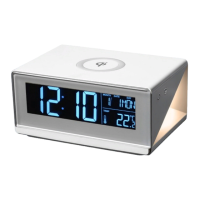
Details the physical components and their labels on the alarm clock.
Explains the various indicators and segments displayed on the LCD screen.
Explains how to activate the pre-installed battery for internal memory.
Guides on connecting the product to a power source via the mains adapter.
Step-by-step instructions for setting the clock's time and date.
How to switch between 12-hour and 24-hour time formats.
Instructions to change temperature display between Celsius and Fahrenheit.
How to adjust the brightness level of the clock display.
Instructions on how to control the brightness of the night light feature.
Guide on setting the alarm time and snooze duration.
Steps to turn the alarm function on or off.
How to stop the alarm once it starts sounding.
Explains how to use the snooze function when the alarm is active.
Instructions for using the wireless charging feature for compatible phones.
Recommendations for storing the product for long-term preservation.
Guidelines on how to properly clean the alarm clock.
Steps to replace the internal battery that powers the clock memory.
Provides general specifications like weight, dimensions, and IP rating.
Details battery type, capacity, and expected use time.
Lists input ports and voltage requirements.
Specifies power output, efficiency, and range for wireless charging.
Information about the type, color temperature, and power of the night light.
Information on how to dispose of the product's packaging responsibly.
Guidance on safe and environmentally friendly disposal of the product and its battery.
 General
| Brand | Reka |
|---|---|
| Model | WIRELESS CHARGING ALARM CLOCK |
| Category | Alarm Clock |
| Language | English |

 To Next Page