PRO function NOISE-MOTION
The NOISE-MOTION System at a glance
This is how the NOISE-MOTION System works
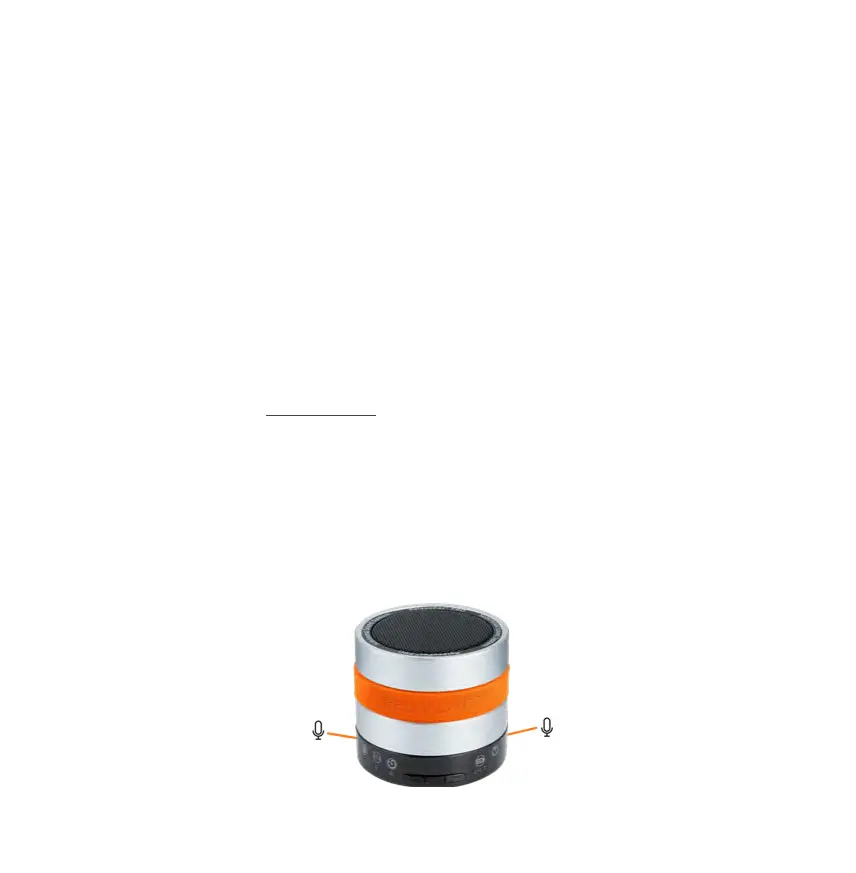
Two highly sensitive microphones in the RelaxoPet
©
PRO animal relaxation trainer automatically
and continuously monitor the surrounding environment (up to approx. 3m indoor) after the NOI-
SE-MOTION System has been activated and automatically switch on the RelaxoPet
©
PRO sound
module if noises or stressors occur in the animal.
The sound duration in NOISE-MOTION mode is 30 minutes. After 30-minute sounding process,
RelaxoPet
©
PRO automatically switches back to monitoring mode. As soon as the microphones
detect further or continuous noises of the animal, the 30-minute sounding process begins again.
How to switch on the NOISE-MOTION function
For NOISE-MOTION operation only activate the selector switch (see page 13).
An additional switch-on is not necessary. This replaces the On-Off function.
Room detection starts immediately. However, you can choose between the audible or inaudi-
ble mode, whereby we recommend the audible mode when the owner is absent. In NOISE-
MOTION mode, volume adjustment is out of order. To switch off the sound module, simply turn
off the NOISE MOTION selector switch.
Note that you should only use NOISE-MOTION when your pet is at home alone. Switch off extra-
neous noises (such as TV / radio) as this can lead to malfunctions.
Please do not cover the two highly sensitive microphones on the RelaxoPet
©
PRO sound module!
17


 To Next Page