User manual MR004DL/FA 07.03.02, Version 1.2 5
GmbH, Stettiner Str. 38, D-33106 Paderborn
Hints for installation:
• Write down the individual ID no. of the meters in the flats / real estates
• Configure the meters or puls adaptors
• Configure the M-Bus Display / Datalogger (using keyboard or with the service
software FService on a Laptop or via Modem)
• Log in with the PasscodeB (predefined to: 00001767)
• Setup baud rates, search mode .. in the menu „Display config.“
• Start search for installed meters with „List of slaves - AutomaticSearch“
• Check the list of slaves for missing meters, you can evtl. add slaves manually
• Change the predefined passcodes (at least passcode B)
Trouble shooting:
• No LED is on:
Check power supply and fuse.
• Red LED is on:
Check the M-Bus wiring for short circuits and ground loops. Defective slaves can
also produce an overcurrent. The source for the short circuit can be found easier by
removing some bus segments from the M-Bus terminals.
• Yellow LED (Max) is staticly on:
The bus current has exceeded the nominally allowed current. Check the number of
connected meters. You can connect 60 meters specified with 1 unit load (1.5mA),
but only 30 meters specified with 2 unit loads (3mA). Are there defective slaves or
open cable ends lying in the earth of building-plots?
• One or more meters are not detected in automatic search procedure:
Retry automatic search. Check baud rate and address of this meter. You can add
the meter manually to the list of slaves and perform then a single readout of this
meter.
• No reply from meter:
Check baudrate and address of this meter. Check the bus extension: The bus
voltage at any slave must be >24V. Temporarily remove other bus segment.
• „Status: Error“:
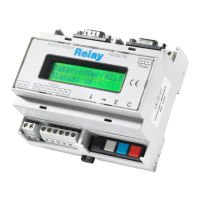
MR004DL/FA in waiting status (inactive): Press ↓ and C keys simultaneously to view
the list of errors. Please note the error codes and then delete the error codes by
pressing the → key. The most important error codes can be decoded using the table
in the addendum.
• Wrong Passcode
Please do the following steps, if you have forgotten the passcode:
Do the actions which are described in “Status: Error” and then press the → key
again. Please write down the 16 digit string (display config) and send it together with
the firmware version no. and serial no. by email to INFO@RELAY.DE. We will send
you a working passcode.



 To Next Page