EasyManua.ls Logo

ReliOn 510REL - User Manual

ReliOn 510REL
24 pages
Print Icon
To Next Page IconTo Next Page
Loading...
INSTRUCTION MANUAL
ULTRA COMPACT
EAR THERMOMETER
Model 510REL
ESPAÑOL
ENGLISH

Questions and Answers

  • J
    Jessica BennettAug 15, 2025
    Why is the display light not turning on my ReliOn 510REL Thermometer?
    • P
      Paula WangAug 15, 2025
      If the display light on your ReliOn Thermometer isn't turning on, it's likely due to a low battery. Replacing the battery should solve this problem.
  • E
    Erik PerryAug 18, 2025
    What to do if my ReliOn 510REL displays a blank mark?
    • M
      Michael SteeleAug 18, 2025
      If the ReliOn Thermometer displays a " " mark after illuminating all symbols, it indicates a low battery. Replace the battery to resolve this issue.
  • J
    Jessica CastilloAug 21, 2025
    How to fix a ReliOn 510REL that won't turn on?
    • A
      Adam MillerAug 22, 2025
      If nothing is displayed on your ReliOn Thermometer after turning it on, the possible causes are: * The battery is dead: Replace the battery. * The battery polarities (+ and -) are incorrect: Replace the battery with correct polarities.
  • M
    Marie AyersAug 25, 2025
    What to do if my ReliOn 510REL shows flashing '°F' or '°C'?
    • T
      Tonya Marquez DVMAug 26, 2025
      If your ReliOn Thermometer shows flashing “°F” or “°C” symbols without a “0” symbol, it could be due to a few reasons: * The lens cover might be dirty: Replace it with a new one. * The lens might be dirty: Clean it with a cotton swab. * Ear drum may be blocked with earwax: Remove earwax.
  • V
    victorcardenasAug 28, 2025
    Why does my ReliOn 510REL display a "0 0" symbol?
    • M
      Melanie MartinezAug 28, 2025
      If your ReliOn Thermometer displays a "0 0" symbol, it means the unit is operating in a high room temperature environment, requiring a special operation. To resolve this: 1. Place the unit in the ear. 2. Wait 2 seconds. 3. Press the button and wait for 4 beeps. 4. Remove the unit from the ear and check the results.
  • N
    nicholasmorrisonSep 1, 2025
    Why is my ReliOn Thermometer reading too high?
    • L
      levymollySep 1, 2025
      To ensure an accurate temperature reading with your ReliOn Thermometer, make sure the probe is snug against the opening of the ear. Also, verify that the lens cover is clean and the ear canal is free of earwax.
  • B
    Brent GonzalesSep 4, 2025
    How to stabilize the temperature on ReliOn 510REL?
    • B
      bduncanSep 4, 2025
      To stabilize the temperature reading of your ReliOn Thermometer, ensure the unit remains at room temperature where the measurement will take place. Allow 30 minutes for the unit to stabilize before using. The normal operating range is 50°F to 104°F (10°C to 40°C).
  • H
    Heather HintonSep 7, 2025
    What to do if the lens cover is not on the ReliOn Thermometer probe?
    • M
      matthewleeSep 8, 2025
      Attach the lens cover to the probe of your ReliOn Thermometer before taking a measurement.
  • D
    donnablevinsSep 12, 2025
    What does 'Er.1' mean on my ReliOn 510REL Thermometer?
    • N
      natashaprestonSep 12, 2025
      Turn the ReliOn Thermometer on again. If "Er.1" is still displayed, the unit may require service. Call Customer Service Dept. 1-800-634-4350

Summary

Introduction

Part Names

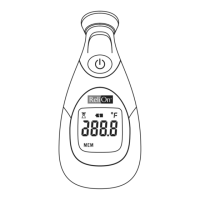
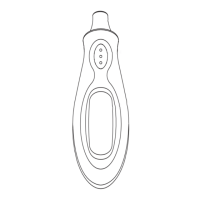
Part Names Diagram

Visual identification of the thermometer's components like lens, probe, and button.

Conversion Between Fahrenheit to Centigrade (°F;°C)

How to Convert Temperature Scales

Step-by-step instructions to switch measurement units between Fahrenheit and Centigrade.

Before Use

Replacing Lens Cover Procedure

Instructions for hygienic replacement of the lens cover.

Operating Instructions and Memory Feature

Guide on turning on the unit, taking measurements, and using the memory function.

Care and Maintenance

Cleaning and Storage Guidelines

Advice on cleaning the thermometer and storing it in suitable environmental conditions.

Battery Replacement

Battery Replacement Steps

Detailed steps for replacing the CR2032 battery, including polarity.

Specifications

Technical Specifications Overview

Summary of the thermometer's technical details like model, power, accuracy, and ranges.

Troubleshooting

Display Issues and Solutions

Addresses common display messages like dead battery, polarity errors, and dirty lens.

Error Codes and Range Issues

Explains error codes like "Er.1" and issues related to temperature range extremes.

Warning

Safety and Usage Precautions

Important warnings regarding intended use, hygiene, handling, and environmental factors.

FCC Statement

Radio;Television Interference Information

Details compliance with FCC rules and potential interference for US and Canadian users.

Quick Reference

Quick Start and Support

Provides a brief operational summary and customer service contact information.

ReliOn 510REL Specifications

General IconGeneral
TypeDigital Thermometer
DisplayLCD
Power SourceBattery
Water ResistantYes
WaterproofNo
Measurement SiteOral, Rectal
Accuracy±0.1°C (±0.2°F)
Battery1 x LR41
Auto Shut-OffYes

Related product manuals