EasyManua.ls Logo

Reload BACKUP CAMERA - User Manual

Reload BACKUP CAMERA
24 pages
Print Icon
To Next Page IconTo Next Page
Loading...
SKU# 299-2744 (RSI305755G)
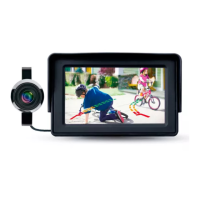
WITH 4.3” DASH MONITOR
/ŶƐƚĂůůĂƟŽŶĂŶĚ
Owners Manual
Care!
Please read this manual carefully before using
and keep it for future reference.
BACKUP CAMERA
Question and Answer IconNeed help?

Do you have a question about the Reload BACKUP CAMERA and is the answer not in the manual?

Summary

Warm Tips for Backup Camera Kit

Applicable Car Models and Support

Safety Information

Safety Around and Behind Other Vehicles

Package Contents Overview

Product Specifications

How the Backup Camera System Works

Product Operation Overview

Explains how the camera and monitor are powered by the reverse light.

Installation Steps Overview

Connection with Reverse Light

Details on connecting the system to the vehicle's reverse light.

Install Camera (#B)

Instructions for mounting the backup camera.

Install Monitor (#A)

Instructions for mounting the dashboard monitor.

Running Wire from Monitor to Camera

Guidance on routing the main cable between monitor and camera.

Installation - Step 1

Step 1 Connection with Reverse Light

Detailed steps for connecting the power to the reverse light.

Installation - Step 2

Step 2 Install Camera (#B)

Instructions for mounting the camera on the license plate area.

Installation - Step 3

Step 3 Install Monitor (#C)

Instructions for mounting the monitor on the vehicle's dashboard.

Installation - Step 4

Step 4 Running Wire from Monitor to Camera

Guidance on routing the main cable between the monitor and the camera.

Installation Wiring Details

4.1 Monitor Cable Connection

Connect the main cable to the monitor.

4.2 Cable Routing to Trunk

Route the main cable from the monitor towards the trunk.

Installation Wiring Details Continuation

4.3 Routing Cable to Trunk

Route the main cable to the trunk of the car.

4.4 Camera Cable Connection

Connect the main cable to the camera socket.

Testing and Adjustment

5.1 Initial Power-Up and Image Check

Turn on power and shift to reverse to check image display.

5.2 Camera Bracket Adjustment

Adjust the camera bracket for optimal viewing angle.

Testing and Adjustment Details

5.3 Wire Organization and Panel Replacement

Organize wires and replace interior panels after testing.

5.4 Adjusting Camera Settings

Adjust camera settings like brightness, color, and contrast.

Trouble Shooting

Maintenance Guide

Warranty Information

Reload BACKUP CAMERA Specifications

General IconGeneral
BrandReload
ModelBACKUP CAMERA
CategoryDash Cameras
LanguageEnglish

Related product manuals