5
ENGLISH
DESIGNATION
1. Top-Panel
2. Bottom-Panel
3. Push-Locks
4. Safety-Pins
5a. Thread A (for Safety-Pins)
5b. Thread B (for Safety-Pins)
6. USB-C Port (3.2 Gen 1 - SuperSpeed 5Gbps
7. USB-A 3.0 Port (USB hub)
8. USB-C PD Port (3.2 Gen 1 - SuperSpeed PD5)
9. Status-LED
10. USB-C to C Cable (30 cm)
11. USB-A to C Cable (25 cm)
12. USB-A to C Cable (50 cm)
STRUCTURE
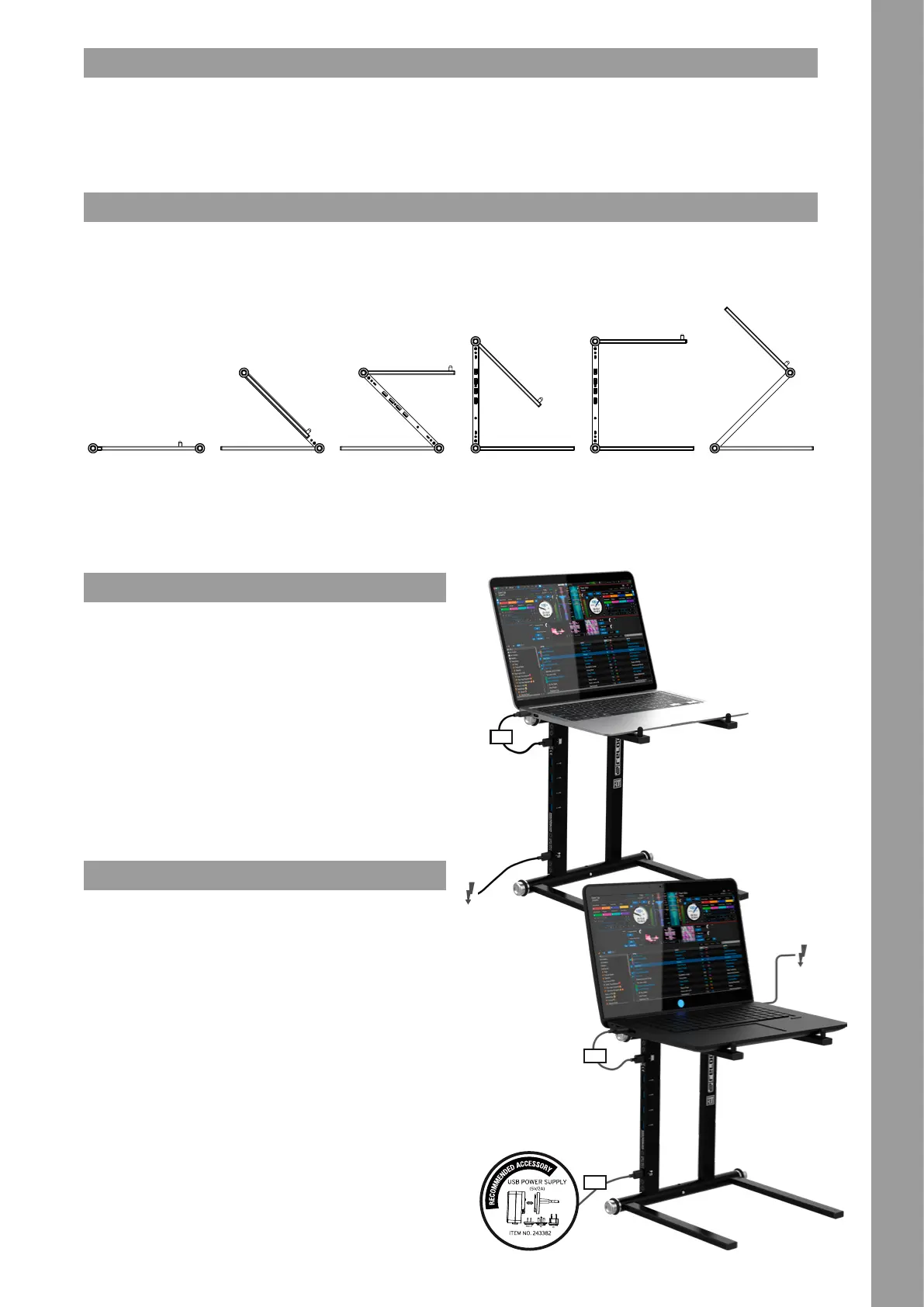
The intuitive Reloop Stand Hub design allows you to set up the stand in 6 different positions. In order to change the different assembly positions you only have to press the push buttons
-3- and adjust it to the desired snap-in point.
Note: Please make sure to set up your Reloop Stand Hub on a solid, horizontal and stable surface.
** To use the Higher-Z-Shape design, you must screw the locking pins -4- into thread B -5b-.
CONNECTION
The Stand Hub has a USB-C port -6- to connect your computer, laptop or smart device.
It also has an integrated USB-C PD connector -8- which can be used to power the laptop,
smart device and/or the USB-A -7- ports.
Note: A USB power supply unit for powering the USB-A ports -7- is available separately.
(item number 243382)
If you have a MacBook PRO or laptop/tablet with USB-C power supply, you can connect the
included power adapter to USB-C PD Port -8- to power your device.
Note: the USB-C-PD-port supports power up to 60W.
Furthermore, the Stand Hub has a high retention 4 USB-A 3.0 hub port -7- design. These
are used to connect the desired USB peripherals and are downward compatible.
Note: To ensure an optimal connection, please use the cables included in the scope of
delivery. In addition, we recommend that you always operate the USB hub in active mode,
with a connected USB power supply, to ensure a stable power supply.
TECHNICAL DATA
Connections:
- 1x USB-C 3.2 Gen 1 (SuperSpeed 5Gbps, for computer connection)
- 1x USB-C PD 3.2 Gen 1 (SuperSpeed PD5, for power supplies up to 60W)
- 4x USB-A 3.0 (1,5A per port / 6A total / downward compatible)
Stand Data:
• Max. Load Capacity: 5,0 kg
• Weight: 1,4 kg
• Dimensions: 290 x 250 x 270 mm (w x h x d)
Scope of delivery:
• Stand Hub (Laptop Stand)
• Cables:
- 1 x USB-C to C cable (30 cm)
- 1 x USB-A to C cable (25 cm)
- 1 x USB-A to C cable (50 cm)
• Transport Bag
• InstructionManual
Transport Position
(compact transport
position)
Lower Z-Shape
(at design for tablets and
controllers)
Z-Shape
(stable structure at
optimum working height)
Lower C-Shape
(optimized for use with
keyboards, modular
controllers or tablets)
Classic C-Shape
(classic laptop stand
construction)
Higher Z-Shape
(raised Z-shape
construction)**
10
11
12
Laptop USB-C
Power Supply
Laptop
Power Supply


 To Next Page
 Loading...