2
2. Operacja początkowa / Initial operation
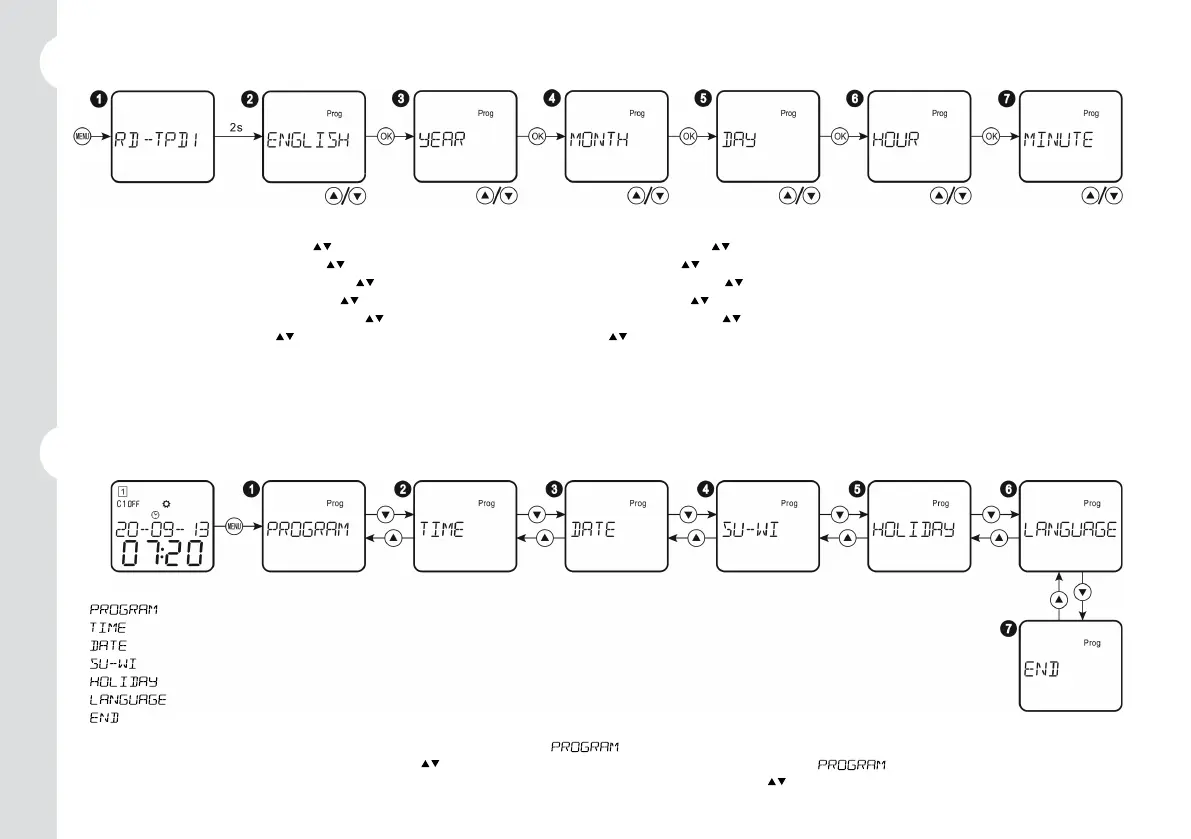
¶ Naciśnij przycisk „MENU”, ekran wyświetli tryb przez 2 sekundy. / Press ”MENU” button, the screen will display the model for 2 seconds.
· Wybierz żądany język przyciskami „ ” i naciśnij przycisk „OK”. / Select the desired language with ” ” buttons and press ”OK” button.
¸ Wybierz odpowiedni rok przyciskami „ ” i naciśnij przycisk „OK”. / Select adequate year with ” ” buttons and press ”OK” button.
¹ Wybierz odpowiedni miesiąc przyciskami „ ” i naciśnij przycisk „OK”. / Select adequate month with ” ” buttons and press ”OK” button.
º Wybierz odpowiedni dzień przyciskami „ ” i naciśnij przycisk „OK”. / Select adequate day with ” ” buttons and press ”OK” button.
» Wybierz odpowiednią godzinę przyciskami „ ” i naciśnij przycisk „OK”. / Select adequate hour with ” ” buttons and press ”OK” button.
¼ Wybierz minutę przyciskami „ ” i naciśnij przycisk „OK”. / Select the minute with ” ” buttons and press ”OK” button.
Jeśli ustawianie nie zostanie zakończone i nie będzie obsługiwane za pomocą przycisków przez 2 minuty, urządzenie powróci do menu „ENGLISH”.
/ If the settings were not ended and not operated by buttons for 2 minutes, device will return to ”ENGLISH” menu.
3. Menu główne / Main menu
¶ : Menu ustawień programu. / Program setting menu.
· : Menu ustawień czasu. / Time setting menu.
¸ : Menu ustawień daty. / Date setting menu.
¹ : Menu ustawień letnich/zimowych. / Summer/winter setting menu.
º : Menu ustawień trybu świątecznego. / Holiday mode setting menu.
» : Menu ustawień językowych. / Language setting menu.
¼ : Zakończ ustawianie i wyjdź z menu. / End settings and exit from menu.
Naciśnij przycisk „MENU”, aby wejść do ustawień menu, a pojawi się symbol
. Brak aktywności przez 1 minutę spowoduje automatyczne
wyjście z ustawień. Wybierz żądane menu przyciskami „
”. / Press ”MENU” button to enter menus setting, and symbol appears.
If not operated for 1 minute, the device will automatically exit from setting. Select the desired menu by pressing ”
” buttons.


 To Next Page
 Loading...