The RemoBell is a wireless video doorbell designed to enhance home security and convenience by allowing users to see, hear, and speak to visitors from anywhere using a mobile device. It records all activities at the door, whether answered or missed, providing a comprehensive log of events with videos and timestamps.
Function Description:
The RemoBell operates as a smart doorbell, connecting to your home Wi-Fi network to provide real-time video and audio communication with visitors. When someone presses the bell button, or when motion is detected by the PIR sensor, the device sends an instant alert to your mobile phone. This allows you to view a live feed from the camera lens, communicate through the built-in microphone and speaker, and decide whether to answer the door, even when you're not at home. The ALS sensor helps in adjusting to different lighting conditions, while LED lights ensure visibility in low-light environments. All interactions and motion-triggered events are recorded and saved to a "Recent Activity" log within the RemoBell app, complete with video clips and timestamps, offering a detailed history of activity at your doorstep.
Usage Features:
The RemoBell is designed for ease of use and integrates seamlessly with your mobile lifestyle.
- Wireless Operation: The device is completely wireless, powered by six rechargeable AA batteries, offering flexibility in placement without the need for complex wiring.
- Mobile App Control: The core functionality is managed through the RemoBell app, available on both iOS and Android devices. This app serves as your central hub for all doorbell interactions.
- Account Registration: To begin, users create an account within the RemoBell app, linking their device to their profile. This involves connecting the RemoBell to your home Wi-Fi network by following a straightforward setup process within the app, which includes selecting your timezone and entering your Wi-Fi password.
- Real-time Alerts and Communication: Upon a doorbell press or motion detection, the app delivers instant notifications. Users can then access a live video feed, engage in two-way audio communication with visitors, and review past events.
- Activity Log: The "Recent Activity" log within the app stores all recorded videos and timestamps, allowing users to review who came to their door and when, even if they missed an alert. This feature provides peace of mind by keeping a comprehensive record of doorstep activity.
- Multi-User Access: Up to five iOS or Android devices can access the RemoBell simultaneously, making it suitable for households with multiple members who need to monitor the doorbell. Each user logs in with the same account email and password but can set a different profile name for identification in the "Viewers list."
- Cloud Plan for Video Storage: While the device provides instant alerts and live viewing without a subscription, a complimentary 30-day trial of a Cloud plan is included with purchase. This plan is specifically for saving videos beyond the live viewing period. After the trial, users can extend their Cloud plan for a monthly or annual fee to continue saving video recordings.
- Troubleshooting Support: The manual provides guidance for common issues, such as ensuring proper app permissions for Android users (microphone and storage) and checking motion sensor settings to save videos to the Cloud. It also addresses Wi-Fi connectivity problems during setup, advising users to reconnect to their home Wi-Fi and retry the setup process.
Maintenance Features:
Maintaining the RemoBell is straightforward, focusing primarily on battery management and physical installation.
- Battery Rechargeability: The RemoBell uses six rechargeable AA batteries. When the batteries need recharging, the device can be easily detached from its mounting bracket by removing a security screw at the base. The battery cover is then removed using a screwdriver to access the batteries.
- Charging Process: The rechargeable batteries are removed from the device and charged using a separate battery charger (not included). This allows for continuous operation by swapping out charged batteries or recharging the existing set. The manual clarifies that any AA batteries can be used, providing flexibility.
- Reassembly: Once the batteries are fully charged, they are placed back into the RemoBell, and the battery cover is secured with a screwdriver. The device is then re-mounted onto its bracket, and the security screw is tightened to hold it firmly in place.
- Mounting and Installation: The RemoBell comes with a mounting bracket, screws, and anchors for installation. The bracket is positioned on the desired location, ensuring it is level, and then screwed into the wall. Anchors are provided for various wall types, including brick, concrete, or stucco. The RemoBell unit slides onto the top of the bracket and is firmly pushed in, then secured with a security screw at its base to prevent tampering or accidental detachment.
- Software Updates and Support: While not explicitly detailed as a maintenance feature, the device's reliance on a mobile app implies that software updates will be managed through the app, ensuring optimal performance and security. Customer support is available via email and phone for any issues or questions, with specific operating hours provided.
- Battery Disposal: The manual provides clear instructions on how to dispose of the Nickel Metal Hydride batteries, noting that they are classified as non-hazardous waste but also contain recyclable materials. It directs users to call a specific recycling hotline or visit a website for information on recycling used batteries, particularly for residents in California where specific disposal rules apply.

 Need help?
 General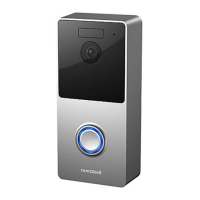

 To Next Page