wiper blades ..............................................
(up to the end of the DU)
screen wash/wipe
replacing blades ...................................
(up to the end of the DU)
windscreen washer/wiper ..........................
(up to the end of the DU)
5.28
ENG_UD77933_2
Balais d essuie-vitres (LJL - Renault)
Wiper blades: replacement
WIPER BLADES: replacement (1/2)
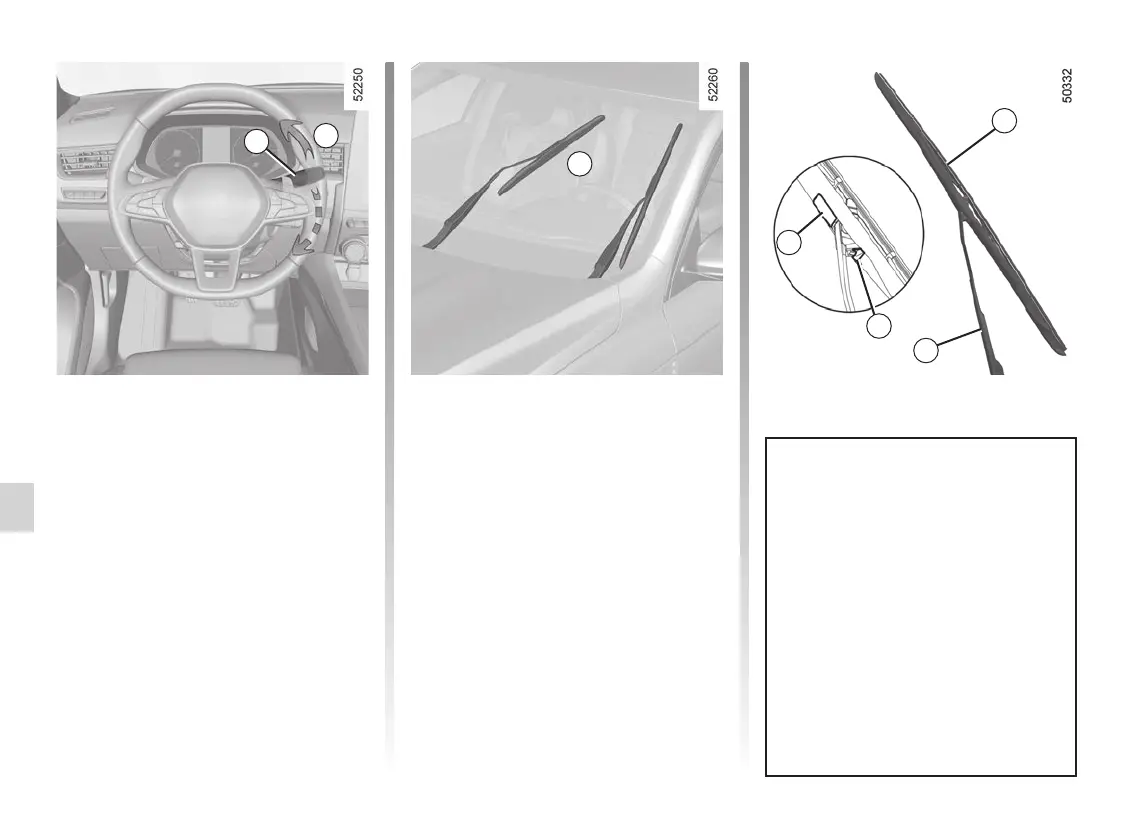
Replacing the windscreen
wiper blades 2
To replace the wipers, first put them in
the service position B.
Engine running or ignition on;
– set the stalk 1 to position A twice in
succession (single sweep): the wiper
blades will stop in the service posi-
tion B away from the bonnet;
– lift the wiper arm 3;
– lower the 4 tab then remove the
blade 2.
To refit
To refit the wiper blade 2, insert it in its
housing in the arm 3, then clip it until
you hear a click. Make sure that the
blade is correctly locked in position.
To return the blades to lowered posi-
tion, make sure that the blades are
folded down onto the windscreen then
set the 1 stalk to position A (single
sweep): the windscreen wiper blades
will fold into the bonnet when the igni-
tion is switched on.
1
A
B
Check the condition of the wiper
blades. You are responsible for their
service life:
– clean the blades, windscreen and
rear screen regularly with soapy
water;
– do not use them when the wind-
screen or rear screen are dry;
– free them from the windscreen
when they have not been used
for a long time.
2
3
5
4














 To Next Page