3.3
MULTI-SENSE (2/2)
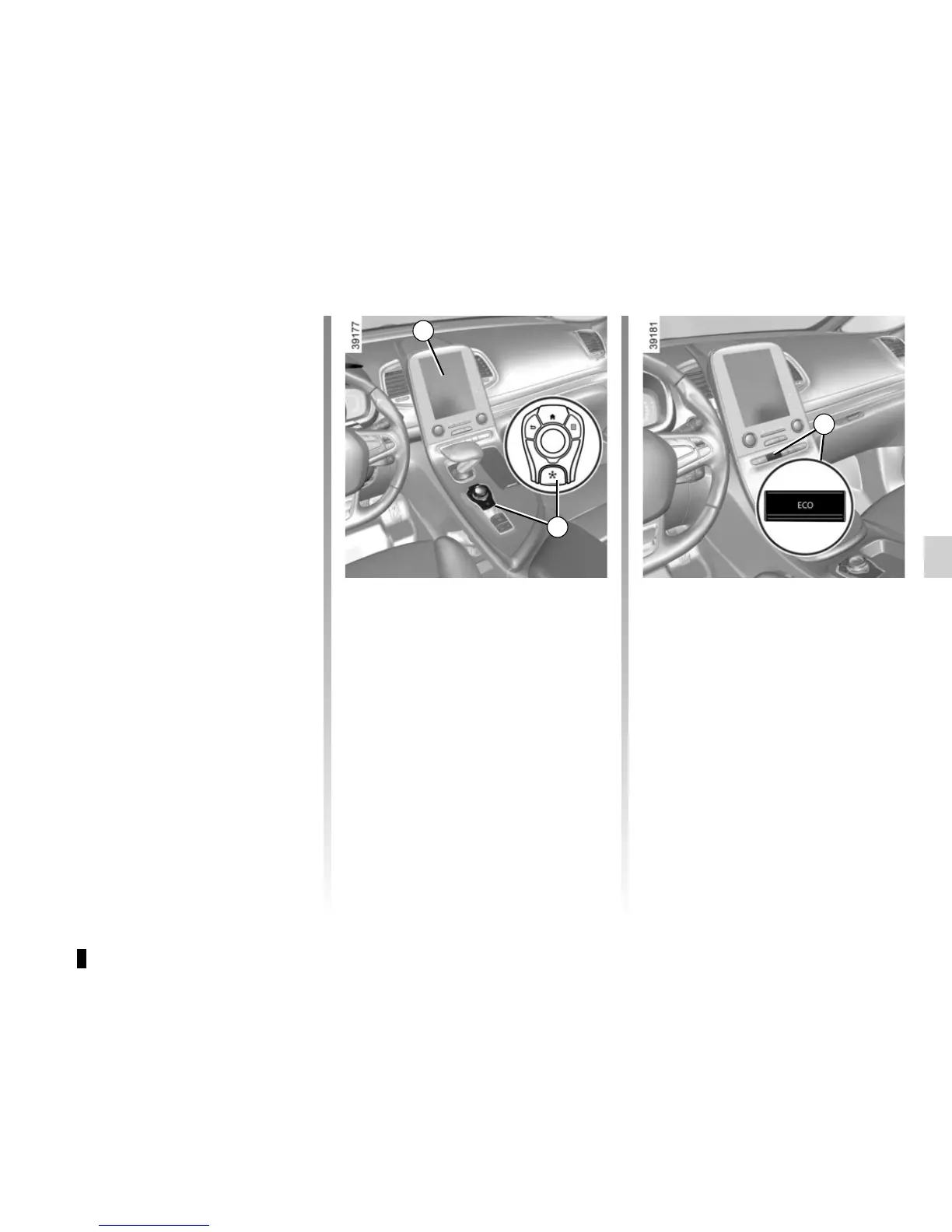
Accessing the menu
You can access Multi-Sense:
– from the multifunction screen 1.
Select menu “Vehicle” then “Multi-
Sense”;
– using switch 2;
– using button Eco 3 which automati-
cally launches mode Eco and opens
the “Multi-Sense” menu on the multi-
function screen 1.
Mode Eco
Mode Eco is geared towards saving
energy and the environment. The sus-
pension and steering are soft, engine
and gearbox management enable fuel
consumption to be lowered. Air con-
ditioning is managed to be used only
when necessary.
Please refer to the information on
“Driving advice, Eco-driving” in
Section 2.
Mode Perso
This mode enables you to manually
configure the drive, light environment
and, depending on the vehicle, the
comfort and engine noise.
1
2
3
Depending on the vehicle, once the
“Multi-Sense” menu is displayed on
the multifunction screen 1, pressing
switch 2 enables you to move between
the two preferential modes you have
selected. Refer to the handbook for the
equipment.













 To Next Page