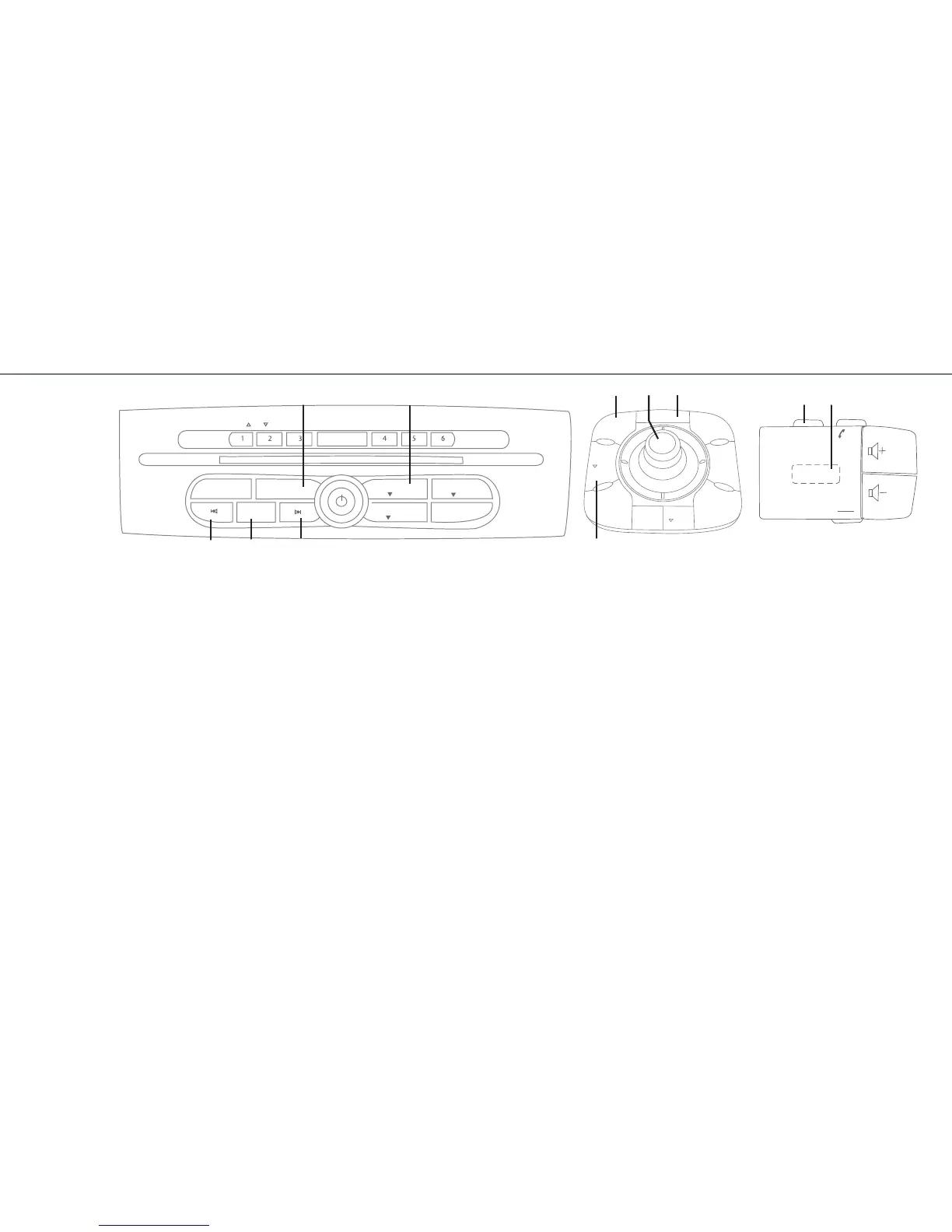
LISTENING TO THE RADIO OR A CD
Choose the source (FM radio or CD) by pressing
one of the buttons A.
FM RADIO SOURCE
To select a radio station from an alphabetical list,
press D, choose the “List” mode, then select the
name of the radio either using the arrows C or by
turning control knob I.
To store a radio station to one of the buttons num-
bered 1 to 6:
– select the radio station;
– press on one of the buttons from 1 to 6, until a
beep sounds.
To recall a stored radio station, press the corre-
sponding button.
CD SOURCE
Before inserting a CD, press button
B. You can
insert up to 6 CDs.
VOICE RECOGNITION
To activate voice recognition to control certain
functions by voice, press on the end of the light-
ing stalk.
STARTING THE NAVIGATION SYSTEM
– press E;
– turn button F to select “new address” then con-
firm by pressing F;
– enter the address fields (town and street) using
the keypad on the screen. To select and confirm
a character, rotate then press button F;
– when entry is complete, select “Start” and follow
the voice guidance and on-screen directions to
your destination.
CANCELLING AN ACTION
Press
G if you wish to return to the previous menu
or erase an entered character.
DISPLAYING THE MAP
Press button
H to return to the map at any time.
A A I
D
C
C
B
F
G
H
E













 To Next Page