control instruments ....................................
(up to the end of the DU)
multimedia equipment ...............................
(current page)
clock ..........................................................
(up to the end of the DU)
clock ..........................................................
(up to the end of the DU)
external temperature .................................
(up to the end of the DU)
1.118
ENG_UD65166_1
Heure et température extérieure (XFK - Renault)
Clock and outdoor temperature
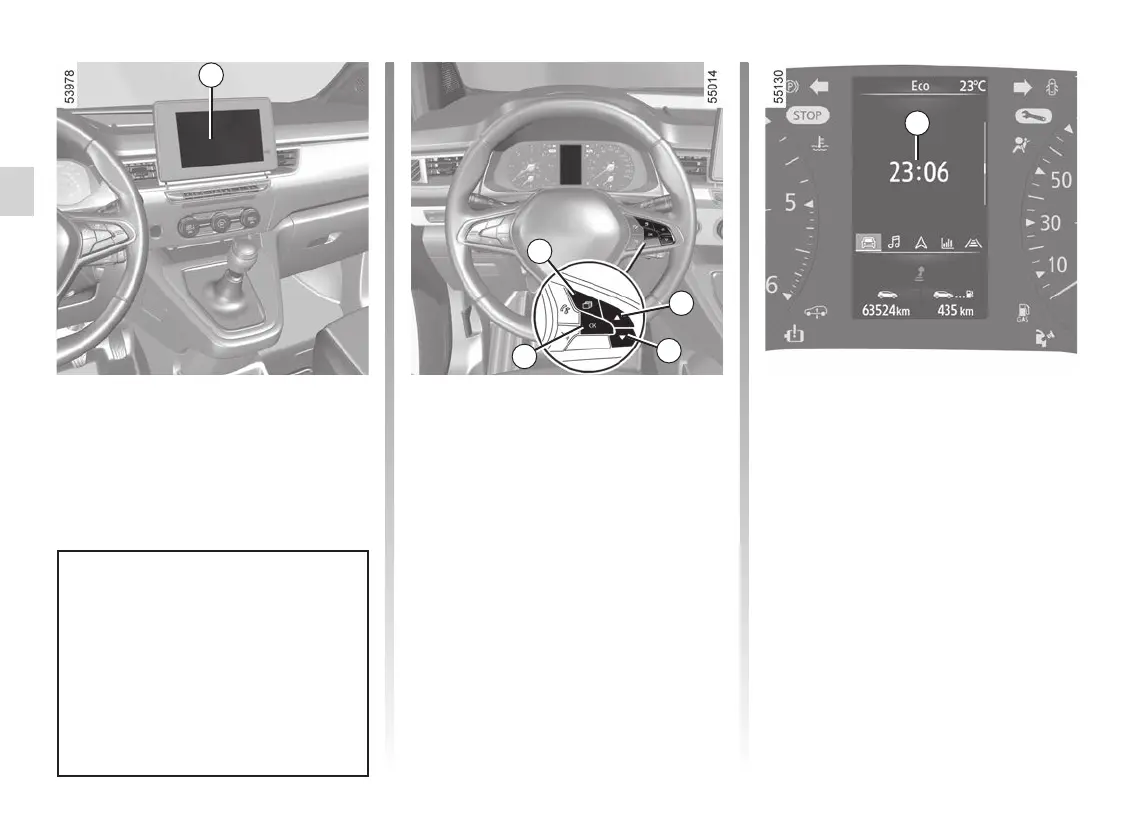
Vehicles fitted with a multimedia
screen
The time and exterior temperature are
displayed on the multimedia screen 1.
Refer to the multimedia instructions.
CLOCK AND EXTERIOR TEMPERATURE (1/2)
1
Vehicles not fitted with a multimedia
screen
Press the 2 switch as many times as re-
quired to reach the “Vehicle” tab.
Repeatedly press control 3 or 4 to set
the 6 clock.
Press and hold switch 5 “OK” until the
time display flashes.
Set the clock using control 3 or 4, then
press switch 5 “OK” to confirm.
Set the minutes using control 3 or 4,
then press switch 5 “OK” to confirm.
6
2
3
4
5
Depending on the vehicle, If the
electrical supply is cut (battery dis-
connected, broken supply wire,
etc.), the clock will automatically
go back to the right time after a few
minutes once the system is capable
of receiving information GPS.











 To Next Page