EasyManua.ls Logo

Renault Master Van 2004 - Page 16

Renault Master Van 2004
190 pages
Print Icon
To Next Page IconTo Next Page
To Previous Page IconTo Previous Page
Loading...
DROPSIDE
WITH
SIDE
PANELS
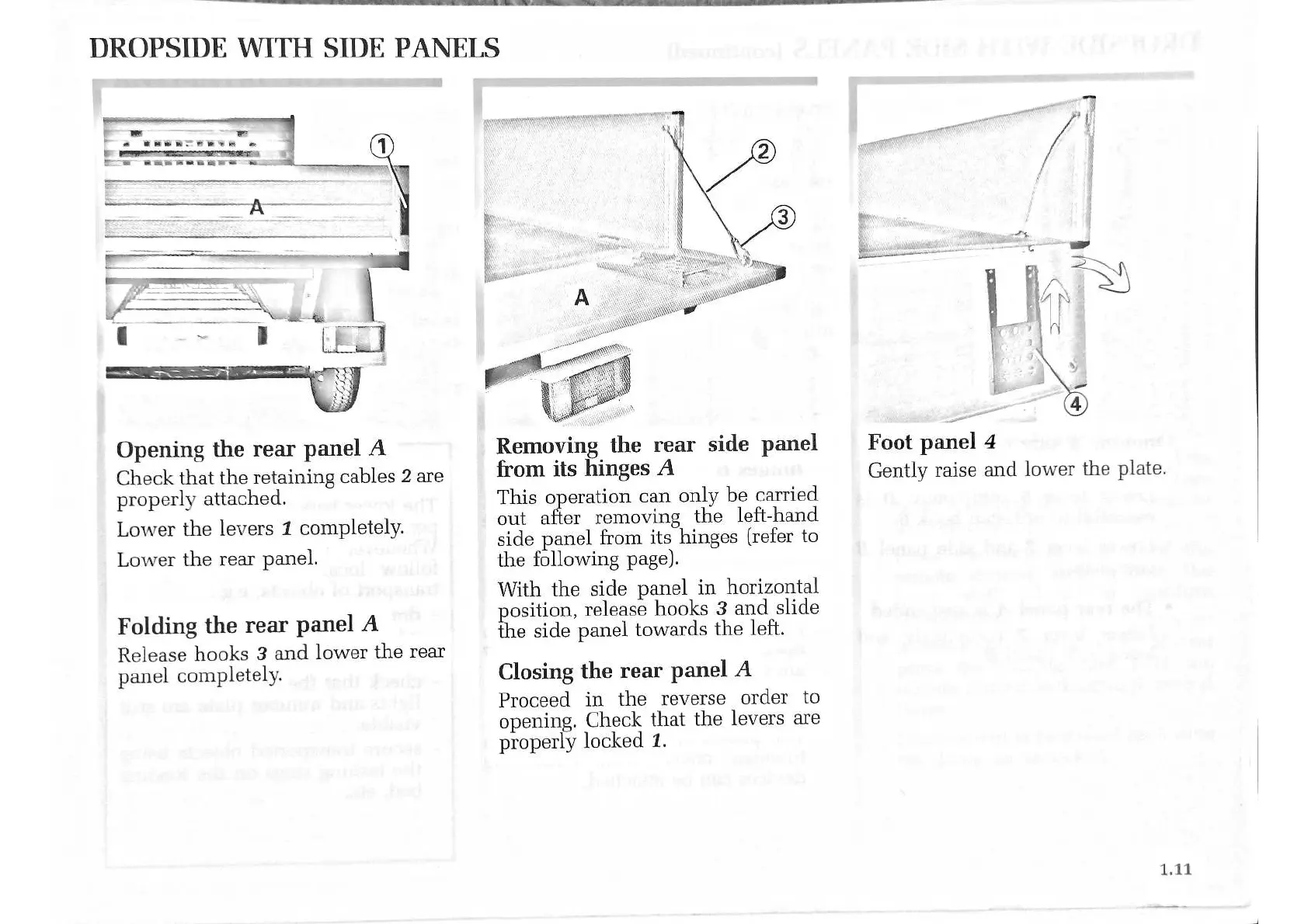
Opening
the
rear
panel
A
Check
that
the
retaining
cables
2
are
properly
attached.
Lower
the
levers
1
completely.
Lower
the
rear
panel.
Folding
the
rear
panel
A
Release
hooks
3
and
lower
the
rear
panel
completely.
Removing
the
rear
side
panel
from
its
hinges
A
This
operation
can
only
be
carried
out
after
removing
the
left-hand
side
panel
from
its
hinges
(refer
to
the
following
page).
With
the
side
panel
in
horizontal
position,
release
hooks
3
and
slide
the
side
panel
towards
the
left.
Closing
the
rear
panel
A
Proceed
in
the
reverse
order
to
opening.
Check
that
the
levers
are
properly
locked
1.
Foot
panel
4
Gently
raise
and
lower
the
plate.

Related product manuals