EasyManua.ls Logo

Renault Master Van 2004 - 6-Speed Sequential Gearbox

Renault Master Van 2004
190 pages
Print Icon
To Next Page IconTo Next Page
To Previous Page IconTo Previous Page
Loading...
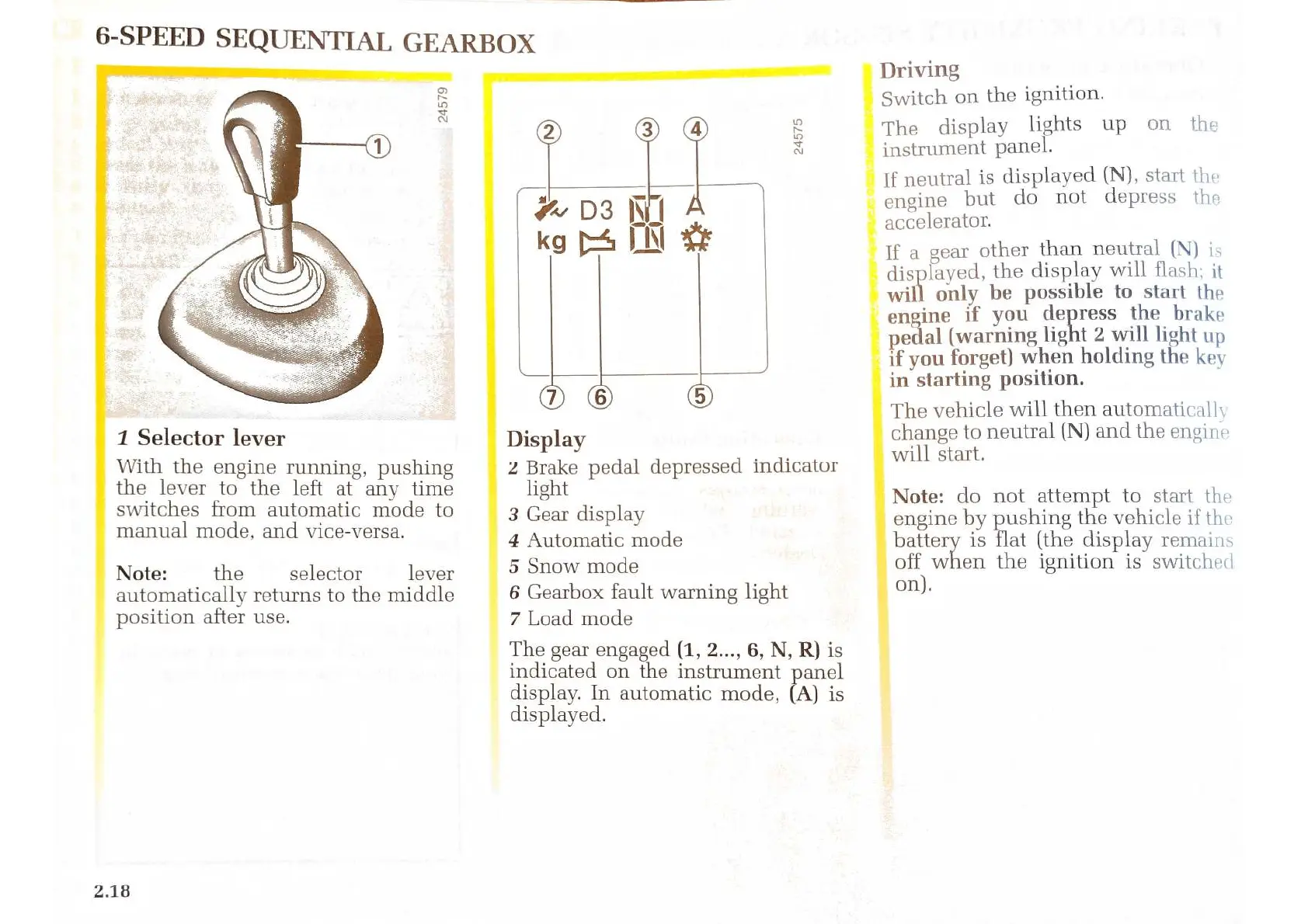
6-SPEED
SEQUENTIAL
GEARBOX
1
Selector
lever
With
the
engine
running,
pushing
the
lever
to
the
left
at
any time
switches
from
automatic
mode
to
manual
mode,
and
vice-versa.
Note:
the
selector
lever
automatically
returns
to
the
middle
position
after
use.
2.18
Display
2
Brake
pedal
depressed
indicator
light
3
Gear
display
4
Automatic
mode
5
Snow
mode
6
Gearbox
fault
warning
light
7
Load
mode
The
gear
engaged
(1,
2...,
6,
N, R)
is
indicated
on
the
instrument
panel
display.
In
automatic
mode,
(A)
is
displayed.
Driving
Switch
on
the
ignition.
The
display
lights
up
on
the
instrument
panel.
[f
neutral
is
displayed
(N),
start
the
engine
but
do
not
depress
the
accelerator.
If
a
gear
other
than
neutral
(N)
is
displayed,
the
display
will
flash;
it
will
only
be
possible
to
start
the
engine
if
you
depress
the
brake
pedal
(warning
light
2
will
light
up
if
you
forget)
when
holding
the
key
in
starting
position.
The
vehicle
will
then
automatically
change
to
neutral
(N)
and
the
engine
will
start.
Note:
do
not
attempt
to
start
the
engine
by
pushing
the
vehicle
if
the
battery
is
flat
(the
display
remains
off
when
the
ignition
is
switched
on).

Related product manuals