1
3
2
4
NU692_7_G2-FRA.qxd 30/09/04 15:29 Page 2.03
J84 - MEGANE SCENIC - NU692-6
C:\Documentum\Checkout\NU692_7_T2-ENG.win 24/11/2004 20:04
-page3
2.03
STARTING THE ENGINE
RENAULT Card
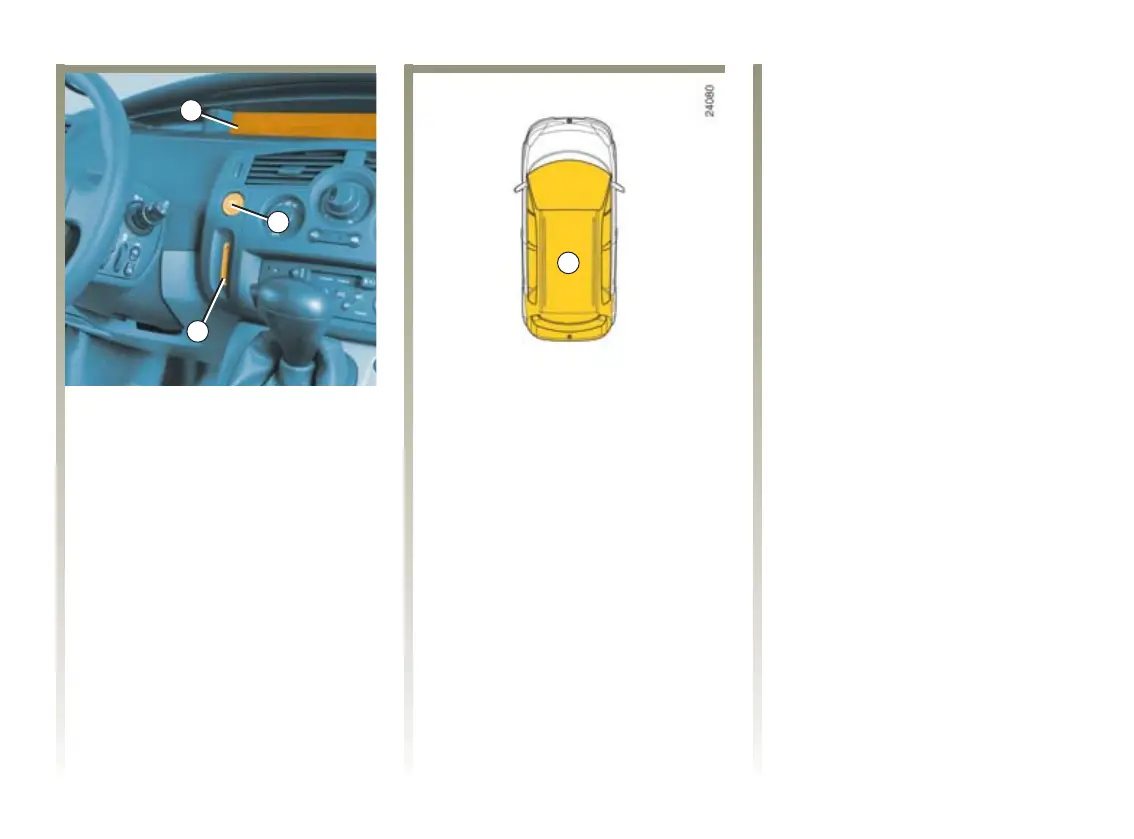
The message “Please insert card”
appears on instrument panel
display 1.
Insert the RENAULT Card fully into
card reader 2.
Hands-Free RENAULT Card
The card must be within the
detection zone 4 (passenger
compartment and boot, but
excluding some elevated areas such
as sun visors, glasses holder, top of
dashboard, etc.).
Starting conditions.
Follow the starting instructions on
the instrument panel describing the
following conditions:
Depress the brake or clutch pedal
(the pedal must be kept depressed
throughout starting) then press
button 3. If a gear is engaged, the
vehicle may only be started by
depressing the clutch pedal.
Special note for vehicles with
automatic transmission: depress
the brake pedal with the lever in
position N or P.
Note:
- if one of the starting conditions is
not met, the messages: “press
clutch + start” or “brake + start”
are displayed on the instrument
panel.
- in some cases it will be necessary
to move the steering wheel while
pressing the starter button 3 to
assist in unlocking the steering
column; a message on the
instrument panel warns of this.
Accessories function
To make some functions available
when the engine is stopped (radio,
navigation aid, etc.) press button 3
only.
Starting with the boot open (with
Hands-Free RENAULT Card)
Insert the card into the card reader 2
if you wish to start the engine with
the boot open.


 To Next Page