b) Rechargeable battery
• The rechargeable battery is built into the product and cannot be replaced.
• Never damage the rechargeable battery. Damaging the casing of rechargeable
batteries may cause an explosion or a re! Unlike conventional batteries (e.g.
AA or AAA batteries), the casing of the LiPo rechargeable battery is made of a
sensitive plastic lm.
• Never short-circuit the contacts of the rechargeable battery or throw the battery or
product into open ames. This may cause a re or explosion!
• Charge the battery regularly, even when you are not using the product. You do not
need to discharge the battery before recharging it.
• Never leave the battery unattended when it is charging.
• Place the product on a heat-resistant surface before charging the battery. The
product may become warm when the battery is charging.
c) Persons and product
• Never use the product immediately after it has been brought from a cold room
into a warm one. The condensation generated may destroy the product. Allow the
product to reach room temperature before connecting it and putting it to use. This
may take several hours.
• Do not listen to loud music for a long period of time, as this may cause hearing
damage.
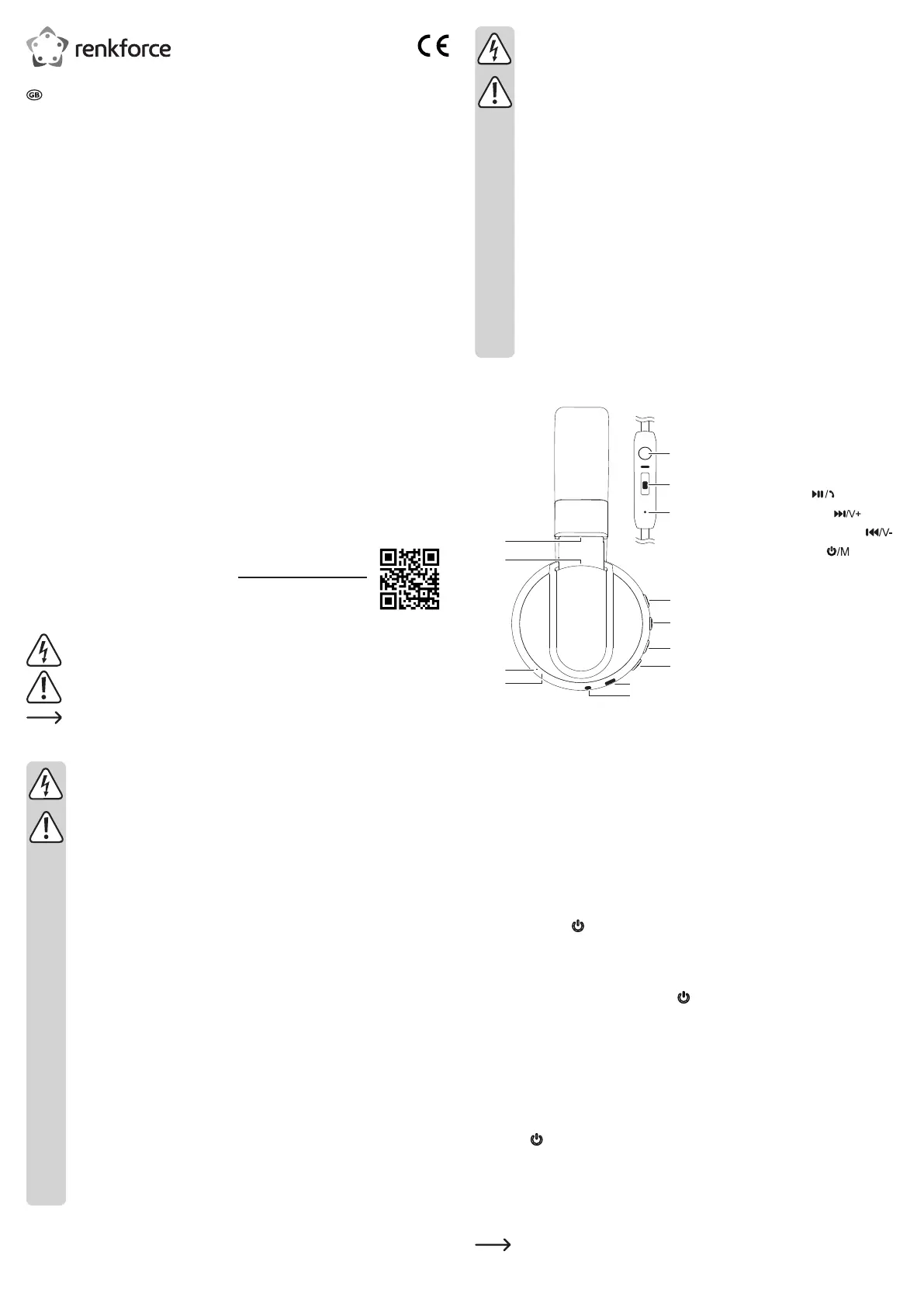
Product overview
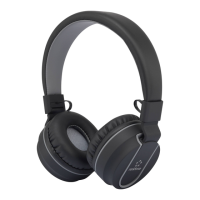
Headphones
1 Ear cup hinge
2 Headband size adjust
3 Microphone
4 LED indicator light (red/blue)
5 Play / answer call
6 Next song / volume up
7 Previous song / volume down
8 Power / mode button
9 Micro USB charging port USB
10 3.5 mm Aux-in
Inline Conrol
11 Function button
12 Volume slider
13 Microphone
Operation
a) Charging the internal battery
• Fully charge the battery before using the headset for the rst time.
• Insert the micro USB cable into the micro USB charging port (9) on the headset, and the other
end to a USB power source (e.g. USB power adapter).
• Charging will automatically begin when the USB power source delivers a current.
The LED indicator (4) will turn red to indicate that the battery is charging and turn off when
the battery is fully charged.
• Recharge the battery when the LED indicator (4) ashes red (indicating a low battery).
b) Turning the headset on/off
• Press and hold the button (8) for 3 seconds to turn the headset on.
• The blue LED indicator (4) will ash several times in quick succession, and the headset will
play a notication tone to indicate that it on.
• The headset will automatically search for available Bluetooth
®
devices.
• To turn the headset off, press and hold the button (8) for 3–5 seconds.
• The LED indicator (4) will turn red and the headset will play a notication tone to indicate that
it is switching off.
c) Pairing the headset with a Bluetooth
®
device
• Place the headset and your Bluetooth
®
audio device approximately 1 m from one another and
avoid interference that may affect signal transmission e.g. electromagnetic elds or metal
objects or behind reinforced concrete walls.
• Make sure the Bluetooth
®
software on your device is up to date.
• Press the button (8) to turn the headset on and enable pairing mode. The LED indicator
(4) will alternate ashing red and blue.
• Select “RF-BTK-100“ on your audio device (e.g. mobile phone or laptop) to pair it with the
headset.
• The LED indicator (4) will ash blue when the devices are paired via Bluetooth
®
, and the
headset will play a notication tone.
If pairing fails, turn off the headset and repeat the pairing process. See section
“Troubleshooting” for further information.
Operating instructions
Bluetooth
®
headset RF-BTK-100
Item no. 1577240
Intended use
This product can connect wirelessly to a Bluetooth
®
enabled audio device. It is powered by
rechargeable battery and includes a 3.5 mm input jack for optional connection to an analogue
auxiliary output. The headset is foldable for increased portability, has built in FM radio and can
be used for voice calls.
This product is intended for indoor use only. Do not use it outdoors. Contact with moisture (e.g.
in bathrooms) must be avoided under all circumstances.
For safety and approval purposes, you must not rebuild and/or modify this product. Using the
product for purposes other than those described above may damage the product. In addition,
improper use can cause hazards such as a short circuit, re or electric shock. Read the
instructions carefully and store them in a safe place. Make this product available to third parties
only together with its operating instructions.
This product complies with statutory national and European regulations. All company and
product names are trademarks of their respective owners. All rights reserved.
Bluetooth
®
is a registered trademark of Bluetooth SIG, Inc. worldwide.
Delivery content
• Bluetooth
®
headset
• Micro USB charging cable
• 3.5 mm AUX-in cable with inline controls and microphone
• Operating instructions
Up-to-date operating instructions
Download the latest operating instructions at www.conrad.com/downloads
or scan the QR code on this page. Follow the instructions on the website.
Explanation of symbols
The symbol with the lightning in the triangle indicates that there is a risk to your
health, e.g. due to an electric shock.
This symbol is used to highlight important information in these operating instructions.
Always read this information carefully.
This symbol indicates special information and advice on how to use the product.
Safety information
Read the operating instructions and safety information carefully. If you do
not follow the safety instructions and information on proper handling in this
manual, we will assume no liability for any resulting personal injury or damage
to property. Such cases will invalidate the warranty/guarantee.
a) General information
• This product is not a toy. Keep it out of the reach of children and pets.
• Do not leave packaging material lying around carelessly, as it may become
dangerous playing material for children.
• Protect the product from extreme temperatures, direct sunlight, strong jolts, high
humidity, moisture, ammable gases, vapours and solvents.
• Do not place the product under any mechanical stress.
• If it is no longer possible to operate the product safely, stop using it and prevent
unauthorized use. Safe operation can no longer be guaranteed if the product:
- is visibly damaged,
- is no longer working properly,
- has been stored for extended periods in poor ambient conditions or
- has been subjected to any serious transport-related stress.
• Always handle the product carefully. Jolts, impacts or a fall even from a low height
may damage the product.
• Always observe the safety and operating instructions of any other devices which
are connected to the product.
• Consult a technician if you are not sure how to use or connect the product.
• Maintenance, modications and repairs must be done by a technician or an
authorized repair centre.
• If you have questions that are not answered in these operating instructions,
contact our technical support service or other technical personnel.


 To Next Page
 Loading...