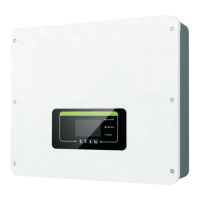
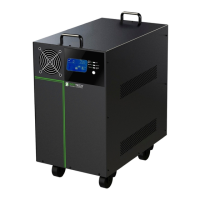
This document is a user manual for the Rentech Jaguar Battery Box, an inverter designed to power home appliances and 3C electronics. It is capable of handling motor-type loads with high surge power. The manual provides detailed instructions for installation, operation, troubleshooting, and specifications for two models: 1.2kVA/900W and 2.4kVA/1600W.
Function Description
The Rentech Jaguar Battery Box functions as an inverter, converting DC power from its internal batteries into AC power for connected devices. It operates in both line mode (when utility power is available) and inverter mode (when running on battery power). In line mode, it provides output power from the mains and simultaneously charges the internal battery. In inverter mode, it supplies power directly from the battery. The unit is designed for indoor use and automatically charges its internal battery when plugged into a wall outlet, even if the unit is off.
Important Technical Specifications
The Jaguar Battery Box comes in two models with distinct specifications:
1.2K Model (1200VA/900W)
- Input:
- Voltage: 220-240 VAC
- Voltage Range: 90-280 VAC
- Nominal Operating Frequency: 50/60Hz
- Maximum Input Current: 10A
- Output:
- Nominal Output Voltage: 220-240 VAC
- Voltage Regulation (Batt. Mode): +/-10%
- Output Frequency Range: 50/60Hz
- Nominal Output Current: 5.2A
- Inrush Current: 10A
- Maximum Output Fault Current: 6.9A
- Transfer Time: 20 ms typical
- Waveform: Simulated Sine Wave
- Battery:
- Battery Type and Numbers: 12 V 100Ah x 1
- Maximum Battery Discharging Current: 76A
- Floating Charge Voltage: 13.7 VDC ±0.5 VDC
- Maximum AC Charging Current: 10 A or 20 A
- Physical:
- Dimension (DxWxH): 393250459 mm
- Net Weight: 40.5 kgs
- Protective Class: I
- Ingress Protection Rating: IP20
- Environment:
- Humidity: 0 ~ 90% RH (No condensing)
- Operating Temperature: 0 to 55°C
- Altitude: 0 ~ 1000 m
2.4K Model (2400VA/1600W)
- Input:
- Voltage: 220-240 VAC
- Voltage Range: 90-280 VAC
- Nominal Operating Frequency: 50/60Hz
- Maximum Input Current: 13A
- Output:
- Nominal Output Voltage: 220-240 VAC
- Voltage Regulation (Batt. Mode): +/-10%
- Output Frequency Range: 50/60Hz
- Nominal Output Current: 10.4A
- Inrush Current: 13A
- Maximum Output Fault Current: 13.6A
- Transfer Time: 20 ms typical
- Waveform: Simulated Sine Wave
- Battery:
- Battery Type and Numbers: 12 V 100Ah x 2
- Maximum Battery Discharging Current: 76A
- Floating Charge Voltage: 27.4 VDC ±1 VDC
- Maximum AC Charging Current: 10 A or 20 A
- Physical:
- Dimension (DxWxH): 345400450 mm
- Net Weight: 75.8 kgs
- Protective Class: I
- Ingress Protection Rating: IP20
- Environment:
- Humidity: 0 ~ 90% RH (No condensing)
- Operating Temperature: 0 to 55°C
- Altitude: 0 ~ 1000 m
Usage Features
The Jaguar Battery Box is designed for user-friendly operation with several key features:
- Power On/Off: A simple power switch controls the unit. Once installed, pressing the switch turns the unit on, and it automatically operates in line or inverter mode based on utility power status. Pressing it again turns the unit off.
- LCD Display: A comprehensive LCD provides real-time information including:
- Input source information (AC input, input voltage, battery voltage).
- Configuration programs and fault information (setting programs, warning and fault codes).
- Output information (output voltage, load percentage, load in Watt, main board firmware version).
- Battery information (battery level, charging status, battery capacity).
- Load information (overload indication, load level by percentage).
- LED Indicators: Three LEDs on the front panel provide quick status updates:
- AC/INV (Green): Solid On for bypass mode, Flashing for inverter mode.
- CHG (Green): Solid On when battery is not charging, Flashing when battery is charging.
- FAULT (Red): Solid On for fault mode, Flashing for battery low or overload warning.
- Audible Alarms: The unit provides audible alerts for various conditions:
- Inverter Mode (Low-battery Voltage): Buzzing every 1 second.
- 110% overload warning: Buzzing every 0.5 second.
- Overcharge: Buzzing continuously.
- Fault mode: Buzzing continuously.
- Function Buttons:
- ESC: Exits setting mode.
- SELECT: Navigates to the next selection in setting mode.
- ENTER: Confirms selection or enters setting mode (by pressing and holding for 3 seconds).
- Configurable Settings: Users can customize various parameters through the LCD setting mode:
- AC input voltage range (Wide/Narrow).
- Battery type (AGM/Flooded/User-defined).
- Max AC charging current (10A/20A).
- Bulk charging (C.V voltage) voltage.
- Floating charging voltage.
- Low DC cut-off voltage.
- Battery Pack Installation: The manual provides clear, step-by-step instructions with diagrams for connecting the internal battery pack for both 1.2k and 2.4k models, involving removal and reassembly of the top case.
Maintenance Features
The manual emphasizes safety and provides guidance for troubleshooting common issues:
- Safety Warnings: Crucial safety precautions are highlighted throughout the manual, including:
- Indoor use only; avoid exposure to rain, snow, or liquids.
- Use only qualified batteries.
- Disconnect AC, DC, and battery power before maintenance.
- Do not disassemble the inverter; it contains no user-serviceable parts.
- Ensure proper wiring and ventilation.
- Avoid covering cooling fans.
- Use insulated tools when working with batteries.
- Remove personal metal items when working with batteries.
- Have fresh water and soap available in case of battery acid contact.
- Never smoke or allow sparks/flames near batteries.
- Disable automatic generator start systems during servicing.
- Troubleshooting Guide: A detailed table helps users diagnose and resolve minor problems based on symptoms (e.g., short backup time, unit working in battery mode despite mains, no LED display, continuous buzzer, red LED on). It lists potential causes and recommended actions, such as:
- Charging the unit for at least 8 hours.
- Checking battery date codes and replacing old batteries.
- Verifying AC breaker and wiring.
- Checking AC wire thickness and length.
- Ensuring proper generator function (if applicable).
- Checking external battery cable and terminal connections.
- Replacing defective batteries.
- Removing abnormal loads.
- Reducing connected load.
- Replacing the fan.
- Checking for blocked airflow or high ambient temperature.
- Verifying battery specifications and quantity.
- Professional Service: For abnormal situations not listed in the troubleshooting guide, users are instructed to contact service personnel for professional examination.
- Warranty: Attempting to service the inverter yourself will void the manufacturer's warranty.


 To Next Page
 General