Español Español47 48
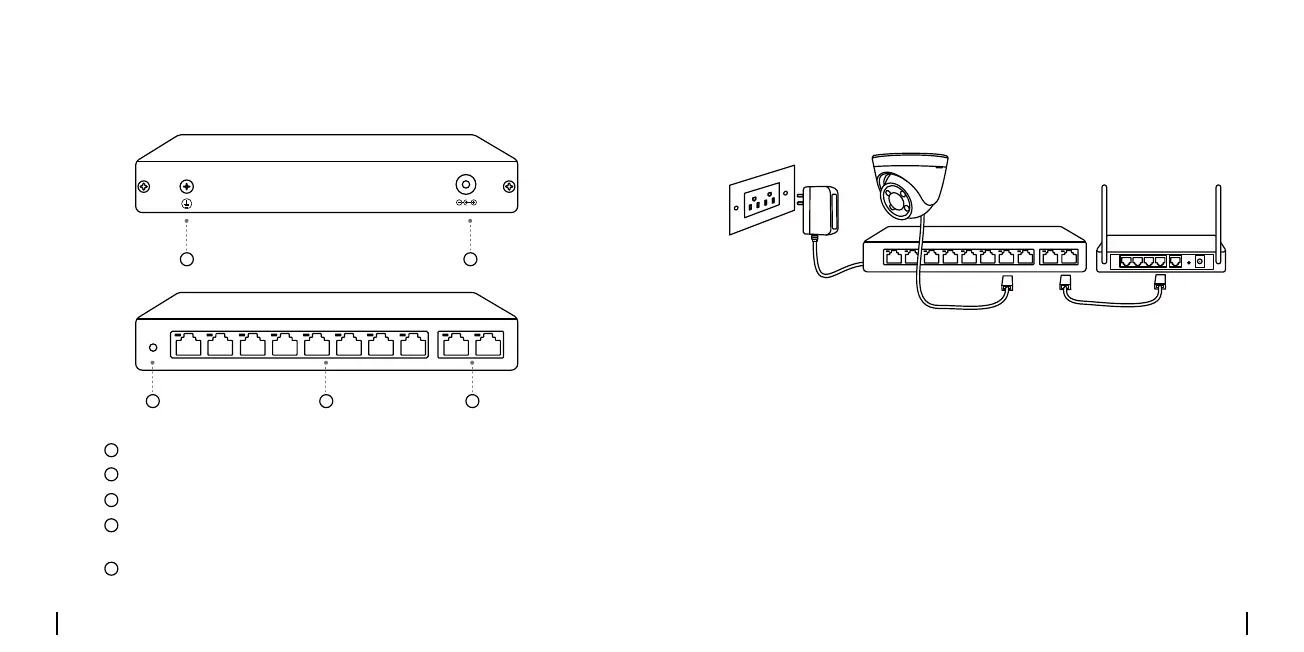
Presentación del producto Diagrama de conexión
DC IN
UPLINKPoEPoE Switch
POWER
DC IN
UPLINKPoEPoE Switch
POWER
3 54
1 2
Tornillo de conexión a tierra
Puertos de enlace ascendente Gigabit Ethernet
LED de encendido
Puerto DC
Puertos PoE+ de enlace descendente 10/100 Mbps
(máx. 30 W por puerto)
1
2
3
4
5
1. Encienda el Switch PoE con el adaptador de corriente suministrado.
2.ConecteunextremodeuncableEthernetalpuertodeenlace
ascendente del Switch PoE y el otro extremo a un rúter.
3. Conecte sus dispositivos a los puertos PoE+ del Switch mediante otro
cableEthernet.


 To Next Page
 Loading...