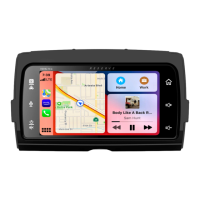
The Soundstream HDHU.14 is a replacement head unit designed for 2014+ Harley Davidson Touring Motorcycles. It integrates advanced audio and connectivity features into the motorcycle's infotainment system.
Function Description
The HDHU.14 serves as a central control unit for audio, communication, and navigation on compatible Harley Davidson motorcycles. It features a 7-inch TFT/LCD display with a resolution of 1024 x 600 pixels, providing a clear and intuitive interface. The head unit supports both Apple CarPlay and Android Auto, allowing seamless integration with smartphones for navigation, music streaming, calls, and voice commands.
Key functions include:
- Audio Playback: Supports AM/FM radio with various regional settings (America, Europe, Japan, Southeast Asia, Latin America, Australia). It also plays audio from USB devices and streams music via Bluetooth.
- Smartphone Integration: Apple CarPlay and Android Auto enable users to access smartphone apps directly from the head unit's display. This includes navigation (Google Maps, Apple Maps), music services (Spotify, YouTube Music), messaging, and phone calls.
- Voice Recognition: Features a dedicated SIRI button for voice commands when an iPhone or Android phone is connected, allowing hands-free operation for safer riding.
- Bluetooth Connectivity: Facilitates wireless connection to mobile phones for calls and music streaming. It includes features like auto-answer, microphone gain adjustment, and a clear records function for managing paired devices.
- Equalizer and Audio Settings: Offers a 10-band equalizer for precise audio tuning, along with controls for subwoofer output, filter frequency, and level. Balance and fader adjustments allow users to optimize sound distribution.
- Display Customization: Users can adjust brightness, background, and LED color. It also supports custom wallpapers from USB devices.
- System Settings: Provides options for language, date and time, key beep tone, and factory reset.
Important Technical Specifications
- Power Requirement: DC 10-16 Volts, Negative ground.
- Current Drain: 15A (Max.).
- Maximum Power Output: 50 Watts x 4.
- RMS Power Output: 25 Watts x 4.
- Speaker Impedance: 2- or 4-Ohm Load.
- Frequency Response: 20Hz ~ 20KHz.
- Operating Temperature: -20 ~ 60 °C.
- Dimensions: 230mm (W) x 210mm (D) x 140mm (H).
- TFT Screen Size: 7-inch TFT/LCD.
- Resolution: 1024 x 600 pixels.
- FM Radio Frequency Range: 87.5 – 107.9 MHz (America), 87.5 – 108 MHz (Europe).
- Usable Sensitivity (S/N=30dB): ≤15dB.
- S/N Ratio: ≥55dB.
- Stereo Separation: ≥30dB.
- AM Radio Frequency Range: 522 – 1620 KHz (America), 530 – 1710 kHz (Europe).
- Usable Sensitivity (S/N=20dB): ≤40dB.
- S/N Ratio: ≥45dB.
- Line-out / Subwoofer Output:
- Maximum Output Level (10K ohms load): ≥4V RMS.
- Subwoofer Time Align: 0 ~ 18ms.
- Connectivity: USB connector for devices and smartphones, AM/FM connector for radio antenna, External Microphone connector for voice commands.
- Amplifier: Built-in 300 Watt 4-channel amplifier.
Usage Features
The HDHU.14 is designed for ease of use while riding, though some features are restricted when the motorcycle is in motion to prevent distraction.
- Pre-Riding Checklist: Users are encouraged to configure personal preferences, including brightness, presets, audio settings, and Bluetooth pairing, before riding.
- Main Menu Navigation: A home button allows toggling between the home screen and active media. Available selections include Radio, Apple CarPlay, Android Auto, BT Music, BT Phone, USB, and Settings.
- Volume Control: Dedicated buttons for increasing and decreasing volume.
- Power/Mute Button: Short press for mute/unmute, long press to power off.
- Radio Operation: Features include pre-scan search, auto-scan searching, local/DX switching, and preset station storage.
- USB Playback: Supports audio playback from USB devices, with folder browsing and search functions.
- Bluetooth Phone: Allows making and receiving calls, accessing call history, contacts, and adjusting Bluetooth settings like auto-answer and microphone gain.
- Display Settings: Offers options for lighting detect, daylight and night dimming levels, illumination color, and wallpaper selection.
- Audio & EQ Settings: Provides detailed control over sound, including balance/fader, subwoofer output, and a 10-band graphic equalizer.
- Installation: The unit fits standard 10-24 screws and requires correct bracket usage. Wiring diagrams are provided for connecting to the motorcycle's harness, external amplifier, and other accessories.
Maintenance Features
Proper care and cleaning are essential to maintain the HDHU.14's performance and appearance.
- Cleaning:
- Use only recommended products and methods.
- Avoid abrasives, polishes, rubbing compounds, ammonia-based cleaners, or chemical-containing wipes on the screen or other components, as these can cause damage.
- Gently clean the display glass surface with a clean, dry microfiber cloth.
- Before cleaning, remove visible dust, dirt, or sand particles with a gentle compressed air stream.
- Troubleshooting: The manual includes a troubleshooting guide for common issues such as no power, no sound output, or poor radio performance. This guide suggests checking fuses, wiring connections, and adjusting settings.
- Firmware Updates: The "About" section in the settings menu displays hardware and firmware versions, and an "Update" button suggests the possibility of firmware updates, though the process is not detailed in this manual.


 To Next Page
 General