Need help?
Do you have a question about the resideo R7284 Series and is the answer not in the manual?
Details on adjusting pump prime timing via advanced interface.
How to interrupt control operation using the 'i' button.
Procedure for entering the installer setup mode.
How to view recent errors using the up/down buttons.
LED indications for different control states and errors.
How LED flashes indicate flame strength (CAD cell resistance).
Mapping LED flashes to specific error codes.
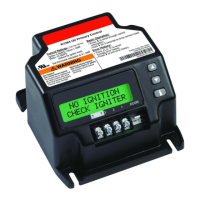
The Resideo R7284 Series Electronic Oil Primary is a control device designed to manage and monitor the operation of oil-fired heating systems. It serves as the central control for various functions, including ignition, flame sensing, and system diagnostics, ensuring safe and efficient operation. This device is available in both basic and advanced interface models, offering different levels of user interaction and diagnostic capabilities.
The primary function of the R7284 is to sequence the operation of an oil burner, from receiving a call for heat to establishing and maintaining a stable flame. It incorporates a Trial For Ignition (TFI) period during which it attempts to ignite the oil burner. If ignition is not established within this period, or if the flame is lost during operation, the control will initiate a lockout state to prevent unsafe conditions.
A key feature is the Pump Priming Cycle, which facilitates the purging of air from oil lines and filters. In the advanced interface, this cycle displays "PUMP PRIME" along with the remaining TFI time. Users can extend the pump prime time by pressing the up arrow button, adding one minute per press up to a maximum of 10 additional minutes. Conversely, the down arrow button subtracts a minute. For the basic interface, the purge timing is limited to five minutes without visual indication.
The R7284 also includes lockout mechanisms to ensure safety. A "Soft Lockout" allows the control to recover automatically once the error clears or after a specified time. A "Hard Lockout" requires manual reset by holding the "i" button for at least 2 seconds. In cases of "Hard Lockout Call Service," holding the "i" button for more than 10 seconds returns the control to Standby.
While specific electrical ratings are not detailed in this document, the manual highlights several adjustable parameters and operational timings:
The R7284 offers different user interfaces:
The advanced interface provides a clear progression of screens during a normal cycle, including STANDBY, CALL FOR HEAT, VALVE ON DELAY, IGNITION TRIAL, PUMP PRIME, RUNNING (with ohms reading), and BURNER OFF DELAY.
This interface consists of 3 buttons and an LED, providing simpler diagnostic information through button interaction and LED codes.
The R7284 incorporates features that aid in troubleshooting and maintenance:
These diagnostic and historical data features allow technicians to quickly identify and address issues, reducing downtime and facilitating efficient servicing of oil-fired heating systems. The ability to adjust various operational parameters through the Installer Setup mode also provides flexibility for optimizing the control for specific applications and system requirements.
 General
| Brand | resideo |
|---|---|
| Model | R7284 Series |
| Category | Controller |
| Language | English |

 To Next Page