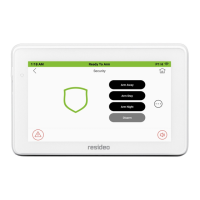
This document describes the Resideo VISTA-128FBPT and VISTA-250FBPT commercial fire and burglary partitioned security systems with scheduling.
Function Description
The Resideo security system offers three forms of protection: burglary, fire, and emergency. It uses microcomputer technology to monitor all protection zones and system status, providing information on the keypad display and initiating alarms. The system can also transmit alarm or status messages to a central monitoring station.
Important Technical Specifications
The VISTA-128FBPT and VISTA-250FBPT control panels have the following differences:
- Number of Zones: VISTA-128FBPT has 128 zones, VISTA-250FBPT has 250 zones.
- Number of User Codes: VISTA-128FBPT supports 150 user codes, VISTA-250FBPT supports 250 user codes.
- Event Log Capacity: VISTA-128FBPT has a 512-event log capacity, VISTA-250FBPT has a 1000-event log capacity.
All other features are identical for both panels.
Usage Features
- Partitioned System: The system shares one physical alarm system among different users, each with their own requirements. A keypad in one partition can perform system functions in another partition if authorized, using the GOTO command (security code + [] + desired partition number 1-8). Entering [] + [0] returns the keypad to its original partition.
- Zones: Sensing devices are assigned to various "zones" (e.g., Entry/Exit door to zone 001, master bedroom windows to zone 002). Zone numbers and alpha descriptors appear on the display during alarms or trouble conditions.
- Fire Protection: Always active, it sounds an alarm if a fire condition is detected.
- Burglary Protection: Must be "armed" to sense burglary alarm conditions. It offers four modes: STAY, AWAY, INSTANT, and MAXIMUM. A CHIME mode alerts users to door/window openings when disarmed.
- Carbon Monoxide Protection: Available with 5800CO Carbon Monoxide Detectors (3V battery-powered wireless devices).
- Alarms: Keypad and external sounders activate, displaying the zone(s) and type of alarm. Disarming the system stops the alarm.
- Memory of Alarm: Displays the zone(s) and type of alarm until cleared by disarming the system.
- Schedules: Programmed for automatic arming, disarming, and device activation. Users can delay closing times, use temporary schedules, or program special user schedules.
- Device Timers: Up to 20 timers control various devices (lights, appliances). Up to 96 devices can be programmed.
- Master Keypad Operation: A "Master" keypad displays the status of all eight partitions simultaneously. Users can get more information on a specific partition by entering [*] + [Partition No.]. To log on to the "Master" partition (9) and perform functions, a user must have access to all partitions.
- Self-Help Feature: Abbreviated user instructions are built into the alpha keypad's display. Press and hold a function key for about 5 seconds to view its description (system must be "READY TO ARM").
- Keypads: Feature a telephone-style keypad and an LCD. Alpha keypads have a 2-line, 32-character alphanumeric LCD for user-friendly messages and custom zone descriptors. Keypads have a built-in sounder for alarms, troubles, and system functions (e.g., entry/exit delays, CHIME mode).
- Entry/Exit Delays: Installer-programmed time delays for leaving (exit delay) and re-entering (entry delay) without triggering an alarm. INSTANT or MAXIMUM arming modes can be used to arm with no entry delay.
- Security Codes and Authority Levels: Users are assigned a 4-digit security code and an authority level (1-6: Master, Manager, Operator A, Operator B, Operator C, Duress). Authority levels define system functions a user can perform.
- Duress Code: Silently notifies the central station if used under threat (authority level 6).
- Quick Arming: If programmed, the [#] key can be pressed instead of a security code to arm (security code always required to disarm).
- Duplicate User Codes: System checks for duplicate user codes in the same partition.
- Adding/Changing/Deleting Users: Master or Manager codes are required. User numbers are 3-digit entries (e.g., 003). Security codes are 4-digit numbers.
- Checking for Open Zones: Before arming, all protected zones must be closed or bypassed. Pressing the [*] READY key displays faulted zones.
- Displaying All Zone Descriptors: When "Disarmed-Ready to arm" is displayed, press and hold the [*] READY key for at least 5 seconds to view all programmed zone descriptors.
- Bypassing Protection Zones: Use the
6 BYPASS key to arm the system with specific zones intentionally unprotected. Bypassed zones will not cause an alarm. Fire or emergency zones cannot be bypassed. All bypasses are removed upon an OFF sequence (security code + OFF).
- Quick Bypass: Bypasses all open (faulted) zones without individual entry (security code +
6 + #).
- Displaying Bypassed Zones: View currently bypassed zones by entering security code +
# + 84.
- Group Bypass: Bypasses a group of zones (up to 15 groups) without individual entry (security code +
6 + * + group number 01-15).
- Arming Perimeter Only (With Entry Delay ON) - STAY modes: Use
3 STAY when staying home but expecting someone to use the entrance. STAY modes 1, 2, and 3 automatically bypass specific zones.
- Arming Perimeter Only (With Entry Delay OFF) - INSTANT modes: Use
7 INSTANT when staying home and not expecting late arrivals. INSTANT modes 1, 2, and 3 automatically bypass specific zones.
- Arming All Protection (With Entry Delay ON) - AWAY mode: Use
2 AWAY to arm both perimeter and interior protection. Late arrivals can enter through an entry delay zone if disarmed before the delay expires.
- Arming All Protection (With Entry Delay OFF) - MAXIMUM mode: Use
4 MAXIMUM for extended vacancies. Eliminates entry delay.
- Quick Exit: Press
# + 9 to exit an armed partition without disarming, using the programmed exit delay time.
- Disarming and Silencing Alarms: Use the
1 OFF key with your security code to disarm the system and silence alarms/trouble sounds.
- Using the Keyswitch: Turn the key right for 1 second to arm in AWAY mode (red light steady). Turn and hold right for >10 seconds to arm in STAY mode (red light slow flashing). Turn right and release to disarm.
- Chime Mode: Press security code +
9 to turn CHIME mode on/off. When on, three tones sound at the keypad when a protected door/window is opened while disarmed.
- Viewing Alarm Company Messages: Press and hold
0 for 5 seconds to view messages from the monitoring agency or installer.
- Panic Keys: Special key combinations (e.g.,
1 + *, 3 + #, * + #, or lettered keys A, B, C) can be programmed to manually activate Silent Emergency, Audible Emergency, or Personal Emergency functions.
- Relay Control: Security code +
0 can momentarily unlock a door (e.g., in a lobby) for 2 seconds.
- #70 Relay Menu Mode: Security code +
# + 70 allows turning lights or other devices on/off using 2-digit device numbers.
- Programming Device Timers: Security code +
# + 83 allows programming up to 20 timers with ON/OFF times and active days for various output devices (up to 96 devices).
- Randomize Output Device Times: Security code +
# + 41 randomizes activation times of all programmed devices by up to 30 minutes. Security code + # + 42 randomizes only devices with activation times between 6 PM and 5 AM.
- #77 Instant Activation Mode: Security code +
# + 77 activates outputs, bypasses zones, etc., immediately upon exiting the mode. Actions include relay commands, arm/disarm commands, zone bypassing commands, and open/close access conditions.
- Event Log Procedures: Security code +
# + 6 + 0 allows viewing a history log of up to 1000 events, categorized as Fire, Life Safety, Troubles/Supervisory, System Events, or All Events. Logs can be viewed as RECENT (since last clear) or COMPLETE.
Maintenance Features
- System Testing: Weekly testing is recommended. Enter security code +
5 to enter Burglary Walk Test mode. Open/close doors/windows, walk in front of motion detectors, and test smoke detectors. Turn off Test mode with security code + OFF.
- Replacing Batteries in Wireless Sensors: Each wireless sensor has a 9-volt or 3-volt battery. A low battery message (LO BAT) appears on the keypad when a sensor battery is low (replacement due within 30 days). Battery-operated smoke detectors also emit a single "chirp" every 20-30 seconds. Use only recommended replacement batteries.
- Silencing Low Battery Warning Tones: Perform an OFF sequence (code + OFF key) to silence keypad tones. The low battery message remains until the battery is replaced and the sensor is activated.
- Routine Care: Treat components like other electrical equipment. Keep keypads and sensors free of dust. Clean with a dry soft cloth; do not spray water or fluids.

 Need help?
 General

 To Next Page