QUICKGUIDE:
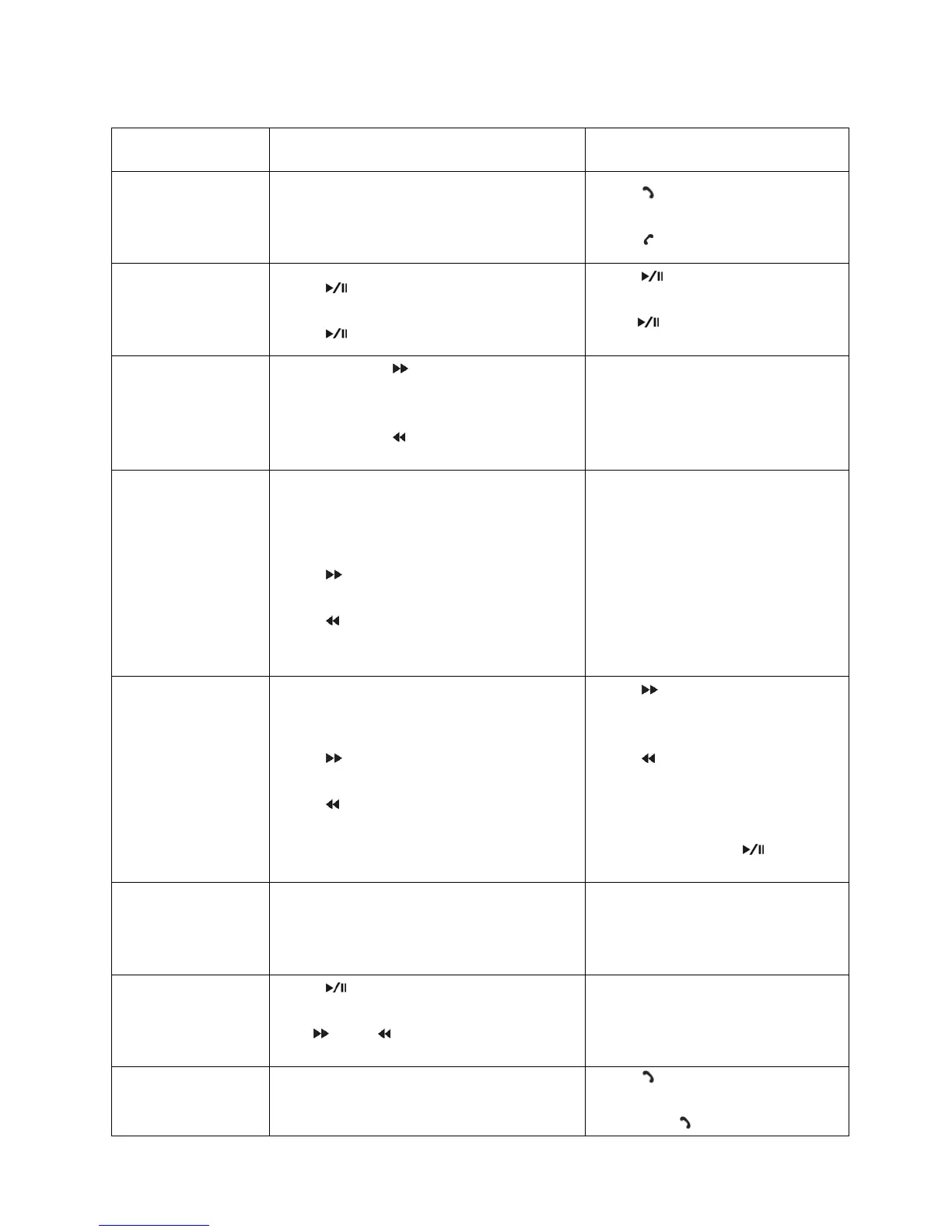
OperationGuide OnFMtransmitter OnRemoteControl
Answer/Hangupa
Call
Press"AnswerCall"button:answerthe
call
Press"HangUp"button:hangupthecall
Press“ ”toanswerthecall
Press“ ”tohangupthecall
PlayandPausethe
Music
Press“ ”Button:Playthemusic
Press“ ”Buttonagain:Pauseplaying
Press“ ”Button:Playthemusic
Press” :Buttonagain:Pause
playing
Adjustingthe
Volume
Pressandhold“ ”button:Increase
Volume
Pressandhold“ ”Button:Decrease
Volume
Press“+”toincreasetheVolume
Press“‐”todecreasetheVolume
Settingthe
Frequency
Press“CH”buttonfirst,then:
Press“ ”:increasethefrequency
Press” ”:decreasethefrequency
Press“CH+”button:Increaseby
0.1MHz
Press“CH‐”button:decreaseby
0.1MHz
ORPressthenumbersofthe
frequencythatyouwantand
press“CH+”toconfirm
ChoosingtheMusic
Press“
”Button:Playthenextsong
Press“ ”Button:Playtheprevioussong
Press“ ”button:Playthenext
song
Press“ ”button:Playthe
previoussong
ORPressthenumberofthesong
youwantandpress“ ”to
confirm
ChoosingtheEQ
NotSupported–Canonlybedoneonthe
RemoteControl
Press“EQ”buttontochangethe
EQ
Changingtoa
differentFolder
Press" "buttonfirst,thenpressand
hold"CH"buttontogettothemenulist,
use“ ”and“ ”toscroll,and‘CH’to
selectthedesiredfolder
Press"Folder"buttontoswitch
folder
MakingaCall
NotSupported–Canonlybedoneonthe
RemoteControl
Press“ ”button,inputmobile
numberontheremotecontrol,
thenpress“ ”buttonagain


 To Next Page
 Loading...