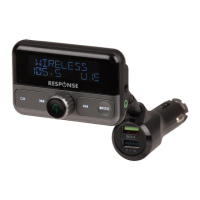
Channel Down / Previous Track
Press to change the frequency
channel down or skip to the
previous track
Call / Hang Up / Volume Dial /
Frequency Adjustment
Press to answer calls, hang up, adjust
the main volume or adjust the FM
frequency
Press to change the frequency
channel up or skip to the next track
Change between Bluetooth, USB,
microSD & Line In Modes
Quick Charge 3.0 USB Charging Port
Charges a smartphone up to 3A
using Qualcomm Quick Charge 3.0
for Android devices. iOS devices will
charge up to 2.4A
USB Music / 2.4A USB Charging Port
Insert a USB flash drive up to 32GB
or charge a smartphone up to 2.4A
Operation:
FM Pairing:
1. Insert the FM Transmitter in to your vehicle’s 12 or
24VDC cigarette lighter socket.
2. The FM transmitter will be automatically powered once
your vehicle has been started.


 To Next Page