
 Need help?
Do you have a question about the Ress FM5 Pro and is the answer not in the manual?
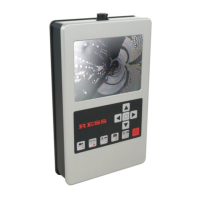
The RESS Monitor FM5 Pro (Art.-Nr. 2528) is a portable video inspection system designed for visual inspection, sweep instruments, and measuring instruments, particularly for chimney inspections. It comprises a monitor unit and a charger, with optional camera accessories like a transport bag and a roller-stand.
The primary function of the Monitor FM5 Pro is to provide visual inspection capabilities, allowing users to view and record video and still images from a connected camera head. It is designed for tasks such as inspecting chimneys for defaults, and can be used in various environments including attics or rooftops. The system facilitates the identification and localization of issues within inspected areas.
The device features a monitor for real-time viewing, control buttons for navigation and operation, and an SD card slot for storing recorded data. It supports both video recording and photo capture, with dedicated buttons for starting/stopping recording, saving pictures, and reviewing stored media. System settings, including date, time, recording mode, recording time, brightness, contrast, saturation, and time display, can be adjusted through a dedicated menu.
The Monitor FM5 Pro is designed for ease of use with a clear interface and intuitive controls.
Start-up and Connection: To begin, the monitor is connected to the cable and charging socket using a quick plug, secured by a quarter-turn clockwise. The camera's jack is then connected to the 12-pin connector on the camera head, ensuring the groove guide aligns with the socket, and secured with a threaded screw. The system is ready for use once all connections are made and the basic unit is switched on, indicated by the illumination lights inside the camera.
Basic Operation: The device is powered on/off using a dedicated switch (button 6). Video recording is initiated and stopped with button 1, while photos are saved using button 4. Stored videos can be reviewed by pressing button 3, and photos by pressing button 5.
Control Buttons:
System Settings: The system settings menu (accessed via button 2) allows adjustment of various parameters. The active setting is highlighted in yellow.
SD Card Usage: The SD card slot is located on the top of the handset. SD cards (1-8 GB) are inserted with the writing facing up until a "click" is heard, locking the card in place. To remove, push the card again until a "click" is heard, and it will pop out. The card can then be connected to a reading device (not supplied) for data transfer.
Power Supply and Charging: The device is powered by a rechargeable lead acid battery. Upon initial purchase, the battery is empty and requires charging. A full charge takes approximately 2 hours and provides about 120 minutes of operating time, depending on the camera head used. The charger has an over-discharge protection feature, automatically switching off when the battery is full. The battery indicator on the LCD screen displays the charge as a percentage. Charging is only possible when the monitor is switched off. The charger's LED light indicates charging status: yellow when connected, orange during charging, and blinking green/orange then solid green in standby mode after charging is complete. Users are advised to charge the battery when "Batt?" appears, indicating approximately 5 minutes of operating voltage remaining.
Inspection Tips:
Cleaning:
Safety Precautions:
Troubleshooting:
Warranty: The warranty is void if the camera head or monitor has been opened manually.
For service and support, contact the RESS SERVICE-Hotline: +49 5208/9127-0.
 General
| Brand | Ress |
|---|---|
| Model | FM5 Pro |
| Category | Analytical Instruments |
| Language | English |

 To Next Page