3
A.Before using
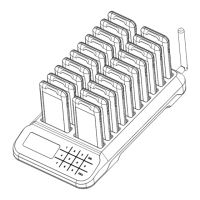
Wiring: Host connects to power source via adapter. Charging base connects to host via Type-C cable.
Connect host to power source, and charge pagers for 10 minutes at least before using.
Charging Indicator Information:
B.Operating Instruction
CALL mode is the default mode. Continuously press Delete button (←) to return Call Mode while in
other mode. C--- is displayed in CALL mode.
Input the number and press CALL button to call the corresponding pager.
C.Mute mode
Press MUTE and 999 (S999 displayed) then press CALL, all charging pagers change to MUTE mode.
Press MUTE and 000 (S000 displayed) then press CALL, all charging pagers change to normal mode.
In MUTE mode, all pagers only vibrate and flash while being called.
Continuously press DELETE button (←) to return CALL mode. (C--- displayed)
D.Call History
Press button H to check the recent 10 called numbers (HXXX displayed). Press △/▽ button to page
up/down.
Continuously press DELETE button (←) to return CALL mode. (C--- displayed)
Note: No looping of △/▽.
E.One-Call-Off
In CALL mode, press 999 and CALL, all charging pagers will be off. Re-charge pagers will turn on again.
Note: This instruction is invalid to the pagers not being charged.
F.Keyboard Transmitter Off
When powered by battery, long press H and △ at same time, keyboard transmitter is off. Long press
H and ▽at same time, keyboard transmitter is on. This operation is invalid when powered by power
source.
G.Program Operation
All pagers are programmed before delivery. So this operation is only necessary when adding new
pagers or changing numbers.
Put the pagers on the charging base, press P and 999 (P999 displayed), then press CALL to enter
programming mode. The operation must be finished in 20 seconds after pagers are charged.
In programming mode, all LED display of the pagers will keep flashing.
Then input number and press CALL, all pagers display this number. Move the top pager away,
the pager will beep once and stop flashing. It means the pager is programmed.
Repeat the steps to program other pagers.
Note: The pagers will quit programming mode if no operation within 1 minute. All pagers’ numbers will
not change if not being programmed.
1 pager only can be programmed 1 number. Old number will be replaced by the new one.
Instructions for Use
Host Pager
Red LED Charging Flashing Charging
Green LED Full Charged Always On Full Charged


 To Next Page