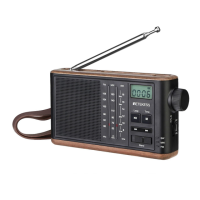
EN:
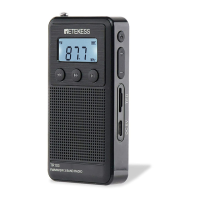
External view and function tips
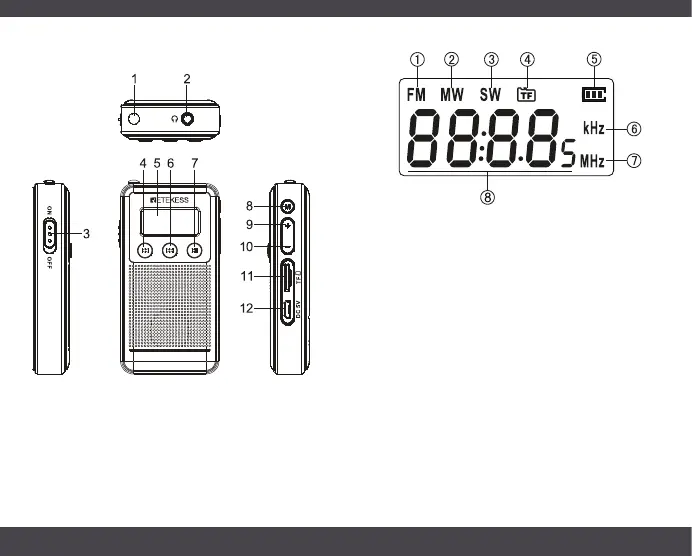
LCD instruction
1. FM mode display
2. Medium wave mode display
3. Short wave mode display
4. Micro SD card playback mode
5. Battery indicator
6. MW frequency unit
7. FM and SW frequency unit
8. *Show track number about 2 seconds when press
previous or next.
*Show the playing time when the track is played
*Show the frequency when receiving station
*Volume display during volume adjustment
Radio operation
1. Set the power switch to "ON" to turn on the power.
2. Press function switch button (8) to reach FM, AM
and SW play and the LCD frequency plays.
3. FM band switching: FM has two bands to choose,
FM1:87-108MHz, FM2:64-108MHz. You can change
the FM band by long press “M” (8) for 5 seconds to
switch.
1 Rod antenna
2 Earpiece socket
3 Power button
4 Previous
5 LCD display screen
6 Next
7 Play/Pause button
Long press: Station preset
Short press: Manual tuning
8 Mode switch button
9 Volume + button
10 Volume - male
11 TF card socket
12 DC 5V power port
TR103
FM/MW/SW 3 BAND RADIO
1 2


 To Next Page