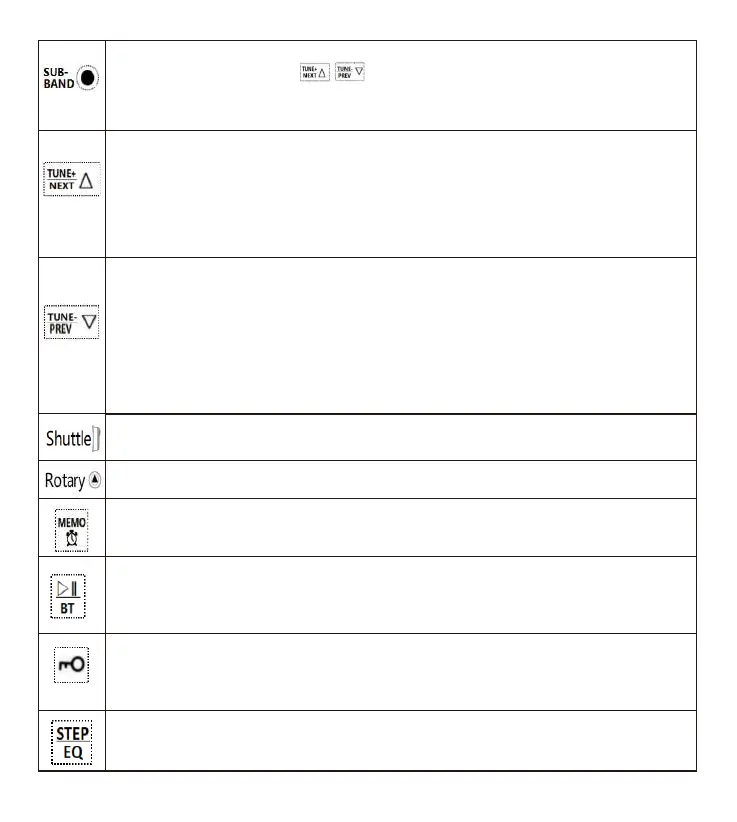
1: When the time is shown: long press this button for 2 seconds to start manual adjustment of FM/MW/SW
frequency range and lightly press “ ” to choose a frequency【refer to details in Article 7.3.2.5 】
2: In the mode of WB, lightly press this button to switch between 7 freque ncies.
3: Correct frequencies cannot be adjusted manually in the mode of VHF/AIR/WB. Every time lightly press
this button to switch to corresponding meter frequency after calculation with algorithm through potentiometer.
1: When time is shown: light press&long pre ss for Time adjustment: time+ FM frequency selection: switch
between FM reception frequencies, switch bet ween AM.9KHZ/10KHZ accordingly Backlight adjustment:
choose a light display mode
2: In the mode of reception: lightly press this button, frequency will increase based on the min step value.
Long press this button for 2 seconds to automatically search chann els up.
3: In the play mode of TF card: lightly press this button to play the next song, and long press it to fast forward.
4: In the play mode of Bluetooth: lightly press this button to play the next song.
1: When time is shown: light press&long press for Time adjustment: time - FM frequency selection: switch
between FM reception frequencies, switch between AM.9KHZ/10KHZ accordingly Backlight adjustment:
choose a light display mode
2: In the mode of reception: lightly press this button, frequency will decrease based on the min step value.
Long press this button for 2 seconds to automatically search channels down.
3: In the play mode of TF card: lightly press this button to play the previous song, and long press it to f ast
backward.
4: In the play mode of Bluetooth: lightly press this button to play the previous song.
1: In the mode of reception: start the rotary shuttle channel selection.
2: In the play mode of Bluetooth or TF card: rotary song selection.
In the mode of FM/MW/SW: adjust the receiving frequency of FM/MW/SW manually.
1: When the time is shown: lightly press this button to start/close the timer function.
2: In the mode of reception: lightly press this button to take a channel. Long press it for 2 seconds to store a
channel manual ly. Lightly press it again to confirm a channel is stored suc cessfully.
1: In the mode of reception: long press this button for 2 seconds to start/close the mute function.
2: Switch between play modes: TF card/Bluetooth/3.5MM audio cable -AUX in/connecti on to computer AUX
- in. Lightly press this button to switch between the four play modes.
3: Long press it for 2 seconds to pause/play.
1: When the time is shown/the radio is powered on: long press this button to start the function of lock, and
long press it for 2 seconds to unlock. (SOS alarm and flashlight are not contr olled by the lock)
2: When the time is shown/the radio is powered on: lightly press this button to start the shuttle lock and
lightly press it again to disabl e the shuttle lock.
1: When searching channels using the shuttle button: the frequency on LCD flashes. Lightly press this button
to switch between step values and search channels together with the shuttle button.
2: Play mode: lightly press this button to choose an EQ.
04



 To Next Page
 Loading...