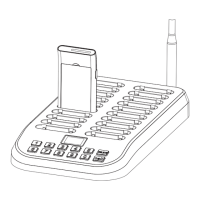
Model: TT106
EU Importer
Name:Germany Retevis Technology GmbH
Address:Uetzenacker 29,38176 wendeburg
Transmitter: TT106
1. ON/OFF operation:
● Turn on: Keep pressing the“M" button for 1 second to turn on, and insert the
microphone to speak.
● Turn off: Keep pressing the “M” button for 1 second to turn off.
2. Mute function and operation
Under the working condition,click the “ ” button, the transmitter will be mute,the
antenna icon “ ” on the screen will be flashing, and the receiver can not receive the
signal from the transmitter anymore; And click again the “ ” button, the antenna icon
“ ”on the screen will not be flashing, and the receiver can receive the signal from the
transmitter again.
3. Click one button to turn off all the receivers
Under the working condition, keep pressing the “ ” button for about 5 seconds until
the screen is flashing, and all the receivers will be forcibly turned off. (Note: Now you
can click any button of the transmitter to quit or keep pressing the “M” button to turn off.)
4. The person in charge of the devices needs to know how to set
the channel:
(1) Why and when need to set the channel:
● When there are two or more groups using the devices at the same location,to
avoid the interference between the groups,you need to set different channels for
the devices (including both transmitters and receivers) of different groups.
● When you need to add more receivers to a group, and the channel of these added
receivers is not the same as that of the devices of the group, you need to set the
channel of these added receivers to be the same as that of the group. (The
channel of the transmitter and the receivers in a group must be the same, or the
receivers can not receive the signal from the transmitter)
(2) The ways of channel setting:
Under the working condition, keep pressing both “ ” button and the “ ” button at
the same time until the channel icon on the screen changes from “M” to “ID”, then
release both “ ” button and the “ ” button, now the transmitter has entered the
channel setting mode (Now you can see the right-most figure of the channel number
is flashing), then you can click the “ ” or “ ” button to change the channel number.
The channel number can be changed from 0001 to 9999, click the “ ” button to
choose the location of the figure that you want to change(every click will move one
location from right to left, and it can repeat to choose), the figure on the location you
chose will be flashing; And then you can click the “ ” button to change the figure
on the location you chose (it can be changed from 0 to 9). After you have chosen the
channel number, keep pressing “M" button for about 3 seconds until the four-figure
channel number starts flashing, then release the “M" button, now the transmitter has
entered the wireless channel matching status, now you can put the receivers (the
receivers have been turned on) closed to the transmitter (within 2 meters), and the
receivers’ channel will match the transmitter’s channel and become the same, and
the receivers’ flashing blue light will turn to stable blue light, now the channel matching
is finished. Then you can click the transmitter’s “M" button to quit the channel matching
status, now if the transmitter speaks, the receivers can hear it.
5.Wireless channel setting:
There’s an MIC input hole for microphone at the right side of the transmitter,and there’s
an AUX audio input hole at the bottomđthe transmitter will check these two input holes,
and it will turn itself off automatically if it finds no plug in the input holes within 6 minutes.
Note: Please don’t mix the two holes,if you put the microphone into the audio input hole,
the microphone will not speak.
6. Use two transmitters at the same time in one group:
This product allows two transmitters to work at the same time or take turns to work in
one group (That means that it allows two persons to speak at the same time or take
turns to speak, and all the listeners with receivers can hear). If you need to use two
transmitters in one group, when you turn on the transmitters, you have to turn on
one transmitter first, and then turn on the other one after the first one is turned on,
don’t turn on both of them at the same time. (The first letter is “M” on the display
screen of the transmitter turned on first, and the first letter is “S” on the display
screen of the transmitter turned on secondly). If the first letter is “M” on the display
screen of both transmitters, please turn off one of the transmitters and then turn it
on again, otherwise you can hear only one of the transmitters’voice.
Receiver: TT106
1. On-off operation
● Turn on: Keep pressing the “ ” button for 1 second until the indicator light
lights up to turn on.
After it turns on
1. if there’s a transmitter with the same ID speaking nearby within about 150
meters), it will hear what the transmitter says, and its blue light will flash
once every 3 seconds;
2. if there’s a transmitter at the status of ID matching nearby (within about 2
meters), its ID will match the transmitter’s ID automatically and its flashing
blue light will turn to stable blue light.
● Turn off: Keep pressing the “ ” button for 1 second to turn off (The indicator
light turns off too). You can also use the transmitter’s function “Click one button
to turn off all the receivers”to turn off the receiver.
2. Volume adjustment:
Click the “+” “-” button to adjust the volume. You can hear the prompt tone if the
signal is lost, and it continues until it enters the power saving mode, you can click
any button to turn it off.
Note: There will be no prompt tone if the transmitter is turned off to lose the signal.
3. Battery status:
The indicator light will be flickering after the receiver is turned on, the battery level
is full if the indicator light flickers 5 times, the battery level has only 80% left if the
indicator light flickers 4 times, ....and the battery level has only 20% left if the
indicator light flickers only once.
Attention:
1. When the transmitters and receivers are not used for a long time, please charge
them once every 3 months, so that the batteries can be protected. (There is
lithium battery inside the device, if it was not used or charged for a long time, the
battery would be damaged.)
2. If the devices are the first time used for the tour companies or the tourist attracti-
ons, please reset a relatively complicated channel number for them (don’t use
the default channel), so that the crosstalk problem caused by the same channel
used by different tourist teams in the same place can be avoided.
User instruction of Charging case
1. Power supply: AC 90V--250V
2. When it is going to be charging, take the foam out,and keep the cover open.
3. Normally it takes about 3 hours to charge the receivers full, and it takes about 6
hours to charge the transmitters full.
P.S: If you use the single charger to charge the device, it takes about 2 hours to
charge the receiver full,and it takes about 4 hours to charge the transmitter full.
Wireless Transmission System
1 2
Henan Eshow Electronic Commerce Co., Ltd
Add: 7/F, Sanjiang Building, No.170 Nanyang Road, Huiji District,
Zhengzhou, Henan, China

 Need help?
 General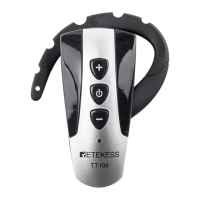

 To Next Page