08
Other Functions
Message
This menu is mainly set up with SMS related functions:
1)Inbox: Display the received SMS content.
2)Write: edit the message. Edit the text message, long press the [*scan] key to switch between
uppercase and lowercase letters and
numbers.
3)Send Items: Outbox. Check the sent messages, and edit it to resend forward again.
4)Quick text. Edit the quick message text in the CPS, and then choose them on the radio.
Call Log
Check Missed call,Answered call,Outgoing Call.
Contact: priority contact
The HD2 can save 5000 priority contacts on the radio.
1)Enter the [Contacts] menu.
2)Edit the ID, choose the contact type: group, private, or All.
3)Name the contact. Long press[*SCAN] button to switch between ABC, abc, 123.
4)Switch channel knob to edit next contact.
5)In channel band setting, you can choose one of the contacts as your communication
contact.
Radio ID
There can set 32 radio IDs. Edit 32 IDs, and then choose an using ID for a digital channel.
FM radio
32 FM Radio channels can be stored through computer program software;
1)Press the [MENU] key to turn o the radio, or turn on the radio, press [EXIT] to exit.
2)Long press the Exit button to switch between the VFO channel and MR storage channel in
radio mode;
3)Long press the [* Scan] button to save the radio frequency as the radio channel;
4)Sho press the [#] button to turn on or o DW. Dual Watch represents that in FM radio
mode, if there is an intercom signal coming in,
it will rst switch to receiving the intercom signal. If the intercom signal disappears, it will
return to the FM Radio signal.
Version information
Displays the Serial number and rmware version.
Detailed functional operations
1.Save an analog Channel
1)Input 144.25000MHz on Band A or Band B;
2)Press the Menu key to enter Band A or Band B Set;
3)Set the C-CDC and/or the R-CDC. If the C-CDC or the R-CDC is dierent, then set C-CDC
and R-CDC separately.
4)After completing the above operations, it is currently a tempora channel that can be used
for transmission and reception.
5)Enter the Main Set– “Save CH” menu again, select an empty channel to save as a new
channel.
2.Save a digital channel
1)Input 144.25000MHz on Band A or Band B;
2)Long press the Exit button to switch between FM and DMR mode.
3)Select a Color Code;
4)DMR Mode: Simplex;
5)Choose DMR slot;
6)Select the Radio ID to be used for the current channel;
7)Select the call contact for the current channel. Return to the main inteace to edit a
tempora channel for communication;
8)Enter the Main Set– “Save CH” menu again, select an empty channel to save as new
channel.
3.Make an analog repeater channel
1)In VFO mode, input a receiving frequency that is the same as the repeater transmission
frequency;
2)For example, 439.2000MHz is the transmission frequency of the repeater, it will be the
reception frequency of the radio;
3)Enter Band A or B to set the frequency dierence direction, in the Shift Up menu item,
choose “Minus”, and Shift Freq edit 08.0000,
The transmission frequency of the radio is 439.2000-8.0000 MHz, which is 431.20000 MHz;
4)The repeater generally has sub tone settings, Set the same CTCSS tone used by the repeater
on the radio;
5)After completing the above operations, the standby inteace of the radio will display
439.2000Mhz;
6)It will display 431.20000Mhz and the CTCSS when transmitting.
4.Make a digital repeater channel
1)In VFO mode, input a receiving frequency that is the same as the repeater transmission
frequency;
2)For example, 439.2000MHz is the transmission frequency of the repeater, it will be the
reception frequency of the radio;
3)Enter Band A or B to set the frequency dierence direction, in the Shift Up menu item,
choose “Minus”, and Shift Freq edit 08.0000,
The transmission frequency of the radio is 439.2000-8.0000 MHz, which is 431.20000 MHz;
4)Choose a same color code with the repeater color code on the radio Band A or B set.
5)Choose DMR mode “repeater” for a repeater channel.
6)Choose a communication contact for this repeater channel;
7)After completing the above operations, go back to the standby inteace. It will display the
frequency 439.2000Mhz, and DMR icon.
5.Frequency Scan and channel Scan operation
Frequency Scan
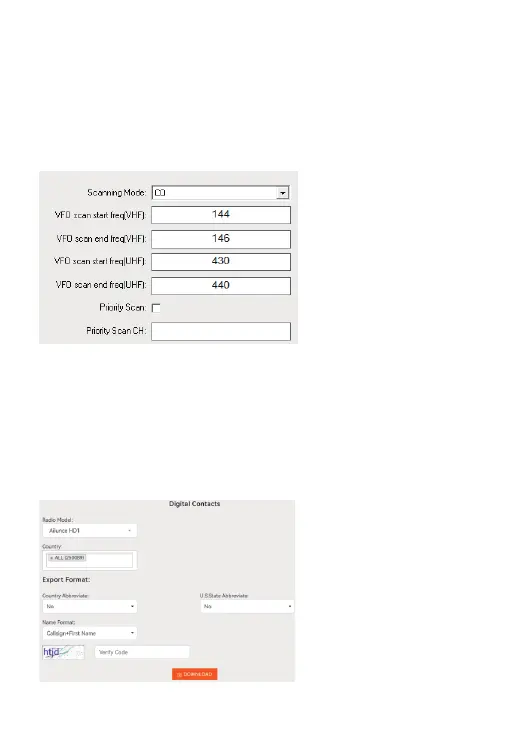
1)In the CPS, you can set the sta and end scan frequency for VHF and UHF.
2)Under VFO mode, Sho press [*SCAN] button to begin frequency scan, sholy press
[*SCAN] will stop the frequency scan
Channel scan
1)The priority channel can be set in the CPS as above picture shows.
2)When operating channel scan, if you choose a zone, it will scan all the channels in that zone,
if you choose “ALL Channels” it will scan eve channel you programmed for the radio.
6.Emergency Alarm operation
Choose remote alarm or local alarm in the CPS. the top orange key is default to emergency
alarm key.
Sho press to sta emergency function, press again to stop alarm.
7.Impo 500,000 DMR contacts operation
The HD2 has the ability to upload 500,000 DMR contacts into the radio. Download the digital
contacts from Ailunce websitehttps://www.ailunce.com/ResourceCenter/



 To Next Page
 Loading...