09
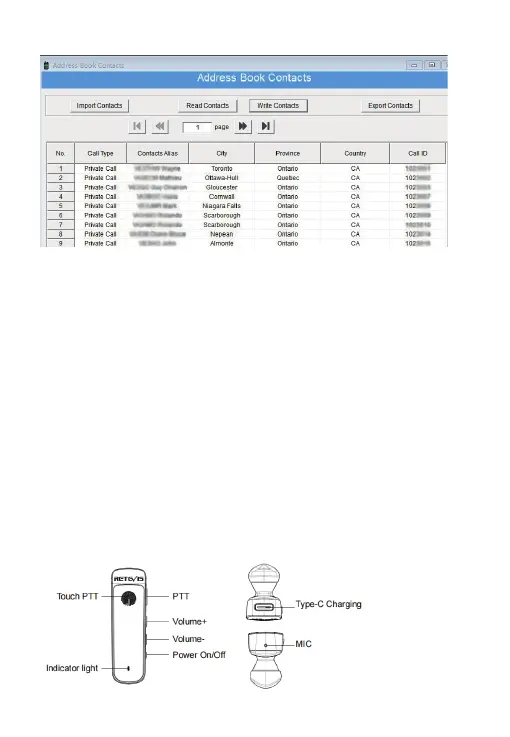
Upload the contacts CSV sheet to the radio via the CPS.
8.Promiscuous Feature
When operating on a on digital channel, the channel needs to match the same contact and
color code. But on HD2, it has contact and
color code feature that allows reception of dierent contacts and color codes.
1)the 24th menu [Promiscuous] of Band A/B Set. If turned On, the HD2 it will receive all the
dierent contacts call in digital channel.
2)The 25th menu [RxALLCC] of Band A/B set, if turned On, the HD2 it will receive all the
dierent color code in digital channel.
3)So, if turned On, [Promiscuous] [RxALLCC] for a digital channel, it will receive signals from
other digital channel with dierent
contacts and color code.
9.GPS Function
GPS function only work on digital channel.
1)On a DMR channel, Menu-Band A/B set-GPS: ON/OFF. Turn on the GPS.
2)Go back to turn on” RxGPSInfo” and “TXGPSInfo”.
3)Band A/B Set 28th menu: GPS Contacts. choose one Priority group contacts or private
contact both OK.
4)All the settings are nished. Next step is to get outside until the GPS icon is activated.
5)Check local radio GPS information under the 9th main menu.
6)When communicating to other HD1 or HD2, and they will transmit their GPS information
together with the voice data, then it
will display their GPS information after voice signal.
10.Bluetooth Operation
1)Turn on the Bluetooth function. The 5th menu of Main Set.
2)Pair the Bluetooth earpiece.



 To Next Page