01
Warranty
Before using the radio, please read the manual carefully.
• Don’t charge the radio in inflammable, explosive and radio-communication-banned areas
(such as gas station, petrol station and airport, etc).
• Don’t operate the radio without license in the areas that government bans.
• Ensure the radio to avoid being placed under the sun and near any heat equipment.
• Ensure the radio to avoid any dusty, humid and splashy place, and avoid being placed near any heat equipment.
• If the scent is smelled or smog is seen, please take down the battery from the radio, then contact with the
nearest retailer.
• The repairing of the radio is in the charge of professionals and the self-dismantling is strictly prohibited.
Charging Attentions
• Please use the matching charger to charge.
• Suggest turning off the radio before charging.
• To get the best battery performance, please charge the radio at least 5 hours for the first charging.
• Don’t charge the battery pack for a long time, or it will shorten service life of battery pack. When fully charged,
stop charging in time.
• The charger is only responsible for the battery pack of this radio, and don’t charge other battery packs.
Otherwise, the charger and battery pack will be damaged.
• When fully charged, battery pack should be placed in cool and dry areas, but near to fire or exposed to the sun,
or there will exist potential safety hazard.
• In the progress of charging, it is suggested not proceeding transmission operation.
• In the process of charging, slight heat of the battery pack is normal.
• The radio's using should be complied with the local radio laws and regulations.
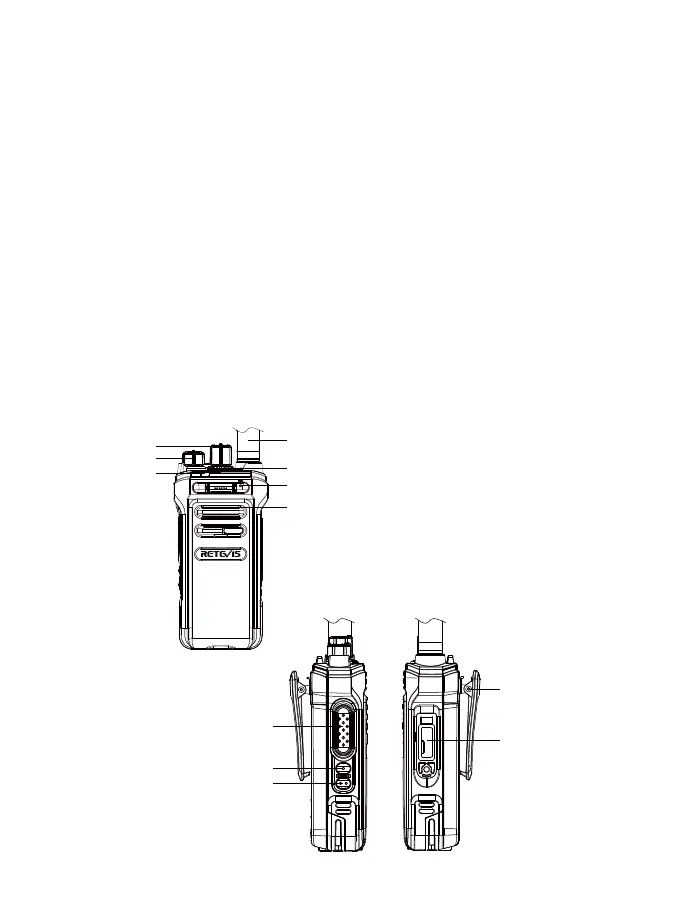
Radio Function
Antenna
Channel Knob
Indicator
Volume/Power Knob
Alarm/Group Call Key
Mic
Speaker
NR30
Belt Clip
PTT Key
PF1 Key
PF2 Key
SP/Headphone/
Programming Jack


 To Next Page