6
2.After the pairing is successful, the blue light of the machine stops flashing, and
the indicator light of the Bluetooth headset stops flashing.
3.You can start the radio transmission by short pressing the button on the
Bluetooth headset, and then press the button on the Bluetooth headset again to
stop transmitting and be in the receiving mode.
(Note: After the pairing is successful, you need to wait about 20 seconds to start
the transmission for the first time, and there is no need to wait in the
subsequent.)
Keyboard key function
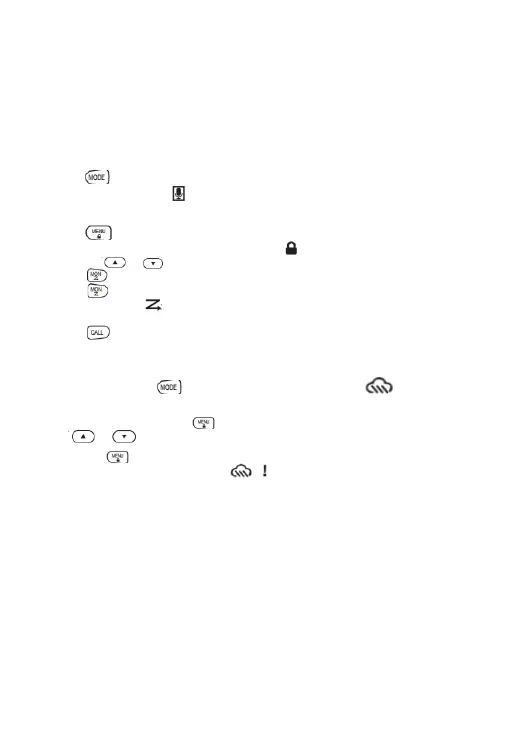
1. Press button shortly to switch“RoomMonitor”function on/off, when“Room-
Monitor”is turned on, the icon is displayed
2. Press the channel mode and NOAA modelongerto switch (Only forthe US
version).
3. Press buttonshortly to enter the menu. However,press the keyboard to
lock/unlock, when the keyboard is locked, the icon will appear.
4. Press the or button to change the parameter setting.
5. Press button for longer to turn on "Monitor".
6. Press button shortly to enter "Scan", searching all channels. Once you
turn "Scan" on, the icon will display. Or else,Press any button( except the
up/down button ) to exit scanning.
7. Press buttonshort to send the call tone,However,press thebutton longer
to quickly enter the call tone selection menu.
NOAA mode
Long press the button to enter the NOAA mode, and the icon will
display.
1. In NOAA mode, press the button to enter the NOAA channel selection,
press or to change the channel.
2. Press the button to enter the NOAA emergency state switch setting.
When the function is turned on, the icon is displayed. After the change
function is turned on, when the 1050HZ audio signal is received, the machine will
forcibly switch to NOAA mode and emit an alarm sound. Press other buttons to
cancel the alarm and receive the information from NOAA normally.
Note :You can find companding, whisper and more features in the software



 To Next Page