Mode – If you don’t press the mode button, you will see the red “Scan” light. Scan
means that the display will rotate the information it gives you. It will show you the
Speed, then the Time, then the Distance, then Calories (an approximation of the
energy used). Pressing the Mode button will stop the display from rotating the
information – keep pressing the Mode button until it shows you the
Speed/Time/Distance/Calorie information that you want to see.
Unit of Time: Minutes/Seconds
Unit of Distance: Kilometres/Metres
If the mode button is pressed before the On button is pressed, the bike will start
more quickly. Most people will prefer not to use this function and we suggest that
you increase the speed yourself after the power button is pressed.
4.
12
9
6
3
0
p1
p2
p3
p4
p5
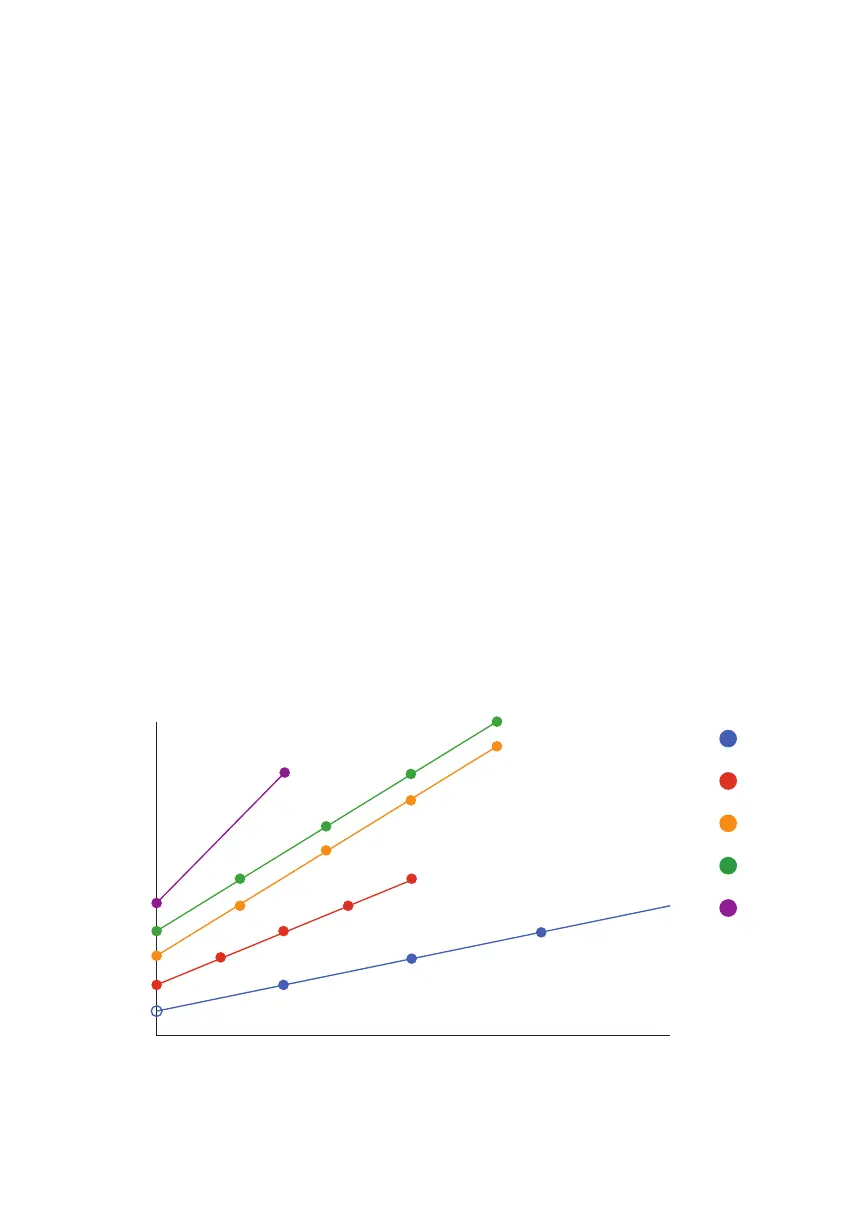
Time (seconds)
Mini Bike : Auto Programme Speed Changes
Before Reverse of Direction
Speed
0 30 60 90 120


 To Next Page