EasyManua.ls Logo

Revopoint 3D Technologies POP 3D SCANNER - Page 9

Revopoint 3D Technologies POP 3D SCANNER
33 pages
Print Icon
To Next Page IconTo Next Page
To Previous Page IconTo Previous Page
Loading...

󾙚
󾙔󾙒󾙔󾙓󾙕
󽙏󾙕󽙐 󽙏󾙖󽙐
󽙏󾙗󽙐󾛒󾛓
󾙘󾙓󾙔󾙕󾙖󾙗󾙘󾙙󾙚
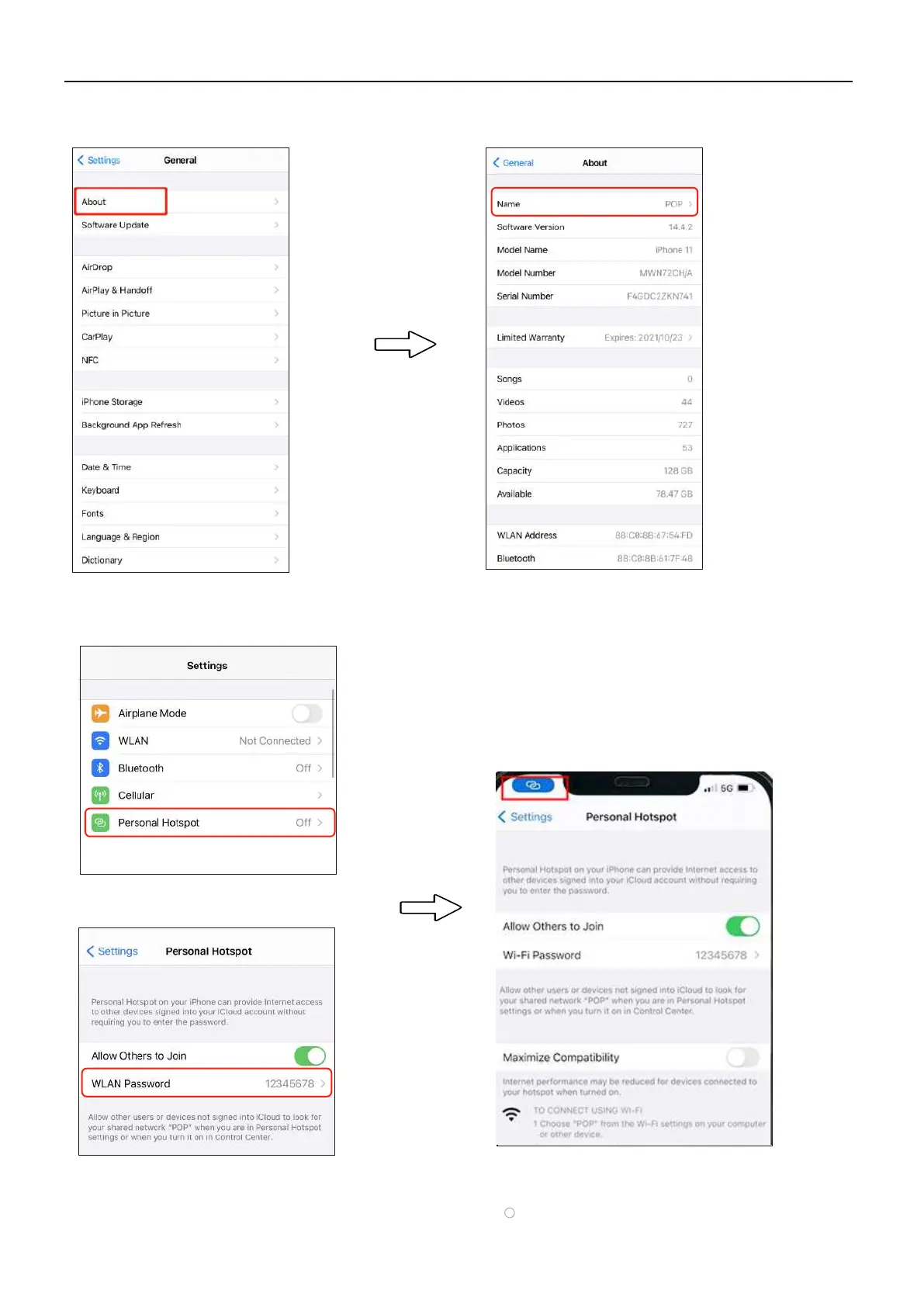
After setting Name and Password,
please wait for 10-20 s. When your
iPhone shows the blue icon on the left
top corner, which means that the POP
has connected to your iPhone.

Other manuals for Revopoint 3D Technologies POP 3D SCANNER

Related product manuals