REVV | GENERATOR G50 MK3 REVV | GENERATOR G50 MK3
76
SETUP &
POWER UP
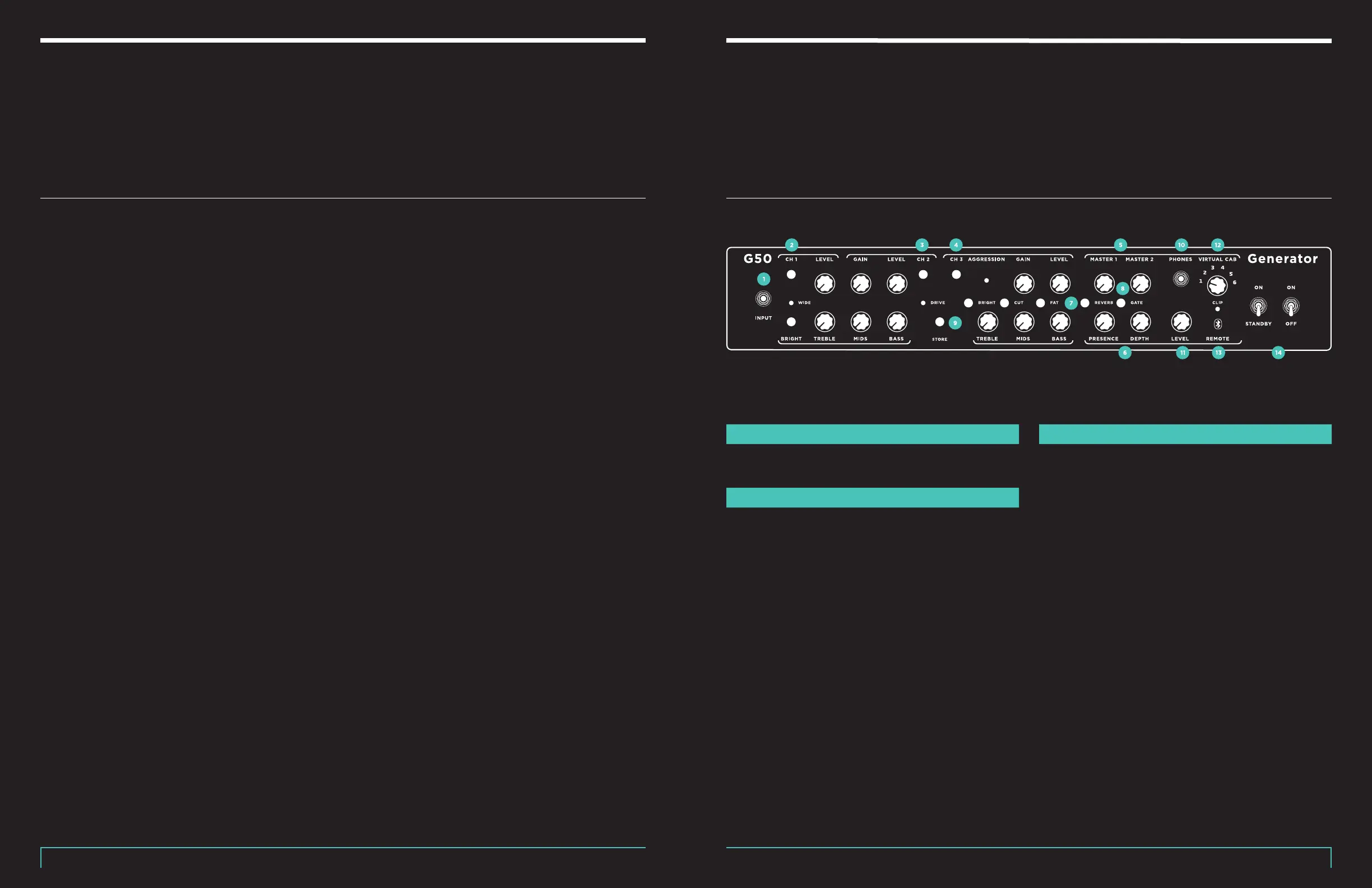
FRONT PANEL
It is very important to place the amplifier in a dry
location that provides 4-6” of space between the rear
of the amplifier and anything in the area that has been
designated for the amplifier. Tubes produce heat, and
anything flammable should be kept away. Verify that the
top heat vent is free from obstruction so that the heat
produced by the tubes can escape from the interior of
the amplifier. Now have a quick look at the tubes and
make sure they are all seated in their sockets. Look
good? We are ready to move on!
First, make sure that the power and standby switches
are in the o (down) positions. Connect the amplifier to
a speaker cabinet using a good quality speaker cable
and select the correct speaker jack on the amplifier
that matches the impedance of the speaker cabinet.
Next, connect the AC power cord to the amplifier Mains
connector on the rear of the amplifier and then to an
AC outlet.
At this point, all other peripherals can be connected to
the amplifier as well:
Note: A good quality, shielded instrument cable is
recommended for guitar input as well as FX loop
connections to prevent unwanted noise. Cables can
color the sound of a guitar’s signal, and sometimes
trying dierent cable lengths, can provide the desired
sound.
Once all your connections are made, move the power
switch to the On position and give the tubes at least one
minute to warm up. Now is a great time to begin setting
all controls while we wait. We recommend setting the
master volume and gain controls to the lowest setting
or zero (fully counterclockwise) and all treble, mid, and
bass controls to the 12 o’clock positions to begin. Set
the standby switch to the ON (up) position and you are
ready to begin exploring!
INPUT
1
1⁄4” Instrument cable input.
CHANNEL ONE (CLEAN)
2
Selected by: 1. Pushing the designated front panel
button, 2. Footswitch button #1 or a footswitch preset
mode setting, 3. MIDI & CC commands.
• Passive treble, middle, & bass controls with a wide
range. Small turns equal large tonal change!
• Level control sets the FX loop signal intensity as
well as overall volume for the channel.
Bright allows you to achieve a brighter or warmer
clean tone without compromising the full range of your
treble knob. This is also useful when using gain pedals
that are picky about which amp they are boosting, so
definitely experiment to taste.
Wide function is activated by pressing the channel
button. When the wide function is active the red LED
will illuminate. In this mode, the sound the channel will
produce will be bolder as all frequencies are boosted.
CHANNEL TWO (CRUNCH)
3
Selected by: 1. Pushing the designated front panel
button, 2. Footswitch button #2 or a footswitch preset
mode setting, 3. MIDI & CC commands.
• Passive treble, middle, & bass controls with a wide
range. Small turns equal large tonal change!
Bright allows you to tailor the sound to your preference
by shifting the high end response of this channel. It
makes quite a large dierence, so don’t be afraid to
turn it on if you like a much more bite tone! Pairing this
on/o position with dialing of the treble knob can yield
very powerful results.
Crunch Gain allows you to go from an almost totally
clean tone to quite a bit of gain! And in conjunction
with the drive mode setting, this channel can get quite
spicy!
Crunch Drive mode is cycled by pressing the channel
button. As you press the channel button you will see
the drive LED change from OFF to Blue to Red. Each
drive mode will alter the gain of the channel as well as
increase or decrease the intensity of certain frequencies.
• FX Loop
• Guitar & Shielded
Cable
• MIDI
• XLR
• USB
• Revv Cabinet Lighting
• Headphones
• Revv Foot Controller


 To Next Page
 Loading...