TX0106XX
2
21
1
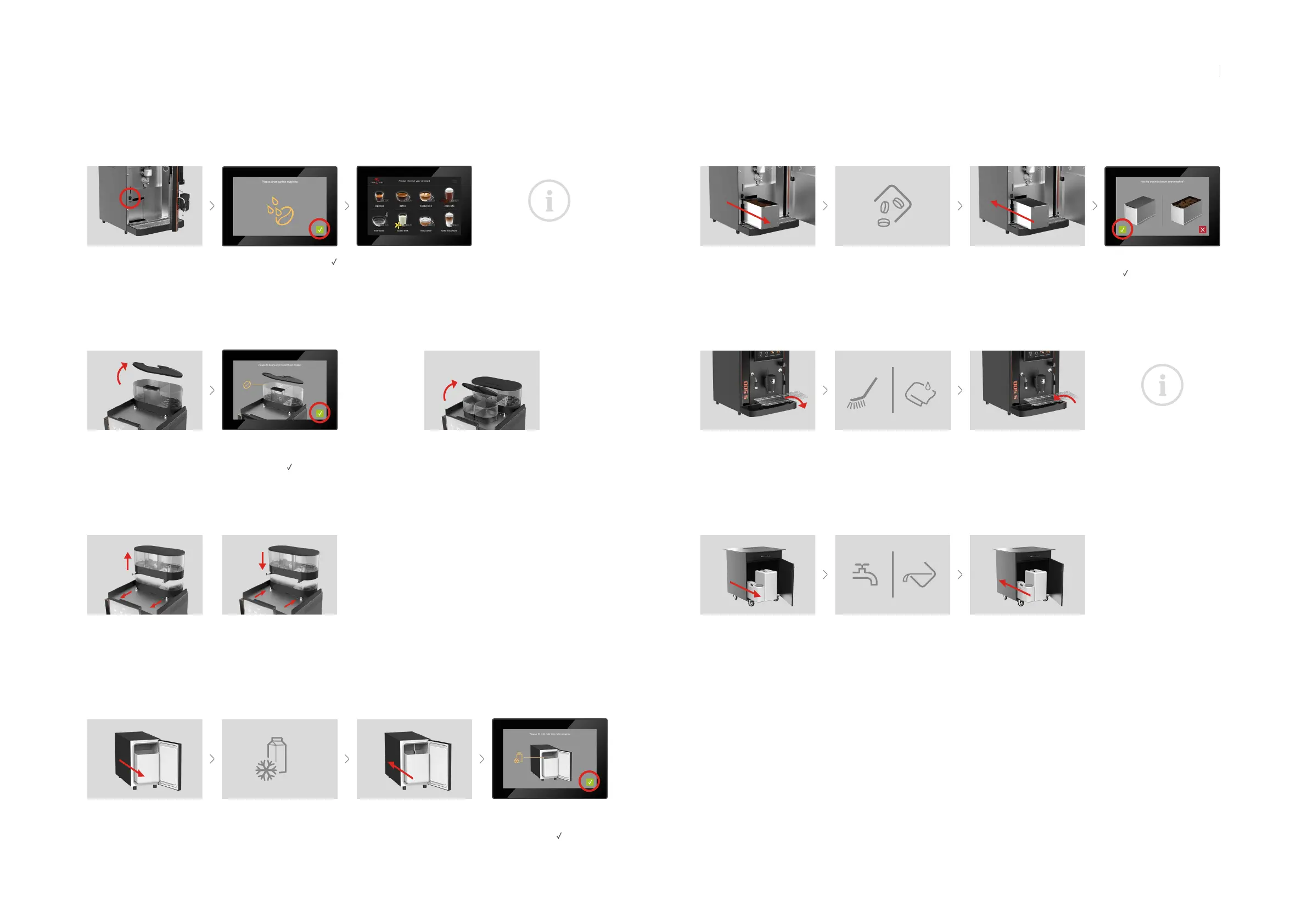
Filling bean container
Filling milk container (all refrigerator systems)
Filling powder containers (oponal)
Operaon
Li the container lid, ll in
beans.
Tip: max. 1 day’s supply
If necessary, conrm the
system message on the
touchscreen with
.
Open the refrigerator door and
remove the milk container.
Fill container with cooled milk.
Tip: max. 1 day’s supply
If necessary, conrm the
system message on the
touchscreen with
.
Place the milk container in
the refrigerator, hang in the
milk sucon and close the
refrigerator door.
Emptying the grounds drawer
Open the front door and
remove the grounds drawer.
Empty and clean the grounds
drawer.
Conrm system message
with
if the grounds drawer
has been emped. Otherwise,
press .
Reinsert the grounds drawer
and close the front door.
Switching on/o
Open front door and set main
switch to posion I. Then close
front door again.
Conrm system message with
to rinse the coee machine.
Aer a short me the machine
will have nished rinsing, will
be warmed up and is ready
for use.
Note: Before switching o, the
coee machine must be cleaned.
Please follow the instrucons in
the cleaning manual.
Cleaning the residual water tray
Mobile soluon: Empty or ll water tanks (oponal)
Remove the drip grid. Clean the grid and tray. Place the drip grid back.
Remove both tanks and
carefully remove hoses.
Empty residual water tank, top
up fresh water tank.
Insert both tanks again and
connect hoses.
Li the container lids, ll in in-
stant powder.
Note: Follow the informaon in
the cleaning manual.
Remove/insert bean container
1 Pull the locking devices
2 Remove the container
1 Set up the container
2 Push the locking devices
EN
98



 To Next Page