Display Dimension 180 90 45
Weight 319
Battery Type
Battery
Warranty One year
6000 counts
Ranging Auto/Manual
Material ABS
Update Rate 3 times/second
Ture RMS
Data Hold
Operating
Temperature
Temperature
Humidity
Humidity
Storage
Backlight
Low Battery Alert
Auto Power Off
(LCD)
mm
g
1.5
2
v AA
√
√
√
√
√
0~40℃
75%
-20~60℃
General Specifications
Mechanical Specifications
Environmental Specifications
<
80%
<
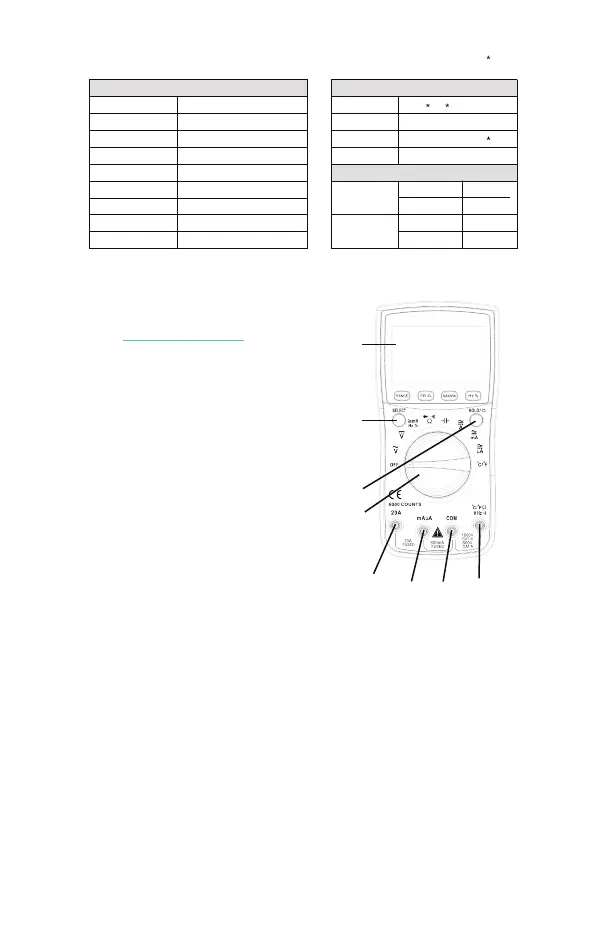
8
1
2a
2b
3
4
5 6
7
9 10 11
1. LCD display
2. buttons
2a. SELECT: To toggle between
AC/DC, Voltage(mV) / Frequency
/ Duty Cycle/ Resistance /
Continuity / Diode, or ℃/℉,
press this button.
2b. HOLD: To hold the current
reading, press this button and
you will see “HOLD” on the
display; press again to cancel.
To turn on the backlight, press this button for more than 2
seconds; long-press again to turn off.
3. Rotary Switch
To change mode or range。 (from OFF, clockwise)
3a. OFF
3b. AC Voltage (V)
3c. DC Voltage (V)
3d. Voltage(mV)/Frequency/Duty Cycle/
3e. Resistance/Continuity/Diode
3f. Capacitance
D
Instruction
Front Panel(see the picture on the right)


 To Next Page
 Loading...