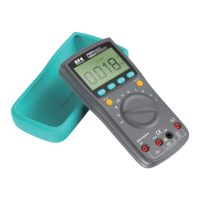
3g. AC/DC Current (A)
3h. AC/DC Current (mA)
3i. AC/DC Current (μA)
3j. Temperature
4. 20A
Input terminal for current (V) measurements.
5. mA/μA
Input terminal for current (mA and μA) measurements.
6. COM
Common terminal for all measurements.
7. VΩHz
Input terminal for voltage, frequency, duty cycle,
resistance, continuity, diode, capacitance, and tempera-
ture measurements.
8. RANGE
press this button to enter the manual range; each push
increases the range; when the highest range is reached,
next push will go back to the lowest range; to exit the
manual range mode, press the button for 2 seconds.
9. REL
the product allows relative measurements for the Modes of
Voltage, Current, and Capacitance; press this button to
enter the relative measurements mode; press again to exit.
10. MAX/MIN
press the button once to measure the MAX Value; press
twice to measure the MIN Value; to exit the mode, press
the button for 2 seconds.
11. Hz%
press this button when you measure AC Voltage or AC
Current to measure their frequency/duty cycle


 To Next Page
 Loading...