EasyManua.ls Logo

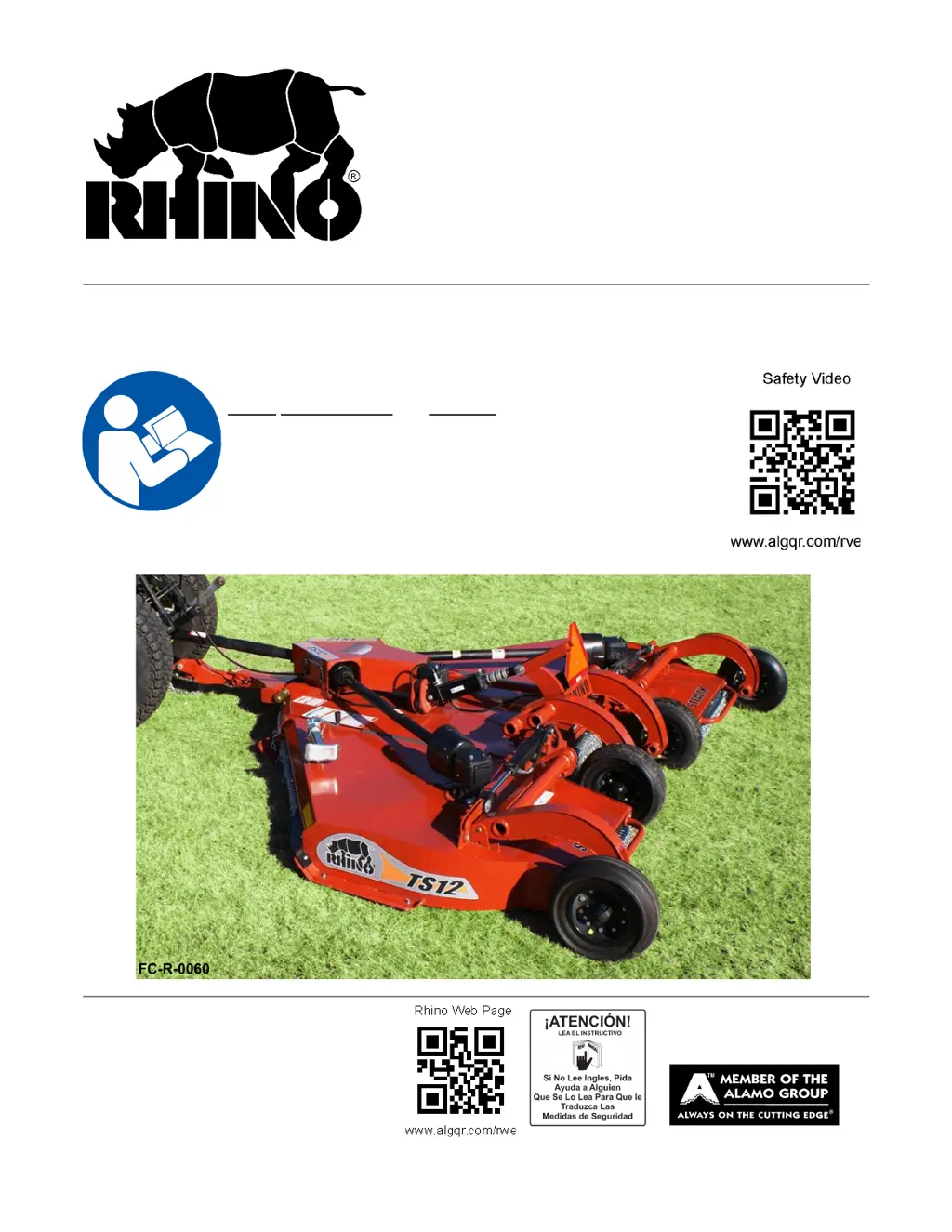
RHINO TS12 - User Manual

RHINO TS12
176 pages
Print Icon
To Next Page IconTo Next Page
Loading...
©2021 Alamo Group Inc.
TS12
Published 04/21 Part No. 00790219C
RHINO
®
1020 S. Sangamon Ave.
Gibson City, IL 60936
800-446-5158
Email: parts@servis-rhino.com
FLEX-WING MECHANICAL LEVEL
LIFT ROTARY CUTTER/SHREDDER
OPERATOR’S MANUAL
This Operator's Manual is an integral part of the safe operation of
this machine and must be maintained with the unit at all times.
READ,
UNDERSTAND, and FOLLOW the Safety and Operation
Instructions contained in this manual before operating the
equipment. C01-Cover_Rstr
Important Operating and Safety Instructions are found in the Mower
Safety Video that can be instantly accessed on the internet at:
www.algqr.com/rve

Table of Contents

Questions and Answers

  • A
    Ariel HolmesAug 18, 2025
    What to do if RHINO Paper Shredder gearbox is leaking?
    • R
      ronald34Aug 18, 2025
      If your RHINO Paper Shredder's gearbox is leaking, several issues could be the cause. A damaged oil seal is a common culprit, requiring seal replacement. A bent or rough shaft in the oil seal area also leads to leaks, necessitating shaft replacement or repair. Ensure the oil seal is installed correctly and sealing properly against the housing; if not, replace it, potentially using sealant. High oil levels should be corrected by draining to the proper level. Other causes include sand holes in the casting (requiring replacement of castings or the gearbox), damaged gaskets (replace the gasket), or loose bolts (tighten them).
  • J
    Judy LozanoAug 21, 2025
    Why is my RHINO Paper Shredder gearbox over-heating?
    • O
      Omar ParrishAug 22, 2025
      Overheating in your RHINO Paper Shredder's gearbox can be caused by several factors. First, check the lubricant level and fill to the level plug or dipstick if low. Using the improper type of lubricant can also cause overheating; replace it with Rhino 00786250 lubricant. Ensure the gearbox is properly vented by removing any excessive trash build-up around it. If the bearings or gears are set up improperly, consult your dealer.
  • A
    anthonygregoryAug 26, 2025
    How to fix uneven cut with my RHINO Paper Shredder?
    • E
      Ellen HayesAug 26, 2025
      An uneven cut with your RHINO Paper Shredder can result from several factors. Reduce excessive ground speed to ensure a more even cut. Check the blades for wear, dullness, or bending, and replace them if necessary. Ensure the mower is level from side to side and adjust if needed. Correct any improper height adjustments. Low tractor tire pressure on one side can also cause an uneven cut, so adjust tire pressure accordingly. Reduce ground speed when turning. Adjust your tractor wheel spacing if the tires are pushing the grass down. Repair or replace a damaged mower pan. Ensure phasing cylinders are filled with oil and rephase them if needed, especially if air is trapped in the cylinder circuit. Replace any damaged cylinders and rephase cylinders.
  • C
    Cynthia ReedAug 28, 2025
    Why does the clutch slip excessively on my RHINO Paper Shredder?
    • T
      Terry WilkinsonAug 28, 2025
      Excessive clutch slippage in your RHINO Paper Shredder can be attributed to a few key issues. Badly worn clutch linings or warped plates will require repair per the maintenance section of the manual. If you're using too much power for the clutch, reduce ground speed and material intake. Oil contamination on the facings necessitates facing replacement. Glazed friction facings should be cleaned with emery cloth.
  • N
    Nicole MaxwellAug 31, 2025
    What to do about uncut material with RHINO Paper Shredder?
    • C
      Caleb BoyleAug 31, 2025
      If your RHINO Paper Shredder is leaving uncut material, several factors could be responsible. Start by reducing excessive ground speed. Ensure you are using full PTO speed. Verify that the blades are installed correctly for the direction of cut.
  • D
    David RodriguezSep 4, 2025
    Why am I seeing windrowing with my RHINO Paper Shredder?
    • C
      Christopher SpencerSep 4, 2025
      Windrowing or uneven material distribution with your RHINO Paper Shredder can occur due to several reasons. If the material is heavy and lush, raise the front of the mower relative to the rear. Reduce excessive ground speed. If conditions are too wet, wait for them to dry and reduce ground speed.
  • S
    stacey93Sep 7, 2025
    How to improve shredding/cutting on my RHINO Paper Shredder?
    • J
      Joshua SandovalSep 7, 2025
      Poor shredding or cutting performance with your RHINO Paper Shredder can be caused by excessive ground speed. To resolve this, raise the front of the mower relative to the rear to hold and circulate material longer, and reduce ground speed. Also, check if you are cutting too high and lower the cutting height.
  • P
    Patrick HowellSep 12, 2025
    Why is the gearbox on my RHINO Paper Shredder noisy?
    • J
      Jacob Miller MDSep 12, 2025
      A noisy gearbox in your RHINO Paper Shredder can stem from rough gears, which may need to be run in or changed. Another cause is a worn bearing, which would require replacement.
  • E
    Emily CruzNov 14, 2025
    Why is my RHINO Paper Shredder vibrating excessively?
    • A
      Alex LopezNov 14, 2025
      Excessive vibration in your RHINO Paper Shredder can stem from several sources. Start by checking and tightening any loose gearbox bolts, as well as those on the Blade Holder and Blades. If the output shaft is bent, it should be replaced, especially if oil is leaking. Ensure blades swing freely and are not broken; replace any broken blades in sets. Also, check for even wear on blade tips, weighing them to ensure they are within 1 oz of each other, and replace both blades simultaneously. The blade carrier should be checked for bending and replaced if necessary. Ensure the blade hub is correctly seated on the shaft by removing, cleaning, and replacing it. Mismatched new blades or bolts should be replaced in sets. Finally, drivelines must be phased correctly, which may require replacing drive...

RHINO TS12 Specifications

General IconGeneral
Sheet Capacity12 Sheets
Auto Start/StopYes
Overload ProtectionYes
Jam ProtectionYes
Noise Level65 dB
Can ShredPaper, Credit Cards
Run Time5 minutes
Cool Down Time30 minutes

Related product manuals