MLM WIRELESS WALL THERMOSTAT
RICKARD 2018
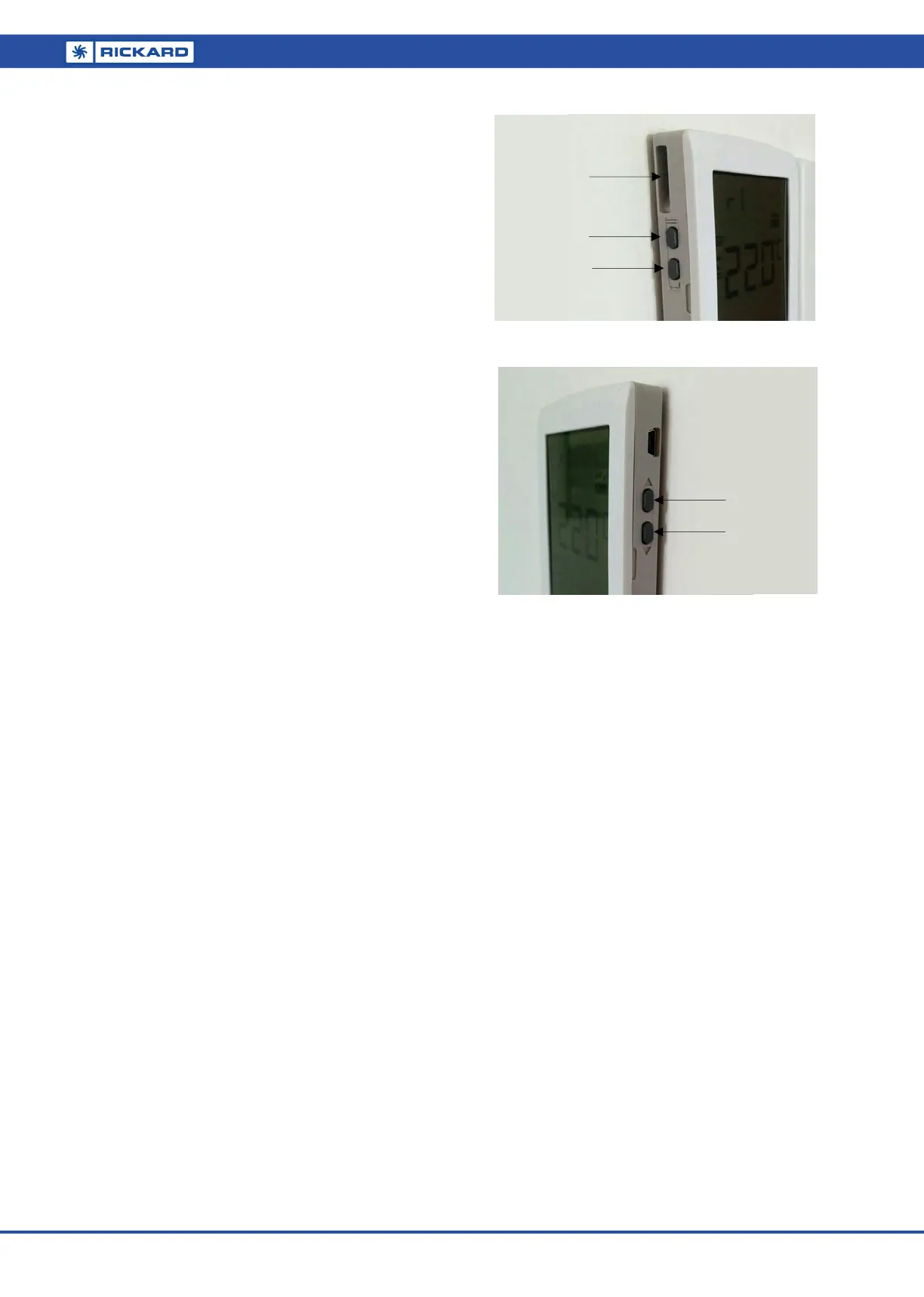
Menu
Enter
Sensing Port
Temp. Down
Temp. Up
COMMISSIONING
Commissioning is a simple two stage process. First, link the remote
RF Wallstats to the correct Access Point. This is achieved by activat-
ing the Access Point linking mode on the MLM application and the
wallstat pairing mode on the device. Once the linking is complete,
the wallstats need to be zoned to the appropriate diffuser. The zon-
ing follows a simple procedure using the MLM application. Please
see the MLM RF User Manual for full commissioning Instructions.
RF NETWORK STATUS AND HEALTH
The MLM Application has the functionality to monitor the RF Net-
works status and health.
The Battery and Signal Strength health of the RF network can be
determined using the built in MLM RF Network Status Wizard.
If required, a Wireless Wallstat can be removed from the system by
using the built in wizard or by manually selecting the end point dis-
played on the application.
Communication errors are also displayed on the Wallstat icon if they
occur i.e. when a WS is non-responsive the WS icon in the network
view will be displayed in yellow.
Rezoning wallstats is a simple matter of re-assigning them with the
MLM application.
SETPOINT ADJUSTMENT
The wallstats setpoint can be adjusted as follows:
1. When in temperature or setpoint display, press the up or
down arrows on the right side of the wallstat to increase or
decrease the setpoint one degree at a time. The value can be
accepted by pressing the enter button (bottom left). Alterna-
tively it will be accepted automatically after a short delay.
Using the menu button (top left), select setpoint adjustment mode
(SP). Follow procedure (1) above to adjust.
AESTHETICS
DISPLAY BUTTONS
The Rickard Wall Thermostat has been designed with discreet but-
tons located on either side of its body. One side allows straight for-
ward temperature adjustment and the other advanced user control.
Right Hand Side Buttons
The buttons located on the right hand side adjust a value up or
down.
Left Hand Side Buttons
The buttons located on the side left hand side give the user access
to advanced commissioning functions. The Menu button is located
above the Enter Button. Standard symbols depict Menu and Enter on
the side of the casing. Each press of the Menu button cycles through
each option and the enter button writes the value to memory.
DISPLAY OPTIONS
FUNCTIONAL EDITING OPTIONS
1. Set point Display: When activated Set point is displayed
instead of room temperature.
2. Temperature Display: By default the room temperature is
displayed.
3. RTC Display: Real Time Clock is displayed.
SENSING ACCURACY
The Rickard MLM Wall Thermostat has a built in sensing port de-
signed to accurately sample room temperature. It is important to find
a mounting location that best represents the occupants environment.
NOTE: Consider the effect of a hot or cold wall on the Wall Thermo-
stat’s sensing accuracy. External conditions can affect internal wall
temperatures to such a degree that the Wall Thermostat’s sensing
ability is also affected.
CONTROLS
1.
Compatible with MLM or MLC.
APPLICATION
The Rickard MLM RF Wall Thermostat;
LEFT‐HANDSIDE
RIGHT‐HANDSIDE



 To Next Page
 Loading...