DE
EN
FR
ES
IT
Fertig!
Done!
Fait!
Hecho!
Fatto!
4
E.N.Z. Engineering GmbH, Salzmatten 6, 79341 Kenzingen (Germany)
3
A
IT
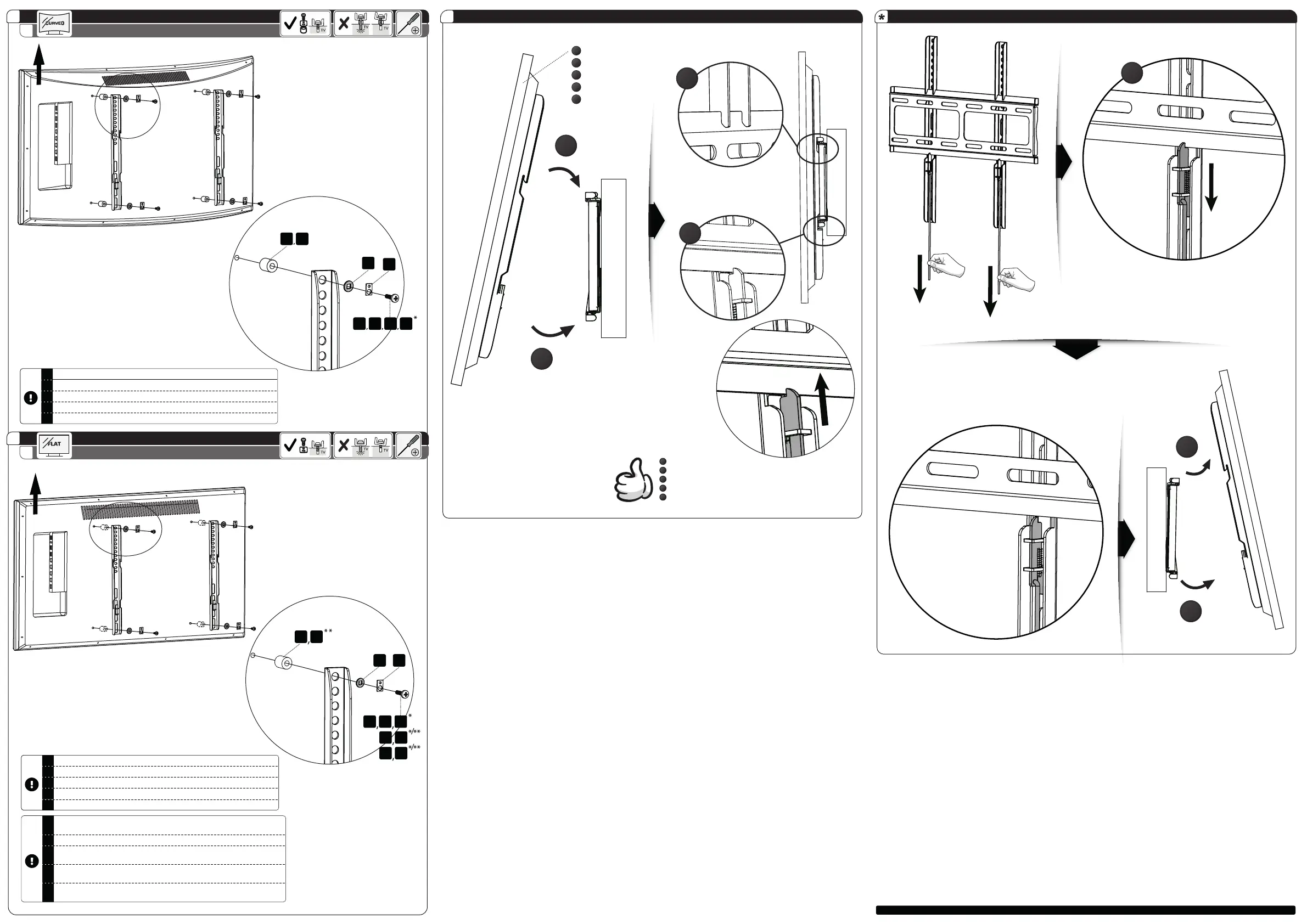
Utilizzare le viti e i distanziali appropriati per lo schermo.
ES
Use los tornillos y espaciadores apropiados para su pantalla.
FR
Utilisez les vis et les entretoises appropriées pour votre écran.
EN
Use the matching screws and spacers for your display.
DE
Benutzen Sie die für Ihren Bildschirm passenden Schrauben und Abstandshalter.
3
B
IT
Utilizzare le viti e i distanziali appropriati per lo schermo.
ES
Use los tornillos y espaciadores apropiados para su pantalla.
FR
Utilisez les vis et les entretoises appropriées pour votre écran.
EN
Use the matching screws and spacers for your display.
DE
Benutzen Sie die für Ihren Bildschirm passenden Schrauben und Abstandshalter.
D E
K L M N
G
F
TOP
TOP
D E
H I J
G F
K L
M N
IT
Se le viti ", L, M, N" sono troppo lunghe, utilizzare i cilindri / distanziali di plastica "D,
E". (come al punto 3 A)
ES
Si los tornillos ", L, M, N" son demasiado largos, utilice los cilindros / distanciadores
de plástico "D, E". (como en el paso 3 A)
FR
Si les vis ", L, M, N" sont trop longues, utilisez les cylindres en plastique /
entretoises "D, E". (comme à l'étape 3 A)
EN
If the screws ", L, M, N" are too long, use the plastic spacers "D, E". (like in Step 3 A)
DE
Wenn die Schrauben "K, L, M, N" zu lang sind, verwenden Sie die Plastik-
Abstandshalter "D, E". (wie im Schritt 3 A)
DE
EN
FR
ES
IT
Bildschirm
Display
Écran
Pantalla
Schermo
1
2
1
2
klick!
2
3
1


 To Previous Page