EasyManua.ls Logo

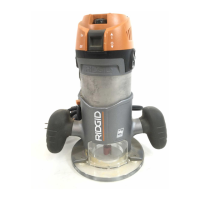
RIDGID R2901 - User Manual

RIDGID R2901
52 pages
Print Icon
To Next Page IconTo Next Page
Loading...
SAVE THIS MANUAL FOR FUTURE REFERENCE
OPERATOR’S MANUAL
MANUEL D’UTILISATION
MANUAL DEL OPERADOR
R29302 ROUTER WITH R2901
MOTOR, R2911 FIXED BASE,
AND R29202 PLUNGE BASE
R29302 TOUPIE AVEC R2901 MOTEUR,
R2911 BASE FIXE ET R29202 BASE PLONGÉE
R29302 FRESADORA CON R2901 MOTOR,
R2911 BASE FIJA Y R29202 BASE TIPO ÉMBOLO
Cette toupie a été conçue et fabriquée conformément à nos strictes
normes de fiabilité, simplicité d’emploi et sécurité d’utilisation.
Correctement entretenue, elle vous donnera des années de
fonctionnement robuste et sans problème.
AVERTISSEMENT :
Pour réduire les risques de blessures, l’utilisateur doit
lire et veiller à bien comprendre le manuel d’utilisation
avant d’employer ce produit.
Merci d’avoir acheté un produit RIDGID
®.
Su fresadora ha sido diseñado y fabricado de conformidad con
nuestras estrictas normas para brindar fiabilidad, facilidad de uso
y seguridad para el operador. Con el debido cuidado, le brindará
muchos años de sólido y eficiente funcionamiento.
ADVERTENCIA:
Para reducir el riesgo de lesiones, el usuario debe leer
y comprender el manual del operador antes de usar
este producto.
Le agradecemos la compra de un producto RIDGID
®.
CONSERVER CE MANUEL POUR
FUTURE RÉFÉRENCE
GUARDE ESTE MANUAL PARA
FUTURAS CONSULTAS
Your router has been engineered and manufactured to our high standards for dependability, ease of operation, and operator
safety. When properly cared for, it will give you years of rugged, trouble-free performance.
WARNING:
To reduce the risk of injury, the user must read and understand the operator’s manual before using this product.
Thank you for buying a RIDGID® product.
To register your RIDGID
product, please visit:
http://register.RIDGID.com
Pour enregistrer votre
produit de RIDGID,
s’il vous plaît la visite:
http://register.RIDGID.com
Para registrar su producto
de RIDGID, por favor visita:
http://register.RIDGID.com
Question and Answer IconNeed help?

Do you have a question about the RIDGID R2901 and is the answer not in the manual?

Summary

R29302 Router Operators Manual

Product Identification

Identifies the specific router model R29302 and its components for user reference.

Important Safety Advisory

Critical safety alert advising users to read the manual before operating the product.

Introduction

Product Overview

Details the product's features, safety, performance, and dependability for user satisfaction.

General Safety Rules

Work Area Safety

Guidelines for maintaining a safe and clean work environment to prevent accidents.

Electrical Safety

Precautions for safe use of electrical power tools, including grounding and cord safety.

Personal Safety

Advice on user alertness, common sense, and protective equipment for safe operation.

Power Tool Use and Care

Instructions for proper operation, maintenance, and storage of power tools to ensure safety.

Specific Safety Rules

Detailed safety instructions specific to router operation, including handling, workpiece securing, and guards.

Symbols and Signal Words

Risk Level Indicators

Explanation of signal words (Danger, Warning, Caution) and their associated risk levels.

Product Markings

Meaning of symbols used on the product for safe and efficient operation.

Electrical Information

Double Insulation System

Explanation of double insulation feature and its safety benefits for electric tools.

Power Connection Requirements

Requirements for connecting the tool to the power supply, including voltage and frequency.

Extension Cord Guidelines

Guidelines for selecting and using appropriate extension cords for power tool operation.

Product Features

Router Components Overview

Description of key router parts like centering tool, chip shield, LED lights, and switches.

Depth and Speed Control

Details on plunge depth stop, spindle lock, and variable speed dial for precise control.

Assembly and Setup

Unpacking and Inspection

Instructions for unpacking the product, checking contents, and inspecting for damage.

Critical Assembly Warnings

Critical warnings regarding product modification and connecting to power before assembly is complete.

Operation

Switching Between Bases

Procedure for switching between fixed and plunge bases for the router motor.

Collets and Bits Handling

Step-by-step guide for securely installing and removing router bits and collets.

Setting Cutting Depth

Guidance on selecting and setting the correct depth of cut for different routing tasks.

Plunge Depth Adjustment

How to set and use the plunge depth stop for precise and repetitive cuts.

Router Control and Usage

Instructions on turning the router on/off, using the variable speed dial, and operating the router.

Routing Techniques

Methods for internal routing, edge routing, freehand routing, and edging with a pilot bit.

Feed Rate and Direction Guidance

Proper direction of feed, thrust, rate, and handling feeding too fast or too slowly for optimal results.

Depth of Cut Best Practices

Importance of depth of cut, recommendations for single pass cuts, and avoiding excessive depth.

Adjustments

Lock Lever Tension Adjustment

How to adjust the lock lever tension on the fixed and plunge bases for secure motor mounting.

Router Table Mounting

Instructions for attaching the router to a routing table using specific screws.

Centering Tool Application

Procedure for using the centering tool to align the subbase with the router motor.

Vacuum Adaptor Installation

Steps for attaching and removing vacuum adaptors for dust-free routing.

Maintenance and Care

General Cleaning and Safety

Tips for cleaning plastic parts and avoiding contact with harmful chemicals.

Bit and Collet Cleaning

Procedures for keeping router bits and collets clean for optimal cutting performance.

Accessories

Available Router Accessories

List of optional accessories for the router and ordering information.

Warranty Information

3-Year Limited Service Warranty

Details of the warranty coverage, duration, and what is included for hand-held tools.

Warranty Service Procedure

How to obtain warranty service, including contact information and required documentation.

Warranty Limitations

Information on what is not covered by the warranty and legal limitations.

Customer Service

Service and Parts Contact

Contact details for authorized service centers, ordering parts, and providing model/serial numbers.

Summary

R29302 Router Operators Manual

Product Identification

Identifies the specific router model R29302 and its components for user reference.

Important Safety Advisory

Critical safety alert advising users to read the manual before operating the product.

Introduction

Product Overview

Details the product's features, safety, performance, and dependability for user satisfaction.

General Safety Rules

Work Area Safety

Guidelines for maintaining a safe and clean work environment to prevent accidents.

Electrical Safety

Precautions for safe use of electrical power tools, including grounding and cord safety.

Personal Safety

Advice on user alertness, common sense, and protective equipment for safe operation.

Power Tool Use and Care

Instructions for proper operation, maintenance, and storage of power tools to ensure safety.

Specific Safety Rules

Detailed safety instructions specific to router operation, including handling, workpiece securing, and guards.

Symbols and Signal Words

Risk Level Indicators

Explanation of signal words (Danger, Warning, Caution) and their associated risk levels.

Product Markings

Meaning of symbols used on the product for safe and efficient operation.

Electrical Information

Double Insulation System

Explanation of double insulation feature and its safety benefits for electric tools.

Power Connection Requirements

Requirements for connecting the tool to the power supply, including voltage and frequency.

Extension Cord Guidelines

Guidelines for selecting and using appropriate extension cords for power tool operation.

Product Features

Router Components Overview

Description of key router parts like centering tool, chip shield, LED lights, and switches.

Depth and Speed Control

Details on plunge depth stop, spindle lock, and variable speed dial for precise control.

Assembly and Setup

Unpacking and Inspection

Instructions for unpacking the product, checking contents, and inspecting for damage.

Critical Assembly Warnings

Critical warnings regarding product modification and connecting to power before assembly is complete.

Operation

Switching Between Bases

Procedure for switching between fixed and plunge bases for the router motor.

Collets and Bits Handling

Step-by-step guide for securely installing and removing router bits and collets.

Setting Cutting Depth

Guidance on selecting and setting the correct depth of cut for different routing tasks.

Plunge Depth Adjustment

How to set and use the plunge depth stop for precise and repetitive cuts.

Router Control and Usage

Instructions on turning the router on/off, using the variable speed dial, and operating the router.

Routing Techniques

Methods for internal routing, edge routing, freehand routing, and edging with a pilot bit.

Feed Rate and Direction Guidance

Proper direction of feed, thrust, rate, and handling feeding too fast or too slowly for optimal results.

Depth of Cut Best Practices

Importance of depth of cut, recommendations for single pass cuts, and avoiding excessive depth.

Adjustments

Lock Lever Tension Adjustment

How to adjust the lock lever tension on the fixed and plunge bases for secure motor mounting.

Router Table Mounting

Instructions for attaching the router to a routing table using specific screws.

Centering Tool Application

Procedure for using the centering tool to align the subbase with the router motor.

Vacuum Adaptor Installation

Steps for attaching and removing vacuum adaptors for dust-free routing.

Maintenance and Care

General Cleaning and Safety

Tips for cleaning plastic parts and avoiding contact with harmful chemicals.

Bit and Collet Cleaning

Procedures for keeping router bits and collets clean for optimal cutting performance.

Accessories

Available Router Accessories

List of optional accessories for the router and ordering information.

Warranty Information

3-Year Limited Service Warranty

Details of the warranty coverage, duration, and what is included for hand-held tools.

Warranty Service Procedure

How to obtain warranty service, including contact information and required documentation.

Warranty Limitations

Information on what is not covered by the warranty and legal limitations.

Customer Service

Service and Parts Contact

Contact details for authorized service centers, ordering parts, and providing model/serial numbers.

RIDGID R2901 Specifications

General IconGeneral
Collet Size1/4 inch
Base TypeFixed
Voltage120 V
Number of Speeds1
Amperage11 A
Cord Length8 ft
Depth AdjustmentMicro-fine depth adjustment

Related product manuals