FASTECH KI - KIS
8
ENGLISH
9
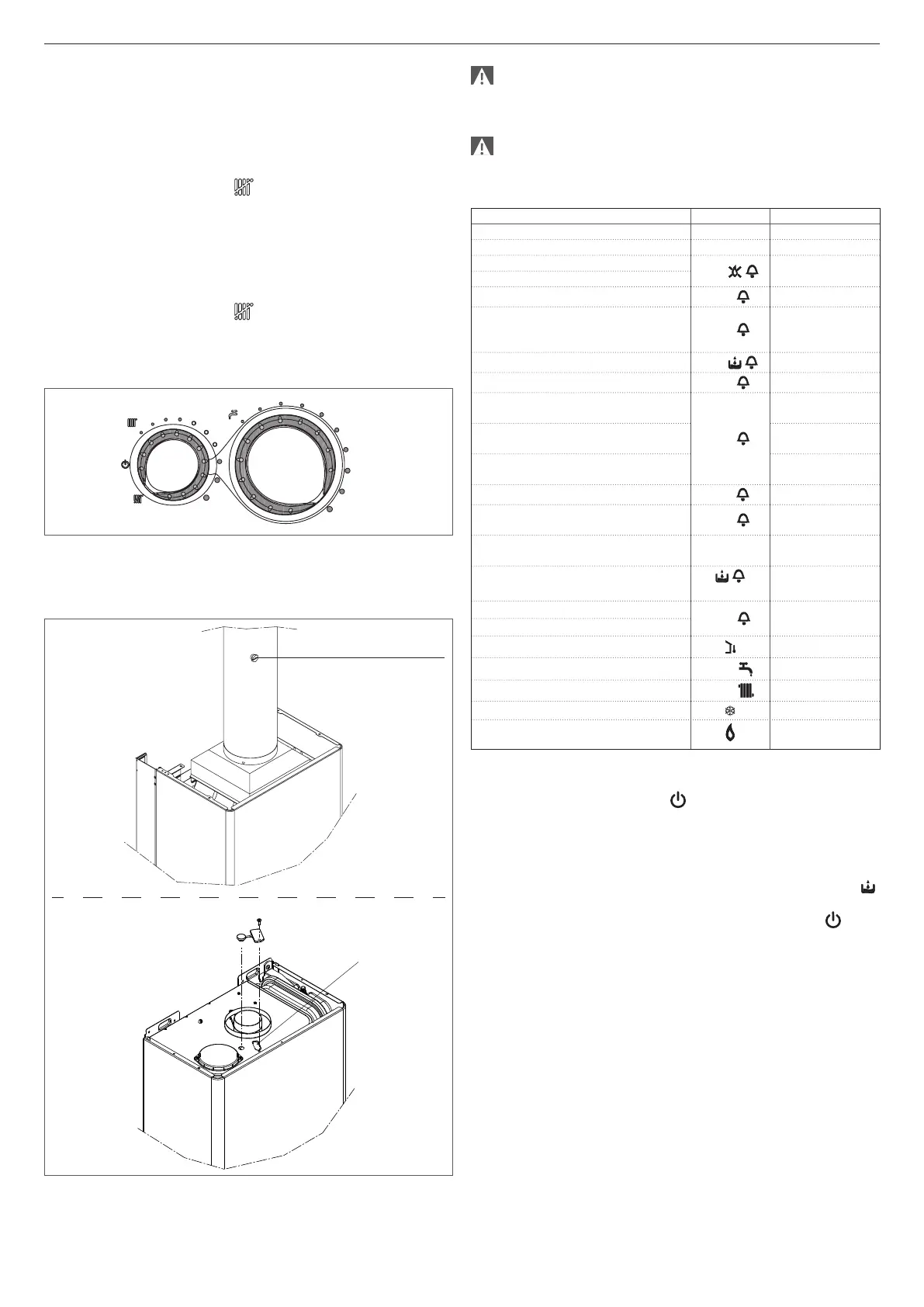
Combustion check
FASTECH KI
- Install the “Flue analysis collection” kit in the straight pipe section
after the hood output, at least 400-500 mm from the hood (as
envisaged by current standards). To install, follow the instructions
supplied with the kit.
- Turn the main system switch to “OFF”.
- Set the function selector to “Summer mode” and the DHW
temperature selector to the maximum.
- Turn the boiler on by setting the main switch to “ON”.
- Open the hot water tap to the maximum ow rate.
- With the boiler at the maximum output, you can check combustion.
FASTECH KIS
- Open the hot water tap to the maximum ow rate.
- Set the function selector to “Summer mode” and the DHW
temperature selector to the maximum.
- Turn the boiler on by setting the main switch to “ON”.
- With the boiler at the maximum output, you can check combustion.
- On completion of the check, shut off the hot water tap.
- Remove the tester sensor and close the test point.
- Close the panel and ret the case, following the disassembly
procedure described above in reverse order.
Hole for ue analysis
tester
FASTECH KI
analysis tester
FASTECH KIS
At the end of the checks:
- set the function selector to “Summer mode” or “Winter mode”
according to the current time of year
- adjust the selectors as required by the client.
The FASTECH boiler is supplied to operate with natural gas and
can be converted for use with LPG. It has been factory set as
specied on the technical data plate and does not require any
calibration.
All checks and inspections must be carried out exclusively by
the Technical Assistance Service.
4.4 Display and fault codes
BOILER STATUS DISPLAY ALARM TYPE
OFF status OFF None
Stand-by - Warning
ACF module block alarm
A01
Permanent block
ACF electronics fault alarm
Limit thermostat alarm
A02
Permanent block
Fumes thermostat alarm (KI)
Differential air pressure
switch alarm (KIS)
A03
Permanent block
Water pressure switch alarm
A04
Permanent block
DHW NTC fault
A06
Warning
NTC fault
(heating)
A07
Temporary stop
Heating delivery sensor
over-temperature
Temporary then
permanent
Delivery/return sensor
differential alarm
Permanent block
Parasite flame
A11
Temporary stop
Low temperature systems
thermostat alarm
A77
Temporary stop
Transitory awaiting ignition
80°C
(flashing)
Temporary stop
Water pressure switch trip
(flashing)
Temporary stop
Service calibration
ADJ
Warning
Installer calibration
External sensor detected Warning
DHW request
60°C
Warning
Heating request
80°C
Warning
Anti-freeze heat request Warning
Flame detected Warning
To restore operation (unblock alarms):
Faults A01-02-03
Set the function selector to OFF , wait 5-6 seconds and return to
the required setting.
If the unblock attempts do not reactivate the boiler, please request
support from the Technical Assistance Service.
Fault A04
The digital display shows the fault code together with the symbol .
Check the pressure shown on the water gauge:
if the pressure is less than 0.3 bar, set the function selector to (OFF)
and adjust the filling valve until the pressure is between 1 and 1.5 bar.
Turn the function selector back to the required setting.
If there are frequent drops in pressure, please request support from
the Technical Assistance Service.
Fault A06
The boiler operates normally but does not guarantee a stable domestic
hot water temperature, which is set to around 50°C.
Please request support from the Technical Assistance Service.
Fault A07
Please request support from the Technical Assistance Service.


 To Next Page