Description of function
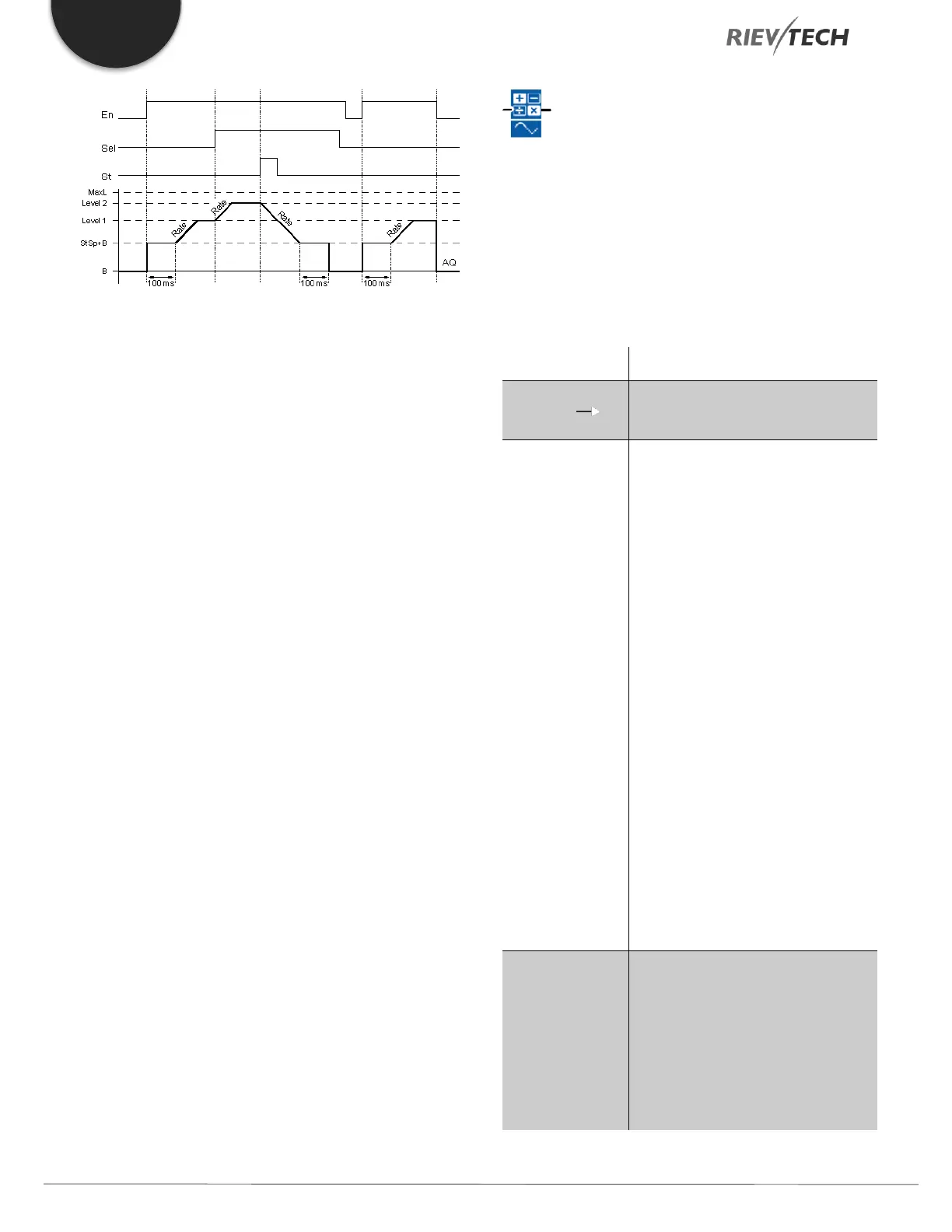
If the input En is set, then the function sets the value StSp
+ Offset "B" for 100 ms.
Then, depending on the connection of Sel, the function
runs from the level StSp + Offset "B" to either level 1 or
level 2 at the acceleration set in Rate.
If the input St is set, the function runs to a level of StSp +
B at the acceleration set in Rate. Then the function holds
the level at StSp + Offset "B" for 100 ms. After 100 ms,
the level is set to Offset "B". output AQ. The scaled value
(output AQ) is 0.
If the input St is set, the function can only be restarted
once the inputs St and En have been reset.
If input Sel has been changed, depending on the
connection of Sel, the function runs from the current
target level to the new target level at the rate that is
specified.
If the input En is reset, the function immediately sets the
current level to Offset "B".
The current level is updated every 100 ms. Note the
relationship between output AQ and the current level:
Output AQ = (current level – Offset "B" ) / Gain "A"
Analogue Math
Description of function
The analogue math block calculates the value AQ of an
equation formed from the user-defined operands and
operators.
V1: Value 1: First operand
V2: Value 2: Second operand
V3: Value 3: Third operand
V4: Value 4: Forth operand
Operator 1: First operator
Operator 2: Second operator
Operator 3: Third operator
Priority 1: Priority of the first
operation
Priority 2: Priority of the second
operation
Priority 3: Priority of the third
operation
P: number of decimals
Range of values: 0,1,2,3
The output AQ is the result of the
equation formed from the operand
values and operators. AQ will be set
to 32767 if a divide by 0 or
overflow occurs, and -32768 if a
negative overflow (underflow)
occurs.


 To Next Page
 Loading...


