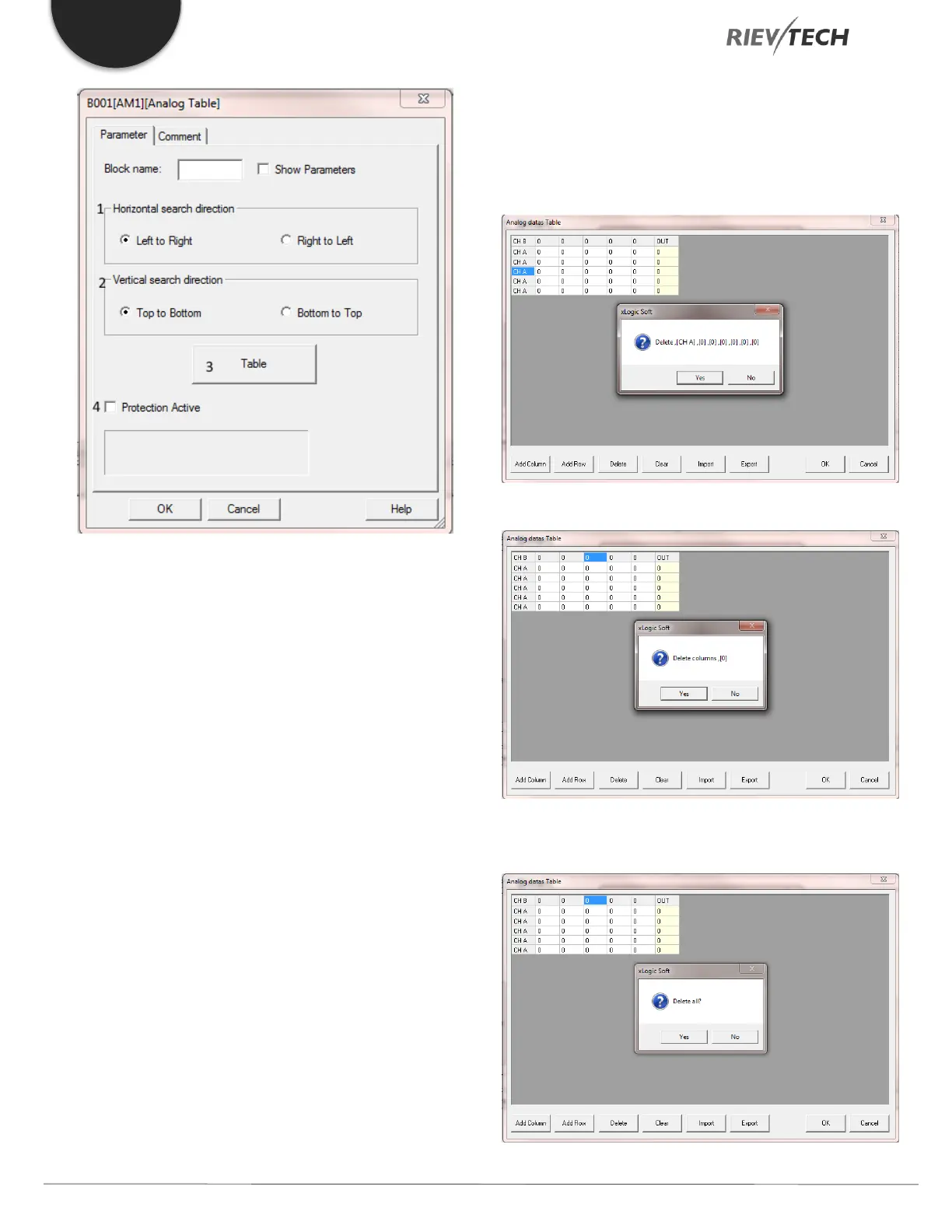
1) Horizontal Search Direction – Channel B Value Search
a) Left to Right – Search for Channel B value starting
from the left-hand column. Note: If the exact
value of B is NOT found then the search will STOP
at the next value which is GREATER than B.
b) Right to Left – Search for Channel B value starting
from the right-hand column. Note: If the exact
value of B is NOT found then the search will STOP
at the next value which is LESS than B.
2) Vertical Search Direction – Channel A Value Search
a) Top to Bottom – Search for Channel A value
starting from the Top row. Note: If the exact value
of A is NOT found then the search will STOP at
the next value which is GREATER than A.
b) Bottom to Top – Search for Channel A value
starting from the Bottom Row. Note: If the exact
value of A is NOT found then the search will
STOP at the next value which is LESS than A.
3) Table
a) Add Column – Add a new column to the table
b) Add Row – Add a new row to the table
c) Delete – Select Row or Column to be deleted and
press Delete button and confirm operation by
clicking Yes or cancel by clicking No.
i) Delete Row Example
ii) Delete Column Example
d) Clear – Delete the whole table. Confirm with Yes
or cancel with No.


 To Next Page
 Loading...


