7. xLogicsoft
xLogicsoft runs under Windows 95/98, Windows NT 4.0,
Windows Me, Windows 2000, Windows XP, Windows Vista,
Windows 7 and Windows 10. xLogicsoft is capable of
client/server operation and offers you a high degree of
freedom for creating your circuit program.
V3.3.6.3 – This is the current version of xLogicsoft. You will
find all the functions and the functionality of the devices
described in this manual for this version and earlier.
NOTICE:
If a full version is not installed, you can carry out
an upgrade as follows:
- Install the software from the CD.
- When the system prompts you for the previous
version, place the old xLogicsoft CD in CD drive.
Point your browser to the “...\Install” directory on the
CD.
Updates and Info
You can download demo versions of the software free of
charge from the Internet address specified in the preface.
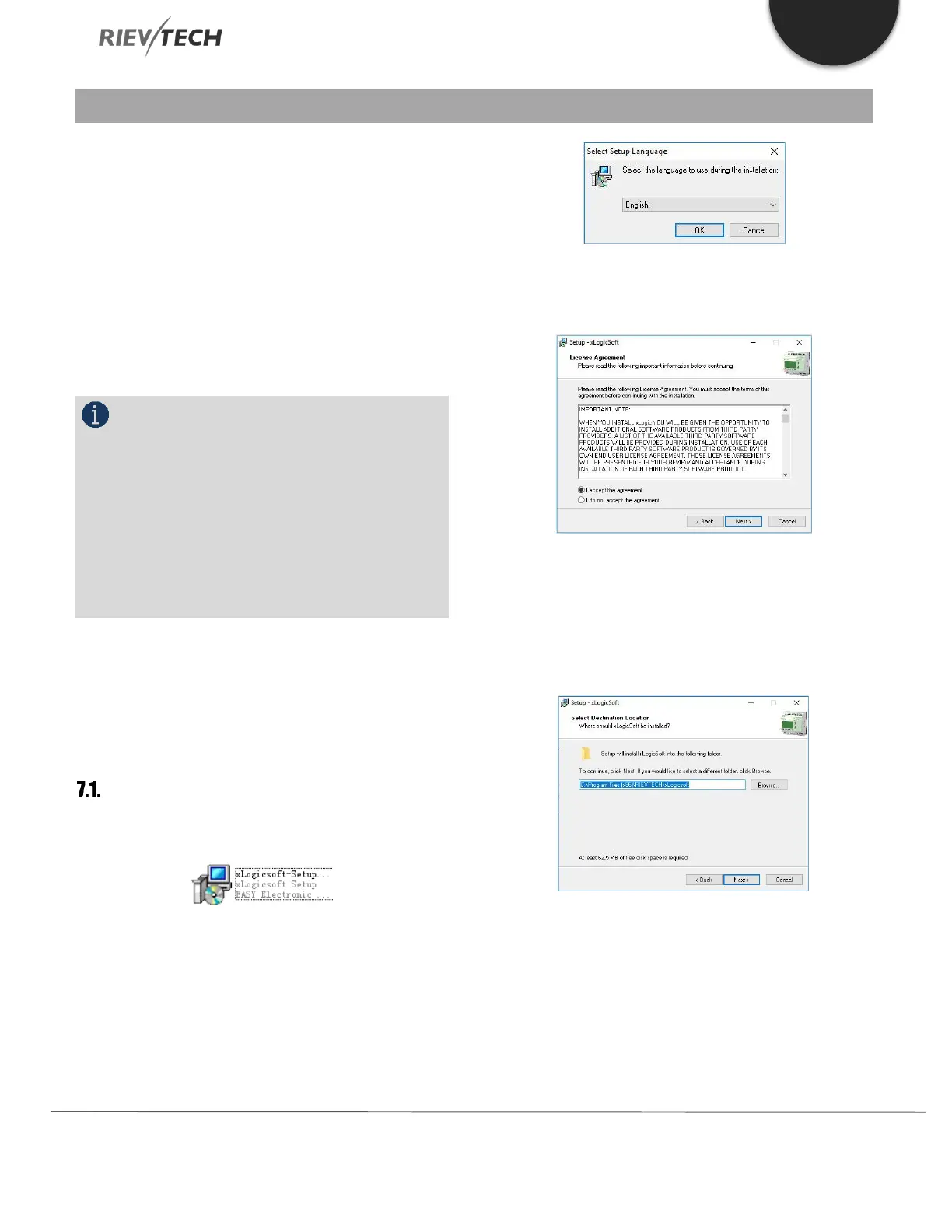
Installing xLogicsoft
1. Double-click on Setup.exe or left click the “INSTALL”
menu directly.
2. Select the language you would like and click OK to
confirm
3.If you consent to the license agreement, click Next to
confirm.
4. Where is the program to be installed? If you do not
want to accept the recommended file location:
C:\Program Files\Rievtech\xLogicsoft, specify another
directory using Browse.
5. If you want to accept the recommended file location,
click Next to Confirm.


 To Next Page
 Loading...


