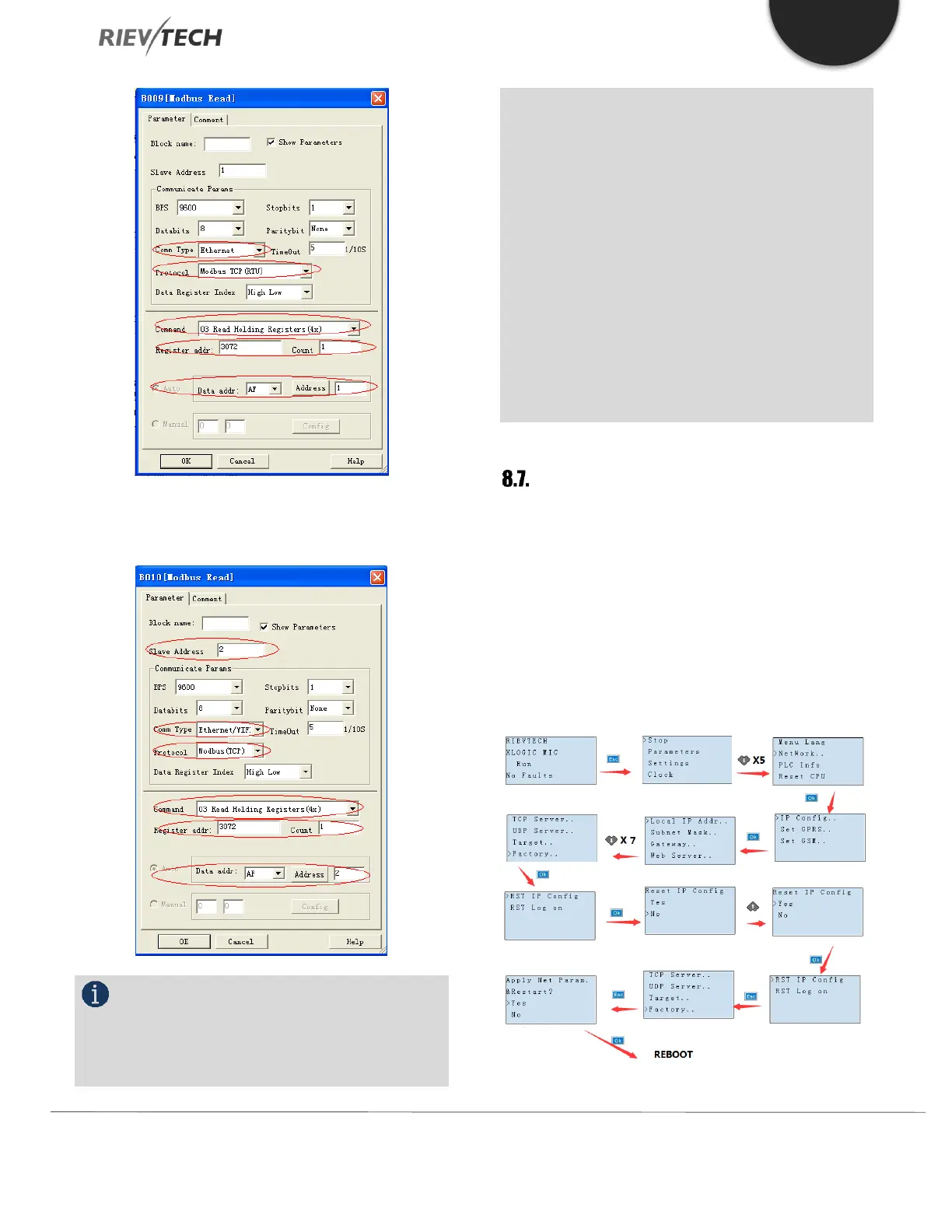
B010: Read the AF1 value from Slave2 to the AF2 flag of
the master. Settings are as follows:
NOTICE:
When you do not use the MODBUS blocks in
your program, then the xLogic Ethernet CPU shall work
as Slave. In this case, you can use the SCADA or a touch
screen/HMI as the Master to communicate with the
xLogic Ethernet CPU via the LAN port.
However, if MODBUS BLOCKS have been used in your
program and the communication type is Ethernet, then
the xLogic Ethernet CPU cannot work as a Slave via its
Ethernet port.
You can use the Modbus read/write blocks in your
program to enable the xLogic Ethernet CPU to be a
Modbus/TCP Master, which will enable it to talk to other
Modbus/TCP Slaves on the Modbus network. These can
be xLogic products or other manufacturers products that
support Modbus/TCP communications.
Resetting to Factory Defaults
The Ethernet and WIFI configurations can be reset to
factory defaults by following the procedures below. Only
the communication settings will be reset and any program
that is in the CPU will be unaffected.
Resetting Ethernet CPU to Defaults
The Ethernet CPUs are reset to factory defaults using the
front HMI panel using the following steps.



 To Next Page