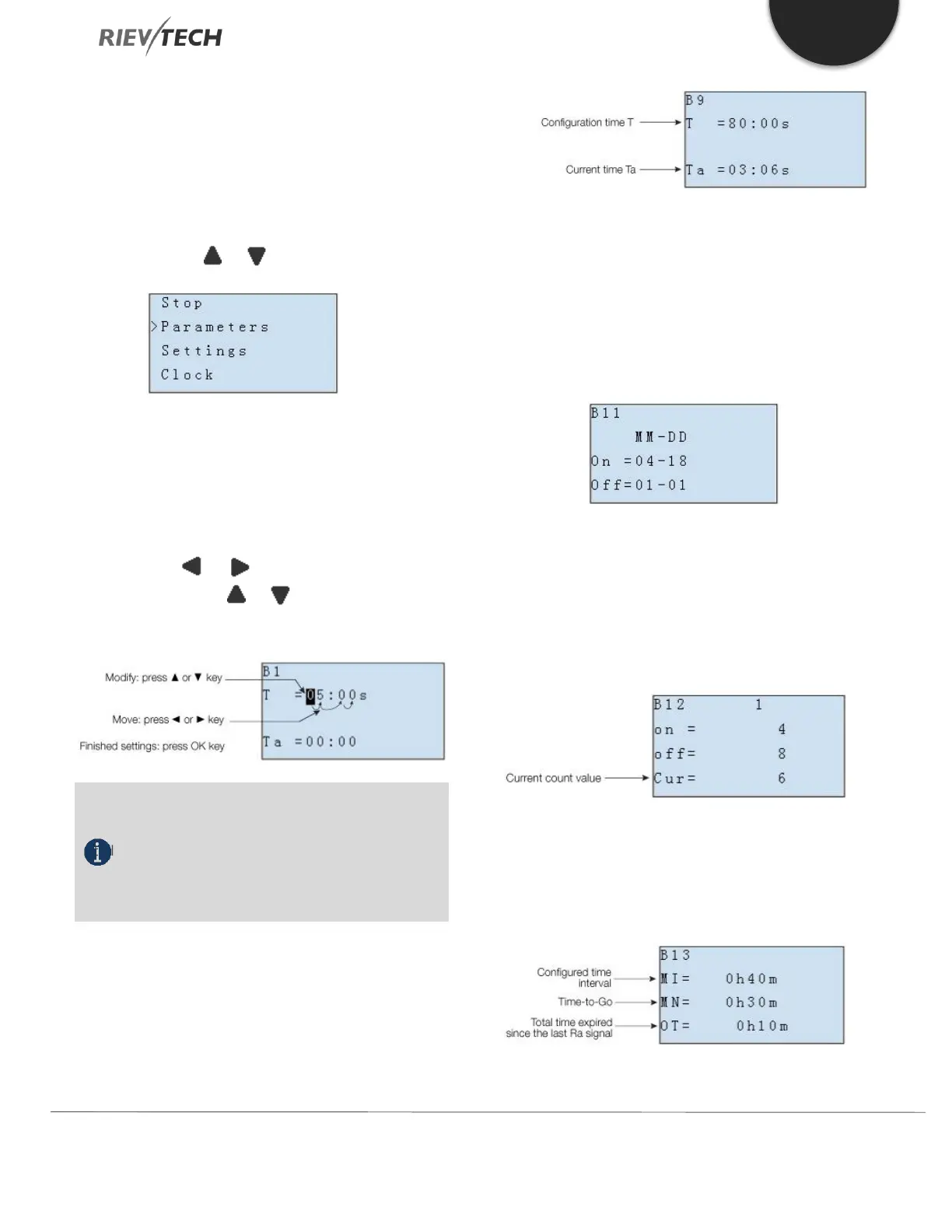
How to modify parameter?
A. First, select a parameter which you need to edit by
following the procedures below:
1. Under the FUNCTION PAGE, select
“Parameters”: Press or key
2. Confirm by pressing the OK key.
B. Move to the parameter, modify value
and press OK to confirm:
1. Move the cursor to the parameter to be
modified: press or key.
2. Modify value: press or key.
3. Confirm the modification by pressing the
OK key.
NOTICE:
When xLogic is running, not only the time value
but also the units of time (S, M, H) can be altered. You
can alter the time base (s=second, m=minute, h=hour)
during runtime.
The current value of time T
View time T in parameter mode:
You can modify the configuration time or switch on/off
time for a particular time segment.
In parameter mode, time segment figure of a timer:
You can alter the time and date of the on/off switch.
The current value of the counter
In parameter mode, the parameter view of a counter:
The current value of hour counter
In parameter mode, the view of the hour counters:
You can edit configured time interval (MI).



 To Next Page