The RigExpert TI-3000 is a USB Transceiver Interface designed for operating phone, CW, and digital modes using a personal computer with a USB port. It acts as a bridge between your transceiver and computer, providing various functionalities for enhanced radio operation.
Function Description
The TI-3000 offers several key functions:
- Transceiver Audio Interface: This is an analog audio connection to your transceiver's audio output (external speaker or line output) and audio input (microphone or line input). This interface is crucial for operating digital modes and allows for other useful functions like measuring signal levels from the air using computer software. The input (main and sub channels) and output volume levels can be adjusted using potentiometers on the front panel.
- CAT Interface: The Computer Aided Transceiver (CAT) system enables computer software to control the transceiver's frequency, operating mode, and other functions. Modern transceivers typically have a serial link (with various signal levels) that provides this CAT interface. The TI-3000 creates a separate COM port for the CAT system, allowing the computer software to communicate with the transceiver.
- PTT and CW Output Functions: The device provides PTT (Push To Talk) and CW (Continuous Wave) keyer inputs, allowing an external device (like a PTT pedal, CW bug, or computer) to switch the transmitter on or off and operate CW. A separate COM port is dedicated to these PTT/CW outputs.
- Squelch Input: For software like EchoLink that requires a squelch input to detect if the radio channel is busy, the TI-3000 assigns the squelch input to the DCD line of the COM port used for PTT and CW outputs.
Important Technical Specifications
General Features:
- Transceiver audio interface for operating digital modes.
- CAT (Computer Aided Transceiver) system.
- PTT and CW outputs.
- Squelch input.
Computer Connection:
- USB (Universal Serial Bus) connector.
- Powered from the USB port, consuming a maximum of 100 mA.
- No external power supply is needed.
Audio Interface:
- Insulated from digital nets.
- Maximum input/output amplitude is 1V.
- Input/output sample rate: 8 to 48 kHz.
- Uses true 16-bit DAC/ADC.
- Volume levels are adjusted by front panel potentiometers.
CAT Serial Port:
- Baudrate: 300-115200 baud.
- Electrical compatibility: RS-232, CI-V, TTL, or inverted-TTL (compatible with Yaesu, Icom, Kenwood, Ten-Tec, Elecraft, and JRC transceivers).
PTT/CW Outputs:
- PTT output: open collector and TTL-level.
- CW output: open collector.
- Maximum current is 500 mA.
System Requirements:
- Desktop or laptop computer with a USB 1/2/3 compliant port.
- Operating systems: Windows XP/Vista/7/8/10 (32 or 64-bit), Mac OS, or Linux.
Transceiver Connection:
- Single 25-pin connector for the transceiver cable.
- Supports various transceiver models.
Physical Specifications:
- Dimensions: 145 x 110 x 40 mm (5.7 x 4.9 x 1.6 in).
- Operating temperature: 0...40 °C (32...104 °F).
- Weight: 200 g (7.05 oz).
Warranty: 2 years.
Manufacturing: Made in Ukraine.
Usage Features
Front Panel Controls and Indicators:
- ON (LED): Lights up when the TI-3000 is plugged in and drivers are installed.
- CW (LED): Indicates transmissions in CW mode.
- PTT (LED): Indicates when the transceiver transmits.
- CAT (LED): Monitors CAT data exchange between the transceiver and computer.
- Main (Potentiometer): Adjusts input level for channel 1 (main receiver audio).
- Sub (Potentiometer): Adjusts input level for channel 2 (sub-receiver audio).
- Out (Potentiometer): Adjusts output level (audio to the transceiver).
Rear Panel Connections:
- TRANSCEIVER (25-pin connector): Connects to the transceiver using a specialized cable.
- USB IN: Connects to the computer's USB port.
Transceiver and Computer Connection:
- Connection to the transceiver requires a specialized cable, which depends on the transceiver's manufacturer and model. Users can either order a cable with the TI-3000 or assemble one themselves using schematic diagrams available on the RigExpert website.
- The 25-pin connector is designed to support a wide range of modern rigs (Icom, Kenwood, Yaesu, Ten-Tec, Elecraft) and future models.
- The squelch connection may not be available in all manufactured cables and might need to be added by the user if required.
- To connect to a computer, use a standard USB A-B cable (up to 5 meters long). It's recommended to use USB sockets located on the back panel of the PC.
- Once connected, the computer should detect the device, and no drivers are required for modern operating systems.
Maintenance Features
Adjusting Input and Output Audio Levels:
- While the front panel potentiometers provide basic adjustment, the TI-3000 also features 6 switches on its bottom side. These switches allow users to increase the range of input and output audio levels, providing finer control over signal strength. This feature is useful for matching the interface to various transceiver audio characteristics.
The RigExpert TI-3000 is designed to be a robust and versatile interface, simplifying the process of integrating your amateur radio transceiver with a computer for various operating modes.

 Need help?
 General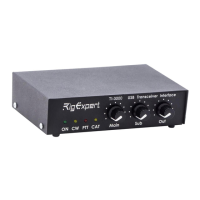

 To Next Page